Enable Mapped Engine Variant
R2026bConfigure Engine Variant
In the configured Simscape plant model:
Right-click the
Enginesubsystem, and under Variant Manager, select Block Parameters.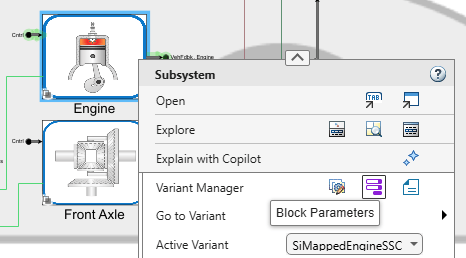
Set Variant choices specifier to one of these options:
For an SI engine, enter
{'SimpleEngineSSC','SiMappedEngineSSC'}.For a CI engine, enter
{'SimpleEngineSSC','CiMappedEngineSSC'}.
Click Apply, and then click OK.
Right-click the
Enginesubsystem and confirm that the active variant isSiMappedEngineSSCfor SI orCiMappedEngineSSCfor CI.Save all model changes.
If you are selecting an engine control unit (ECU) other than
SimpleECU, continue to the next section. Otherwise, in the
Simulink model, click Run.

