主要内容

initialplot

Plot initial condition response of dynamic system

    Description

    The initialplot function plots the initial condition response of a dynamic system model. To customize the plot, you can return an InitialPlot object and modify it using dot notation. For more information, see Customize Linear Analysis Plots at Command Line.

    To obtain initial condition response data, use the initial function.

    initialplot(sys,IC) plots the initial condition response of dynamic system sys.

    If sys is a multi-input, multi-output (MIMO) model, then the initialplot function creates a grid of plots with each plot displaying the initial condition response of one input-output pair.

    If sys is a model with complex coefficients, then the plot shows both the real and imaginary components of the response on a single axes and indicates the imaginary component with a diamond marker. You can also view the response using magnitude-phase and complex-plane plots. (since R2025a)

    example

    initialplot(sys1,sys2,...,sysN,IC) plots the initial condition response of multiple dynamic systems sys1,sys2,…,sysN on the same plot.

    example

    initialplot(sys1,LineSpec1,...,sysN,LineSpecN,IC) sets the line style, marker type, and color for the initial condition response of each system.

    example

    initialplot(___,t) simulates the response for the time steps specified by t. You can use t with any of the input argument combinations in previous syntaxes. To define the time steps, you can specify:

    • The final simulation time using a scalar value.

    • The initial and final simulation times using a two-element vector. (since R2023b)

    • All the time steps using a vector.

    example

    initialplot(sys,IC,t,p) also specifies the parameter trajectory p for LPV models. (since R2023a)

    initialplot(___,plotoptions) plots the initial condition response with the plotting options specified in plotoptions. Settings you specify in plotoptions override the plotting preferences for the current MATLAB® session. This syntax is useful when you want to write a script to generate multiple plots that look the same regardless of the local preferences.

    initialplot(___,Name=Value) specifies response properties using one or more name-value arguments. For example, initialplot(sys,LineWidth=1) sets the plot line width to 1. (since R2026a)

    • When plotting responses for multiple systems, the specified name-value arguments apply to all responses.

    • The following name-value arguments override values specified in other input arguments.

      • TimeSpec — Overrides time values specified using t

      • Parameter — Overrides parameter values specified using p

      • Color — Overrides colors specified using LineSpec

      • MarkerStyle — Overrides marker styles specified using LineSpec

      • LineStyle — Overrides line styles specified using LineSpec

    initialplot(parent,___) plots the initial condition response in the specified parent graphics container, such as a Figure or TiledChartLayout, and sets the Parent property. Use this syntax when you want to create a plot in a specified open figure or when creating apps in App Designer.

    ip = initialplot(___) plots the initial condition response and returns the corresponding chart object. To customize the appearance and behavior of the response plot, modify the chart object properties using dot notation.

    Examples

    collapse all

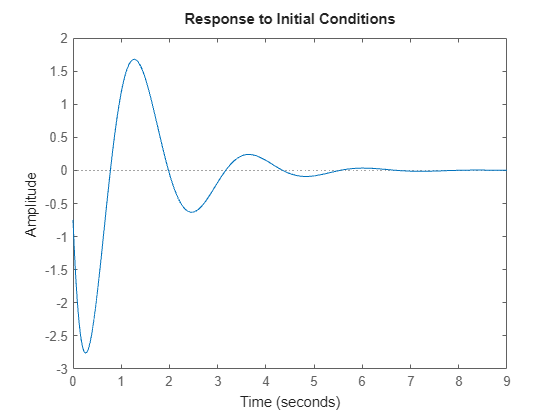
    Generate a random state-space model with 5 states and create the initial condition response plot chart object ip.

    rng("default")
    sys = rss(5);
    x0 = [1,2,3,4,5];
    ip = initialplot(sys,x0);
    MATLAB figure

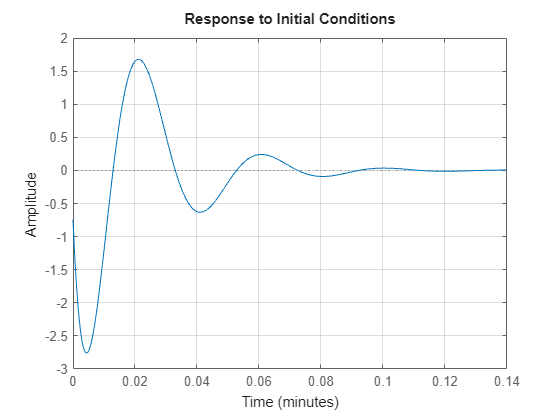
    Change the time units to minutes and turn on the grid. To do so, edit properties of chart object.

    ip.TimeUnit = "minutes";
    grid on
    MATLAB figure

    The plot automatically updates when you modify the properties of the chart object.

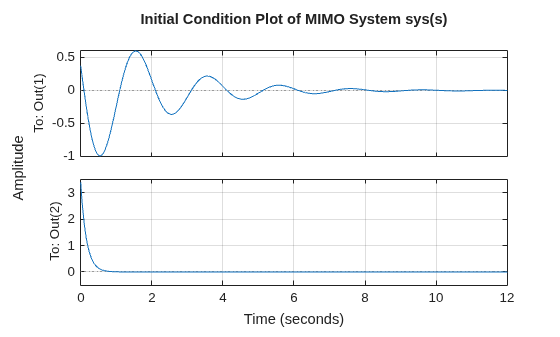
    Consider the following two-input, two-output dynamic system.

    sys(s)=[03ss2+s+10s+1s+52s+6].MIMO system

    Convert the sys to state-space form since initial condition plots are supported only for state-space models.

    sys = ss([0, tf([3 0],[1 1 10]) ; tf([1 1],[1 5]), tf(2,[1 6])]);
    size(sys)
    State-space model with 2 outputs, 2 inputs, and 4 states.
    

    The resultant state-space model has four states. Hence, provide an initial condition vector with four elements.

    x0 = [0.3,0.25,1,4];

    Plot the initial condition response. Turn on the grid and change the plot title.

    ip = initialplot(sys,x0);
    title("Initial Condition Plot of MIMO System sys(s)")
    grid on
    MATLAB figure

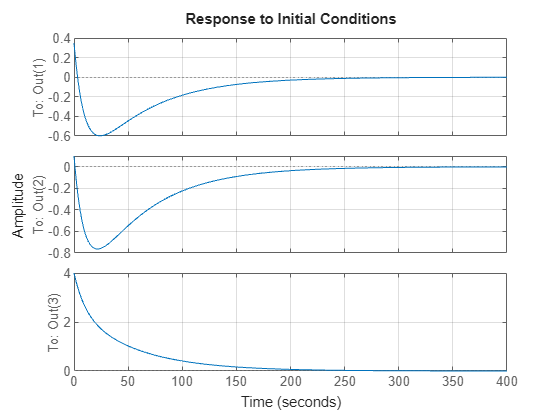
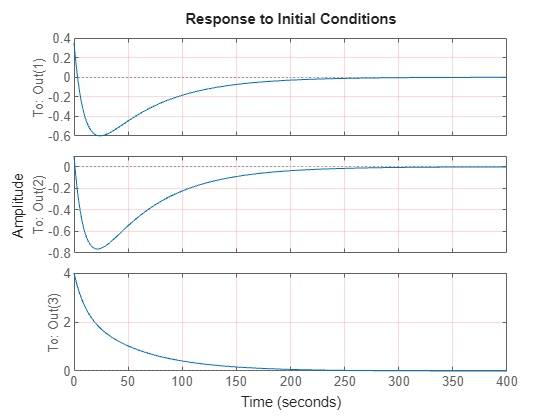
    For this example, consider a MIMO state-space model with 3 inputs, 3 outputs and 3 states. Create an initial condition plot with red colored grid lines.

    Create the MIMO state-space model sys_mimo.

    J = [8 -3 -3; -3 8 -3; -3 -3 8];
    F = 0.2*eye(3);
    A = -J\F;
    B = inv(J);
    C = eye(3);
    D = 0;
    sys_mimo = ss(A,B,C,D);
    size(sys_mimo)
    State-space model with 3 outputs, 3 inputs, and 3 states.
    

    Create an initial condition plot with chart object ip and display the grid.

    x0 = [0.35,0.1,4];
    ip = initialplot(sys_mimo,x0);
    grid on
    MATLAB figure

    Set the grid color to red.

    ip.AxesStyle.GridColor = [1 0 0];
    MATLAB figure

    The plot automatically updates when you modify the chart object. For MIMO models, initialplot produces a grid of plots, each plot displaying the initial condition response of one I/O pair.

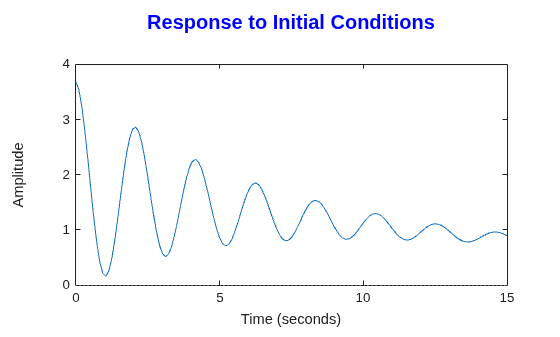
    For this example, examine the initial condition response of the following zero-pole-gain model and limit the plot to tFinal = 15 s. Use 15-point blue text for the title.

    First, convert the zpk model to an ss model since initialplot only supports state-space models.

    sys = ss(zpk(-1,[-0.2+3j,-0.2-3j],1)*tf([1 1],[1 0.05]));
    tFinal = 15;
    x0 = [4,2,3];

    Create the initial conditions response plot and set the title properties of the chart object.

    ip = initialplot(sys,x0,tFinal);
    ip.Title.FontSize = 15;
    ip.Title.Color = [0 0 1];
    MATLAB figure

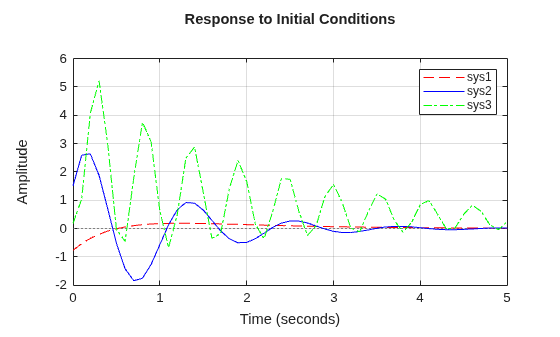
    For this example, plot the initial condition responses of three dynamic systems and use the plot handle to enable the grid.

    First, create the three models and provide the initial conditions.

    rng('default');
    sys1 = rss(4); 
    sys2 = rss(4);
    sys3 = rss(4);
    x0 = [1,1,1,1];

    Plot the initial condition responses of the three models.

    t = 0:0.1:5;
    ip = initialplot(sys1,'r--',sys2,'b',sys3,'g-.',x0,t);
    legend('sys1','sys2','sys3');
    grid on
    MATLAB figure

    Since R2025a

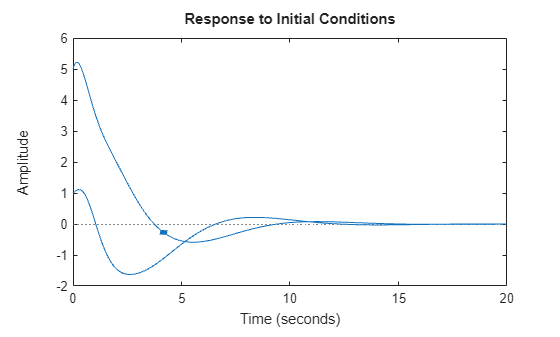
    Create a state-space model with complex coefficients.

    A = [-2-2i -2;1 0];
    B = [2;0];
    C = [0 0.5+2.5i];
    D = 0;
    sys = ss(A,B,C,D);

    Plot the initial-condition response of the system to an arbitrary starting state.

    ic = [1 2];
    ip = initialplot(sys,ic);
    MATLAB figure

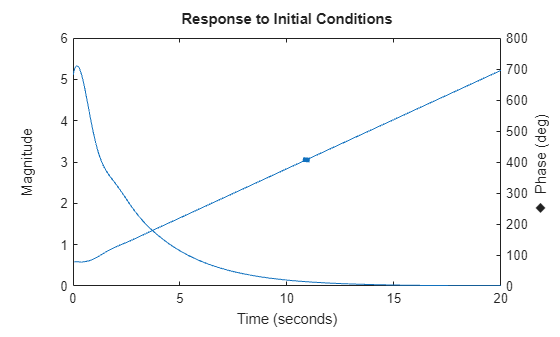
    By default, the plot shows the real and imaginary components of the response on a single axes, indicating the imaginary component using a diamond marker.

    You can also view the complex response using either a magnitude-phase plot or a complex-plane plot. For example, to view the magnitude and phase of the response, right-click the plot area and select Complex View >Magnitude-Phase.

    Alternatively, you can set the ComplexViewType parameter of the corresponding chart object.

    ip.ComplexViewType = "magnitudephase";
    MATLAB figure

    The plot shows the magnitude and phase of the response on a single axes, indicating the phase plot using a diamond marker.

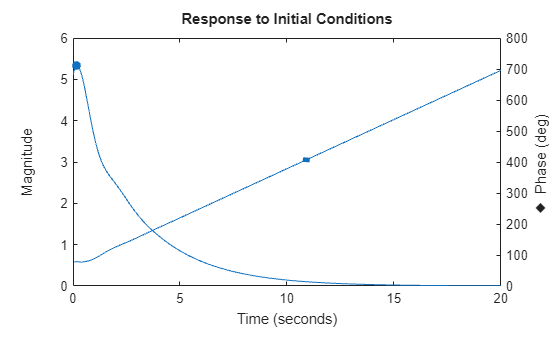
    You can view response characteristics in the plot. For example, to view the peak response, right-click the plot and select Characteristics > Peak Response.

    Alternatively, you can enable the Visible property of the corresponding characteristic parameter of the chart object.

    ip.Characteristics.PeakResponse.Visible = "on";
    MATLAB figure

    Input Arguments

    collapse all

    Dynamic system, specified as a SISO or MIMO dynamic system model or array of dynamic system models. You can only use these types of state-space model:

    • Continuous-time or discrete-time numeric ss models.

    • Generalized or uncertain LTI models, such as genss or uss models. (Using uncertain models requires Robust Control Toolbox™ software.)

      • For tunable control design blocks, the function evaluates the model at its current value for both plotting and returning response data.

      • For uncertain control design blocks, the function plots the nominal value and random samples of the model. When you use output arguments, the function returns response data for the nominal model only.

    • Sparse state-space models, such as sparss and mechss models. You must specify final time tFinal for sparse state-space models.

    • Linear time-varying (ltvss) and linear parameter-varying (lpvss) models.

    If sys is an array of models, the function plots the responses of all models in the array on the same axes.

    Before R2026a: Specify the dynamic system model using the Responses.SourceData.Model property.

    Line style, marker, and color, specified as a string or character vector containing symbols. The symbols can appear in any order. You do not need to specify all three characteristics. For example, specify the marker and omit the line style, then the plot shows only the marker and no line.

    Example: '--or' is a red dashed line with circle markers.

    Line StyleDescription
    "-"Solid line
    "--"Dashed line
    ":"Dotted line
    "-."Dash-dotted line
    MarkerDescription
    "o"Circle
    "+"Plus sign
    "*"Asterisk
    "."Point
    "x"Cross
    "_"Horizontal line
    "|"Vertical line
    "s"Square
    "d"Diamond
    "^"Upward-pointing triangle
    "v"Downward-pointing triangle
    ">"Right-pointing triangle
    "<"Left-pointing triangle
    "p"Pentagram
    "h"Hexagram
    ColorDescription
    "r"red
    "g"green
    "b"blue
    "c"cyan
    "m"magenta
    "y"yellow
    "k"black
    "w"white

    Time steps at which to compute the response, specified as one of these values:

    • Positive scalar tFinal— Compute the response from t = 0 to t = tFinal.

    • Two-element vector [t0 tFinal] — Compute the response from t = t0 to t = tFinal. (since R2023b)

    • Vector Ti:dt:Tf— Compute the response for the time points specified in t.

      • For continuous-time systems, dt is the sample time of a discrete approximation to the continuous system.

      • For discrete-time systems with a specified sample time, dt must match the sample time property Ts of sys.

      • For discrete-time systems with an unspecified sample time (Ts = -1), dt must be 1.

    • [] — Automatically select time values based on system dynamics.

    When you specify a time range using either tFinal or [t0 tFinal]:

    • For continuous-time systems, the function automatically determines the step size and number of points based on the system dynamics.

    • For discrete-time systems with a specified sample time, the function uses the sample time of sys as the step size.

    • For discrete-time systems with unspecified sample time (Ts = -1), the function interprets tFinal as the number of sampling periods to simulate with a sample time of 1 second.

    Express t using the time units specified in the TimeUnit property of sys.

    Before R2026a: Specify time values using the Responses.SourceData.TimeSpec property.

    Initial condition, specified as one of the following:

    • Initial state values, specified as a vector with length equal to the number of states in the model.

    • Response configuration, specified as a RespConfig object. (since R2024b)

    • Operating condition, specified as an operating point object created using findop. An operating point allows you to start the simulation from a steady-state operating condition with nonzero past u, w, and y values. (since R2024b)

    Since R2023a

    Parameter trajectory of the LPV model, specified as a matrix or function handle.

    • For exogenous or explicit trajectories, specify p as a matrix with dimensions N-by-Np, where N is the number of time samples and Np is the number of parameters.

      Thus, the row vector p(i,:) contains the parameter values at the ith time step.

    • For endogenous or implicit trajectories, specify p as a function handle of the form p = F(t,x,u) in continuous time and p = F(k,x,u) in discrete time that gives parameters as a function of time t or time sample k, state x, and input u. An initial parameter value is required for this input method. To specify initial conditions, use the IC argument.

    Time response plot options, specified as a timeoptions object. You can use these options to customize the plot appearance. Settings you specify in plotoptions override the preference settings for the current MATLAB session.

    Parent graphics container, specified as one of these objects:

    • Figure

    • TiledChartLayout

    • UIFigure

    • UIGridLayout

    • UIPanel

    • UITab

    Name-Value Arguments

    collapse all

    Specify optional pairs of arguments as Name1=Value1,...,NameN=ValueN, where Name is the argument name and Value is the corresponding value. Name-value arguments must appear after other arguments, but the order of the pairs does not matter.

    Example: initialplot(sys,IC,LegendDisplay="off") hides the response of sys from the plot legend.

    Time steps at which to compute the response, specified as one of these values. Specifying time values using a name-value argument overrides the time values that you specify using t.

    • Positive scalar tFinal— Compute the response from t = 0 to t = tFinal.

    • Two-element vector [t0 tFinal] — Compute the response from t = t0 to t = tFinal.

    • Vector Ti:dt:Tf— Compute the response for the time points specified in t.

      • For continuous-time systems, dt is the sample time of a discrete approximation to the continuous system.

      • For discrete-time systems with a specified sample time, dt must match the sample time property Ts of sys.

      • For discrete-time systems with an unspecified sample time (Ts = -1), dt must be 1.

    • [] — Automatically select time values based on system dynamics.

    When you specify a time range using either tFinal or [t0 tFinal]:

    • For continuous-time systems, the function automatically determines the size of the time step and number of points based on the system dynamics.

    • For discrete-time systems with a specified sample time, the function uses the sample time of sys as the step size.

    • For discrete-time systems with unspecified sample time (Ts = -1), the function interprets tFinal as the number of sampling periods to simulate with a sample time of 1 second.

    Express TimeSpec using the time units specified in the TimeUnit property of sys.

    If you specify a step delay td using config, the function applies the step at t = t0+td.

    LPV model parameter trajectory, specified as a matrix or a function handle. Specifying parameter values using a name-value argument overrides the parameter values that you specify using p.

    • For exogenous or explicit trajectories, specify Parameter as a matrix with dimensions N-by-Np, where N is the number of time samples and Np is the number of parameters.

      Thus, the row vector Parameter(i,:) contains the parameter values at the ith time step.

    • For endogenous or implicit trajectories, specify Parameter as a function handle of the form p = F(t,x,u) in continuous time and p = F(k,x,u) in discrete time that gives parameters as a function of time t or time sample k, state x, and input u.

      This option is useful when you want to simulate quasi-LPV models.

    Response name, specified as a string or character vector and stored as a string.

    Response visibility, specified as one of these logical on/off values:

    • "on", 1, or true — Display the response in the plot.

    • "off", 0, or false — Do not display the response in the plot.

    The value is stored as an on/off logical value of type matlab.lang.OnOffSwitchState.

    Option to list the response in the legend, specified as one of these logical on/off values:

    • "on", 1, or true — List the response in the legend.

    • "off", 0, or false — Do not list the response in the legend.

    The value is stored as an on/off logical value of type matlab.lang.OnOffSwitchState.

    Marker style, specified as one of these values. Specifying a marker style using a name-value argument overrides any marker style that you specify using LineSpec.

    MarkerDescription
    "none"No marker
    "o"Circle
    "+"Plus sign
    "*"Asterisk
    "."Point
    "x"Cross
    "_"Horizontal line
    "|"Vertical line
    "s"Square
    "d"Diamond
    "^"Upward-pointing triangle
    "v"Downward-pointing triangle
    ">"Right-pointing triangle
    "<"Left-pointing triangle
    "p"Pentagram
    "h"Hexagram

    Plot color, specified as an RGB triplet or a hexadecimal color code and stored as an RGB triplet. Specifying a color using a name-value argument overrides any color that you specify using LineSpec.

    You can also specify some common colors by name. This table lists these colors and their corresponding RGB triplets and hexadecimal color codes.

    Color NameRGB TripletHexadecimal Color Code

    "red" or "r"

    [1 0 0]#FF0000

    "green" or "g"

    [0 1 0]#00FF00

    "blue" or "b"

    [0 0 1]#0000FF

    "cyan" or "c"

    [0 1 1]#00FFFF

    "magenta" or "m"

    [1 0 1]#FF00FF

    "yellow" or "y"

    [1 1 0]#FFFF00

    "black" or "k"

    [0 0 0]#000000

    "white" or "w"

    [1 1 1]#FFFFFF

    Line style, specified as one of these values. Specifying a line style using a name-value argument overrides any line style that you specify using LineSpec.

    Line StyleDescription
    "-"Solid line
    "--"Dashed line
    ":"Dotted line
    "-."Dash-dotted line
    "none"No line

    Marker size, specified as a positive scalar.

    Line width, specified as a positive scalar.

    Series index, specified as a positive integer or "none".

    By default, the SeriesIndex property is a number that corresponds to the order in which the response was added to the chart, starting at 1. MATLAB uses the number to calculate indices for automatically assigning color, line style, or markers for responses. Any responses in the chart that have the same SeriesIndex number also have the same color, line style, and markers.

    A SeriesIndex value of "none" indicates that a response does not participate in the indexing scheme.

    Output Arguments

    collapse all

    Chart object, returned as a InitialPlot object. To customize your plot appearance and behavior, modify the properties of this object using dot notation. For more information, see InitialPlot Properties.

    Version History

    Introduced before R2006a

    expand all