alphaCROWNOptions
R2026bDescription
Add-On Required: This feature requires the AI Verification Library for Deep Learning Toolbox add-on.
Use an AlphaCROWNOptions object to set options for the
α-CROWN verifier. You can use the AlphaCROWNOptions
object as input to the estimateNetworkOutputBounds and verifyNetworkRobustness functions.
α-CROWN is an algorithm for neural network verification. The algorithm uses an Adam solver to optimize the bound propagation through the neural network and produce bounds on the output of a neural network. α-CROWN bounds are typically tighter than CROWN bounds. You can use these bounds to assess the robustness of your neural network to input perturbations. For more information, see CROWN.
Creation
Description
options = alphaCROWNOptionsestimateNetworkOutputBounds function. To use α-CROWN to
verify the robustness of a classification neural network, use the options object as input
to the verifyNetworkRobustness function.
options = alphaCROWNOptions(Property=Value)
Properties
Adam Solver Options
Initial learning rate used for parameter optimization, specified as a positive scalar.
If the learning rate is too low, then the optimization can take a long time. If the learning rate is too high, then the algorithm might reach a suboptimal result or diverge.
Data Types: single | double | int8 | int16 | int32 | int64 | uint8 | uint16 | uint32 | uint64
Maximum number of epochs (full passes of the data) to use for parameter optimization, specified as a positive integer.
Data Types: single | double | int8 | int16 | int32 | int64 | uint8 | uint16 | uint32 | uint64
Learning rate schedule, specified as a character vector or string scalar of a built-in learning rate schedule name, a string array of names, a built-in or custom learning rate schedule object, a function handle, or a cell array of names, metric objects, and function handles.
You can combine multiple learning rate schedules by specifying a string or cell
array. In this case, the software applies the schedules in order, starting with the
first element. At most one of the schedules can be infinite (schedules than continue
indefinitely, such as "cyclical" and objects with the
NumSteps property set to Inf) and the infinite
schedule must be the last element of the array.
Built-in Learning Rate Schedules
Specify learning rate schedules as a string scalar, character vector, or a string or cell array of one or more of these names:
| Schedule | String | Object | Plot |
|---|---|---|---|
| No learning rate schedule. | "none" — Keep the learning rate constant. | NA |
|
| Piecewise learning rate schedule. | "piecewise" — Every 10 epochs, drop the learning
rate by a factor of 10 |
|
|
| Warm-up learning rate schedule | "warmup" — For 5 iterations, ramp up the learning
rate to the base learning rate. | warmupLearnRate — Customize the initial and final learning rate
factors and the number of steps of the warm up schedule. |
|
| Polynomial learning rate schedule | "polynomial" — Every epoch, drop the learning rate
using a power law with a unitary exponent. | polynomialLearnRate — Customize the initial and final learning
rate factors, the exponent, and the number of steps of the polynomial
schedule. |
|
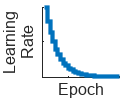
| Exponential learning rate schedule | "exponential" — Every epoch, decay the learning rate
by a factor of 10. | exponentialLearnRate — Customize the drop factor and period of
the exponential schedule. |
|
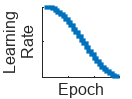
| Cosine learning rate schedule | "cosine" — Every epoch, drop the learning rate using
a cosine formula. | cosineLearnRate — Customize the initial and final learning rate
factors, the period, and the period growth factor of the cosine
schedule. |
|
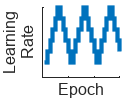
| Cyclical learning rate schedule | "cyclical" — For periods of 10 epochs, increase the
learning rate from the base learning rate for 5 epochs and then decrease the
learning rate for 5 epochs. | cyclicalLearnRate — Customize the maximum factor, period, and
step ratio of the cyclical schedule. |
|
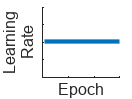
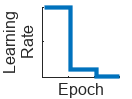
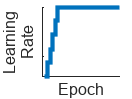
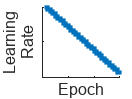
Custom Learning Rate Schedule
For additional flexibility, you can define a custom learning rate schedule as a
function handle or custom class that inherits from
deep.LearnRateSchedule.
| Schedule | Description |
|---|---|
| Custom learning rate schedule function | Function handle with the syntax learningRate =
f(baseLearningRate,epoch), where
baseLearningRate is the base learning rate, and
epoch is the epoch number. |
| Custom learn rate schedule object | Custom learning rate schedule class that inherits from
For more information, see Define Custom Learning Rate Schedule. |
Number of epochs for dropping the learning rate, specified as a positive integer. This
argument is valid only when the LearnRateSchedule value is
"piecewise".
The software multiplies the global learning rate with the drop factor every time the specified
number of epochs passes. Specify the drop factor using the
LearnRateDropFactor argument.
Data Types: single | double | int8 | int16 | int32 | int64 | uint8 | uint16 | uint32 | uint64
Factor for dropping the learning rate, specified as a scalar from 0 to
1. This argument is valid only when the
LearnRateSchedule argument is
"piecewise".
LearnRateDropFactor is a multiplicative factor to apply to the learning
rate every time a certain number of epochs passes. Specify the number of epochs using the
LearnRateDropPeriod argument.
Data Types: single | double | int8 | int16 | int32 | int64 | uint8 | uint16 | uint32 | uint64
Decay rate of gradient moving average for the Adam solver, specified as a
nonnegative scalar less than 1. The gradient decay rate is denoted by
λ1 in the Adaptive Moment Estimation section.
The default value works well for most tasks.
Data Types: single | double | int8 | int16 | int32 | int64 | uint8 | uint16 | uint32 | uint64
Decay rate of squared gradient moving average for the Adam solver, specified as a
nonnegative scalar less than 1. The squared gradient decay rate is
denoted by λ2 in the Adaptive Moment Estimation section.
Typical values of the decay rate are 0.9, 0.99, and 0.999, corresponding to averaging lengths of 10, 100, and 1000 parameter updates, respectively.
Data Types: single | double | int8 | int16 | int32 | int64 | uint8 | uint16 | uint32 | uint64
Denominator offset for Adam solver, specified as a positive scalar.
The solver adds the offset to the denominator in the neural network parameter updates to avoid division by zero. The default value works well for most tasks.
Data Types: single | double | int8 | int16 | int32 | int64 | uint8 | uint16 | uint32 | uint64
Size of the mini-batch to use when verifying robustness, specified as a positive integer.
Larger mini-batch sizes require more memory, but can lead to faster computations.
Data Types: single | double | int8 | int16 | int32 | int64 | uint8 | uint16 | uint32 | uint64
Gradient threshold, specified as Inf or a positive scalar. If the gradient
exceeds the value of GradientThreshold, then the gradient is clipped
according to the GradientThresholdMethod argument.
For more information, see Gradient Clipping.
Data Types: double
Gradient threshold method used to clip gradient values that exceed the gradient threshold, specified as one of the following:
'l2norm'— If the L2 norm of the gradient of a learnable parameter is larger thanGradientThreshold, then scale the gradient so that the L2 norm equalsGradientThreshold.'global-l2norm'— If the global L2 norm, L, is larger thanGradientThreshold, then scale all gradients by a factor ofGradientThreshold/L. The global L2 norm considers all learnable parameters.'absolute-value'— If the absolute value of an individual partial derivative in the gradient of a learnable parameter is larger thanGradientThreshold, then scale the partial derivative to have magnitude equal toGradientThresholdand retain the sign of the partial derivative.
For more information, see Gradient Clipping.
Factor for L2 regularization (weight decay), specified as a nonnegative scalar. For more information, see L2 Regularization.
Data Types: single | double | int8 | int16 | int32 | int64 | uint8 | uint16 | uint32 | uint64
Monitoring
Flag to display optimization progress, specified as a numeric or logical
1 (true) or 0
(false). When you set this input to 1
(true), the function returns the progress of the algorithm by
indicating which mini-batch the function is processing and the total number of
mini-batches. The function also returns the options that the algorithm uses and the
amount of time computation takes.
Data Types: single | double | int8 | int16 | int32 | int64 | uint8 | uint16 | uint32 | uint64 | logical
Hardware
Hardware resource for verifying network robustness, specified as one of these values:
"auto"– Use a local GPU if one is available. Otherwise, use the local CPU."cpu"– Use the local CPU."gpu"– Use the local GPU."multi-gpu"– Use multiple GPUs on one machine, using a local parallel pool based on your default cluster profile. If there is no current parallel pool, the software starts a parallel pool with pool size equal to the number of available GPUs."parallel-auto"– Use a local or remote parallel pool. If there is no current parallel pool, the software starts one using the default cluster profile. If the pool has access to GPUs, then only workers with a unique GPU perform the computations and excess workers become idle. If the pool does not have GPUs, then the computations take place on all available CPU workers instead."parallel-cpu"– Use CPU resources in a local or remote parallel pool, ignoring any GPUs. If there is no current parallel pool, the software starts one using the default cluster profile."parallel-gpu"– Use GPUs in a local or remote parallel pool. Excess workers become idle. If there is no current parallel pool, the software starts one using the default cluster profile.
The "gpu", "multi-gpu",
"parallel-auto", "parallel-cpu", and
"parallel-gpu" options require Parallel Computing Toolbox™. To use a GPU for deep learning,
you must also have a supported GPU device. For information on supported devices, see
GPU Computing Requirements (Parallel Computing Toolbox). If you
choose one of these options and Parallel Computing Toolbox or a suitable GPU is not available, then the software returns an
error.
For more information on when to use the different execution environments, see Scale Up Deep Learning in Parallel, on GPUs, and in the Cloud.
Objective Options
Objective to optimize, specified as one of these values:
"auto"— Optimize the upper-lower bound interval ("interval") when using the object with theestimateNetworkOutputBoundsfunction. Optimize only the lower bounds ("lower") when using the object with theverifyNetworkRobustnessfunction."lower"— Optimize only the lower bounds."upper"— Optimize only the upper bounds."interval"— Optimize the upper-lower bound interval.
Tip
The verifyNetworkRobustness function checks for
classification robustness by computing the difference in class probabilities between
the true and target label probabilities. To check for robustness, it is enough to
check that the lower bound of this difference is greater than 0.
Data Types: char | string
Objective output mode, specified as:
"auto"— Optimize each objective ("individual") when using the object with theestimateNetworkOutputBoundsorverifyNetworkRobustnessfunctions."average"— Optimize the average objective specified byObjective, for example, maximize the average lower bound. This reduces memory and run time use but can result in looser bounds."individual"— Optimize each objective specified byObjective, for example, maximize each lower bound. This increases memory use and run time but can result in tighter bounds.
Data Types: char | string
This option is only valid when ObjectiveMode is set to
"individual".
Objective execution mode, specified as:
"auto"— Optimize in a single batch ("batched") when using the object with theestimateNetworkOutputBoundsandverifyNetworkRobustnessfunctions."sequential"— Optimize each objective specified byObjectivesequentially, for example, maximize each lower bound one at a time. This option reduces memory use but increases run time."batched"— Optimize each objective specified byObjectivein a single batch computation, for example, maximize each lower bound all at once. This option reduces run time but increases memory usage.
The objective execution mode value does not change the returned results.
Data Types: char | string
Object Functions
verifyNetworkRobustness | Verify adversarial robustness of MATLAB, ONNX, and PyTorch networks |
estimateNetworkOutputBounds | Compute output bounds of MATLAB, ONNX, and PyTorch networks |
Examples
Create an AlphaCROWNOptions object.
options = alphaCROWNOptions( ...
    InitialLearnRate=0.001, ...
    MaxEpochs=20, ...
    ObjectiveMode="average", ...
    Objective="upper", ...
    MiniBatchSize=16)
options =
  AlphaCROWNOptions with properties:

                 MiniBatchSize: 16
          ExecutionEnvironment: 'auto'
              InitialLearnRate: 1.0000e-03
                     MaxEpochs: 20
                     Objective: 'upper'
                 ObjectiveMode: 'average'
        ObjectiveExecutionMode: 'auto'
             LearnRateSchedule: 'none'
           LearnRateDropFactor: 0.1000
           LearnRateDropPeriod: 10
           GradientDecayFactor: 0.9000
              L2Regularization: 1.0000e-04
       GradientThresholdMethod: 'l2norm'
             GradientThreshold: Inf
    SquaredGradientDecayFactor: 0.9990
                       Epsilon: 1.0000e-08
                       Verbose: 0
Load a pretrained classification network.
load("digitsRobustClassificationConvolutionNet.mat")Load the test data.
[XTest,TTest] = digitTest4DArrayData;
Randomly select images to test.
idx = randi(numel(TTest),500,1);

X = XTest(:,:,:,idx);
labels = TTest(idx);
Convert the test data to a dlarray object.
X = dlarray(X,"SSCB");Verify the network robustness to an input perturbation between –0.01 and 0.01 for each pixel. Create lower and upper bounds for the input.
perturbation = 0.01;
XLower = X - perturbation;
XUpper = X + perturbation;
Create an AlphaCROWN options object. Optimize the interval and optimize over the average objective.
opts = alphaCROWNOptions(InitialLearnRate=0.9,MaxEpochs=20, ...
    Objective="interval", ...
    ObjectiveMode="average", ...
    Verbose=true);
Verify the network robustness for each test image.
result = verifyNetworkRobustness(netRobust,XLower,XUpper,labels,Algorithm=opts);
Number of mini-batches to process: 4
.... (4 mini-batches)
Total time = 325.2 seconds.
summary(result,Statistics="counts")result: 500×1 categorical
verified 493
violated 2
unproven 5
Load a pretrained regression network. This network is a dlnetwork object that has been trained to predict the rotation angle of images of handwritten digits.
load("digitsRegressionNetwork.mat");Load the test data.
[XTest,~,TTest] = digitTest4DArrayData;
Select the first ten images.
X = XTest(:,:,:,1:10);
T = TTest(1:10);
Convert the test images to dlarray objects.
X = dlarray(X,"SSCB");Estimate the output bounds for an input perturbation between –0.01 and 0.01 for each pixel. Create lower and upper bounds for the input.
perturbation = 0.01;
XLower = X - perturbation;
XUpper = X + perturbation;
Create an AlphaCROWNOptions object. Optimize the upper bound and optimize over the average objective.
opts = alphaCROWNOptions(InitialLearnRate=0.9,MaxEpochs=20, ...
    Objective="upper", ...
    ObjectiveMode="average", ...
    Verbose=true);
Estimate the output bounds for each input.
[YLower,YUpper] = estimateNetworkOutputBounds(net,XLower,XUpper);
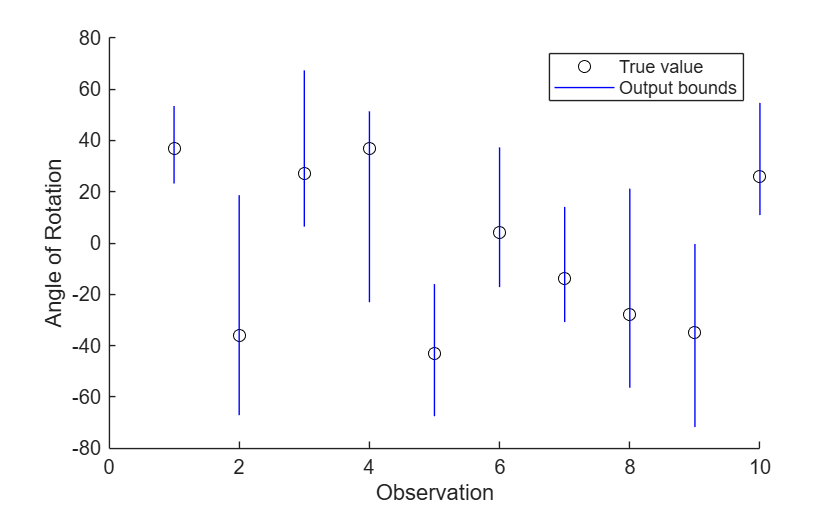
The output bounds are dlarray objects. To plot the output bounds, first extract the data using extractdata.
YLower = extractdata(YLower);
YUpper = extractdata(YUpper);
Visualize the output bounds.
figure
hold on
for i = 1:10
    plot(i,T(i),"ko")
    line([i i],[YLower(i) YUpper(i)],Color="b")
end
hold off
xlim([0 10])
xlabel("Observation")
ylabel("Angle of Rotation")
legend(["True value","Output bounds"])
Algorithms
References
[1] Kingma, Diederik, and Jimmy Ba. "Adam: A method for stochastic optimization." arXiv preprint arXiv:1412.6980 (2014).
[2] Pascanu, R., T. Mikolov, and Y. Bengio. "On the difficulty of training recurrent neural networks". Proceedings of the 30th International Conference on Machine Learning. Vol. 28(3), 2013, pp. 1310–1318.
[3] Singh, Gagandeep, Timon Gehr, Markus Püschel, and Martin Vechev. “An Abstract Domain for Certifying Neural Networks.” Proceedings of the ACM on Programming Languages 3, no. POPL (January 2, 2019): 1–30. https://doi.org/10.1145/3290354.
[4] Zhang, Huan, Tsui-Wei Weng, Pin-Yu Chen, Cho-Jui Hsieh, and Luca Daniel. “Efficient Neural Network Robustness Certification with General Activation Functions.” arXiv, 2018. https://doi.org/10.48550/ARXIV.1811.00866.
[5] Xu, Kaidi, Zhouxing Shi, Huan Zhang, Yihan Wang, Kai-Wei Chang, Minlie Huang, Bhavya Kailkhura, Xue Lin, and Cho-Jui Hsieh. “Automatic Perturbation Analysis for Scalable Certified Robustness and Beyond.” arXiv, 2020. https://doi.org/10.48550/ARXIV.2002.12920.
[6] Xu, Kaidi, Huan Zhang, Shiqi Wang, Yihan Wang, Suman Jana, Xue Lin, and Cho-Jui Hsieh. “Fast and Complete: Enabling Complete Neural Network Verification with Rapid and Massively Parallel Incomplete Verifiers.” arXiv, 2020. https://doi.org/10.48550/ARXIV.2011.13824.
Version History
Introduced in R2026a

