Quantize and Deploy Speech Command Recognition for STM32 Boards
R2026bThis example shows how to quantize and deploy a convolutional neural network (CNN)-based speech command recognition model to an STM32F769I-Discovery board using STM32CubeMX utilizing the ARM® Cortex®-M code replacement library (CRL). The deployment leverages CMSIS-NN kernels to achieve optimal performance.
In this example, you compress the CNN using quantization and then export the CNN to a Simulink® model. Then, integrate the model into a speech recognition model and generate optimized code using ARM Cortex-M CRL. Finally, you deploy the generated code to the STM32F769I‑Discovery board via STM32CubeMX workflow.
This example uses a pre-trained and pruned CNN for speech recognition. For more information on how to prune the CNN, see Prune and Quantize Speech Command Recognition Network (Audio Toolbox).
Required Hardware
ARM Cortex-M STM32F769I-Discovery board
Load Speech Commands Dataset
This example uses the Google Speech Commands Dataset [1]. Download and unzip the data set.
downloadFolder = matlab.internal.examples.downloadSupportFile("audio","google_speech.zip");
dataFolder = tempdir;
unzip(downloadFolder,dataFolder)
dataset = fullfile(dataFolder,"google_speech");
Create Training and Validation Datastores
Create training and validation datastores before loading the pretrained network. The supporting function augmentDataset uses the long audio files in the background folder of the Google Speech Commands Dataset to create one-second segments of background noise. The function creates an equal number of background segments from each background noise file and then splits the segments between the training and validation folders.
augmentDataset(dataset);
Create a categorical array which specifies the words that you want your model to recognize as commands. The createDatastores function creates the training and validation datastores.
commands = categorical(["yes","no","up","down","left","right","on","off","stop","go"]);
[adsTrain,adsValidation] = createDatastores(dataset,commands);
The extractFeatures function extracts the auditory spectrograms from the audio input. XTrain contains the spectrograms from the training datastore and XValidation contains the spectrograms from the validation datastore. TTrain and TValidation are the training and validation target labels, isolated for convenience. Use categories to extract the class names.
[XTrain,XValidation,TTrain,TValidation] = extractFeatures(adsTrain,adsValidation);
classes = categories(TTrain);
Load Pre-trained and Pruned network
Load the pre-trained and pruned network.
load("trainedNetPruned.mat");Quantize Pruned Network
Create a dlquantizer object from the pruned network and specify the ExecutionEnvironment property as "MATLAB". To enhance performance of the quantized neural network, use the prepareNetwork function.
dlquantObj = dlquantizer(trainedNetPruned,ExecutionEnvironment='MATLAB');
prepareNetwork(dlquantObj)
To create a representative calibration datastore with elements from each label in the training data, use the createCalibrationSet function.
calData = createCalibrationSet(XTrain,TTrain,36,["yes","no","up","down","left","right","on","off","stop","go","unknown","background"]);
calibrate(dlquantObj, calData);
Quantize the network using the quantize function.
qnetPruned = quantize(dlquantObj,ExponentScheme="Histogram");
save("qnet_afterPrepareNetwork","qnetPruned")
qDetails = quantizationDetails(qnetPruned);
Evaluate Quantized Network
Calculate the accuracy of the quantized pruned network and plot the confusion matrix.
networkAccuracy(qnetPruned,XTrain,TTrain,XValidation,TValidation,classes,commands,"Pruned and Quantized Network"); "Training Accuracy: 94.3433%"
"Validation Accuracy: 92.4057%"
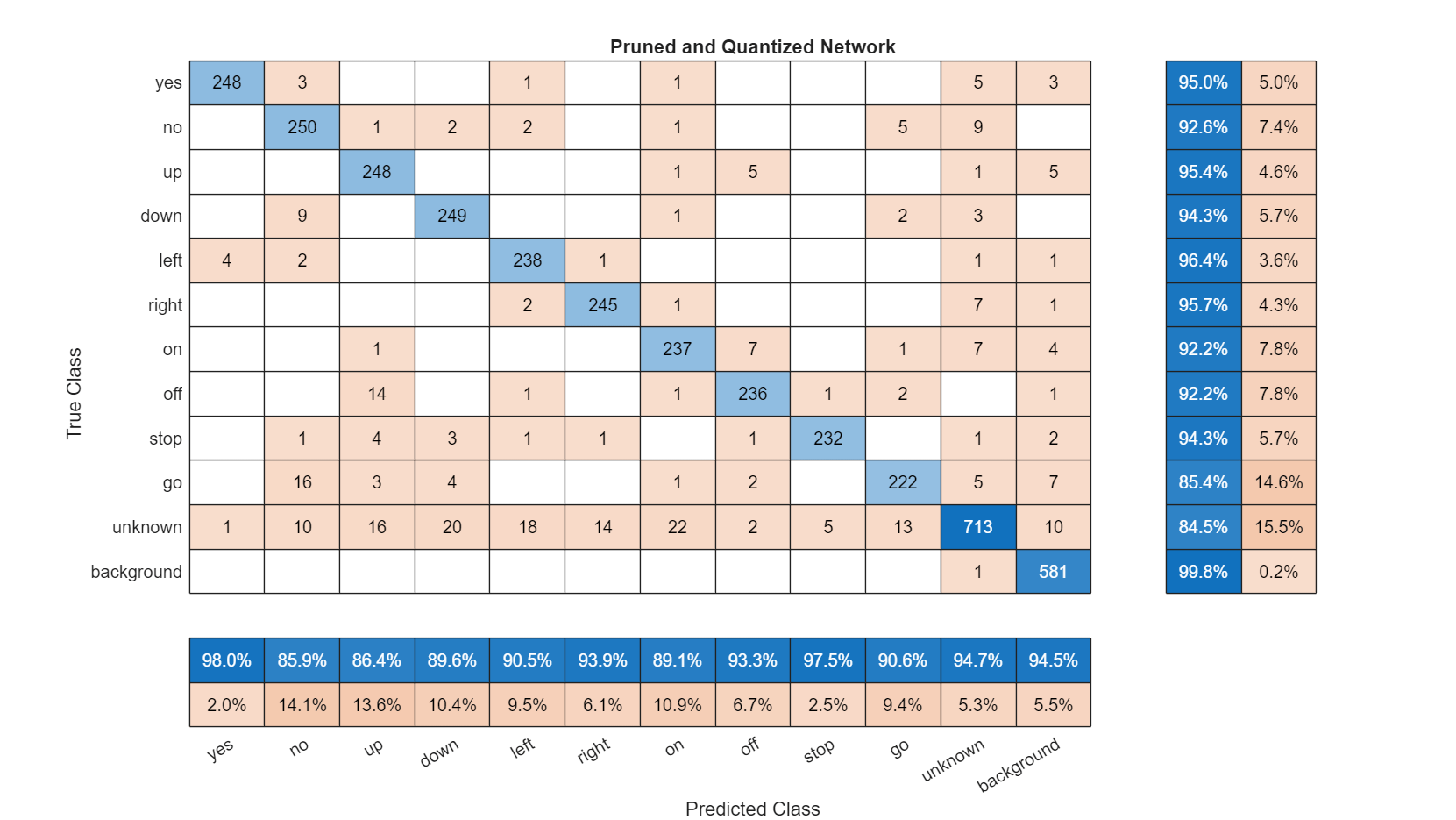
Compare the accuracy of the pruned network before and after quantization. The training accuracy experiences a small decrease, and the validation accuracy remains constant.
Export Quantized Network to Simulink Model
To generate the Simulink model that contains deep learning layer blocks and subsystems corresponding to the deep learning layer objects, use the exportNetworkToSimulink function.
bdclose('CNNLayerBlock');
if exist('CNNLayerBlock.slx', 'file')
    delete('CNNLayerBlock.slx');
end
exportNetworkToSimulink(qnetPruned, 'InputDataType', 'single','ModelName','CNNLayerBlock');

This subsystem layer blocks are used for Deep Learning predictions.
Configure Simulink Reference Model
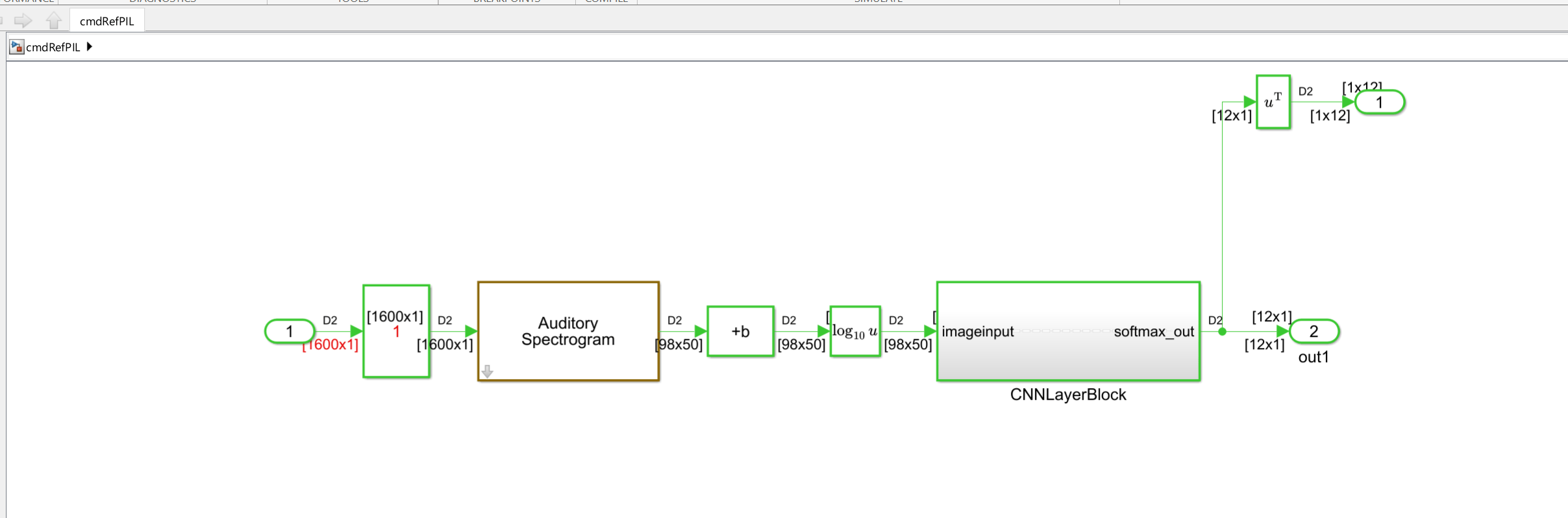
To create a Simulink reference model to run on the STM32F769I-Discovery board, you use the speech command recognition model in the Apply Speech Command Recognition Network in Simulink (Audio Toolbox) example. Replace the Deep Learning Predict block in the speech command recognition model with the newly generated layer block subsystem. Replacing the block allows you to run quantized inference and use the CMSIS-NN kernels for optimized performance on ARM Cortex-M targets. The reference model includes the Auditory Spectrogram block and the subsystem containing the layer blocks, which allows DSP and deep learning computations to run on the target.
To configure the reference model, follow the steps outlined in the following paragraphs.
Open the reference model cmdRefPIL and replace the CNNLayerBlock subsystem with the subsystem generated using the exportNetworktoSimulink function. Make sure that the input block properties match the top-level model.
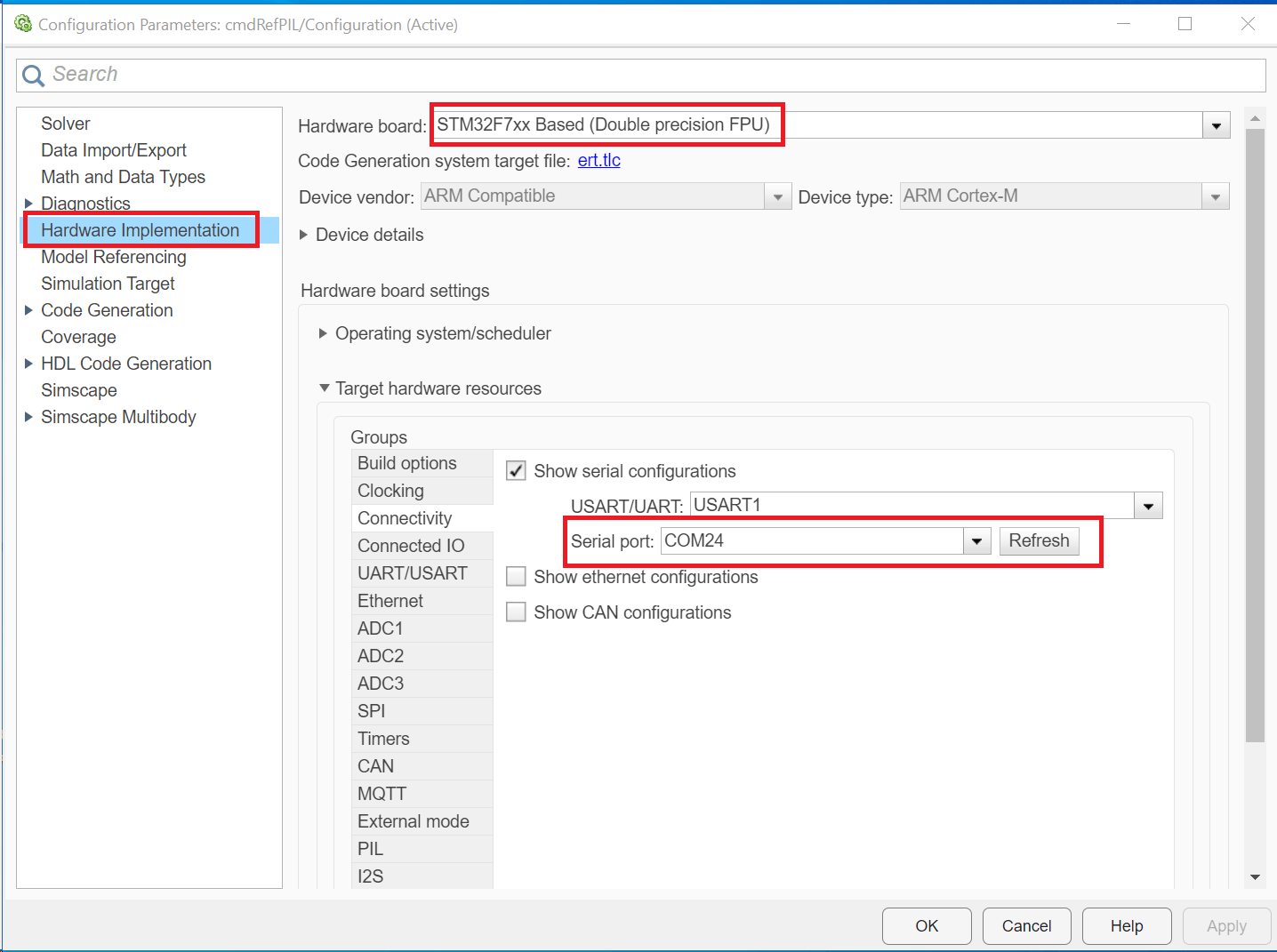
Click the Modeling tab on the Simulink toolstrip and select Model Settings to open the Configuration Parameters dialog box.

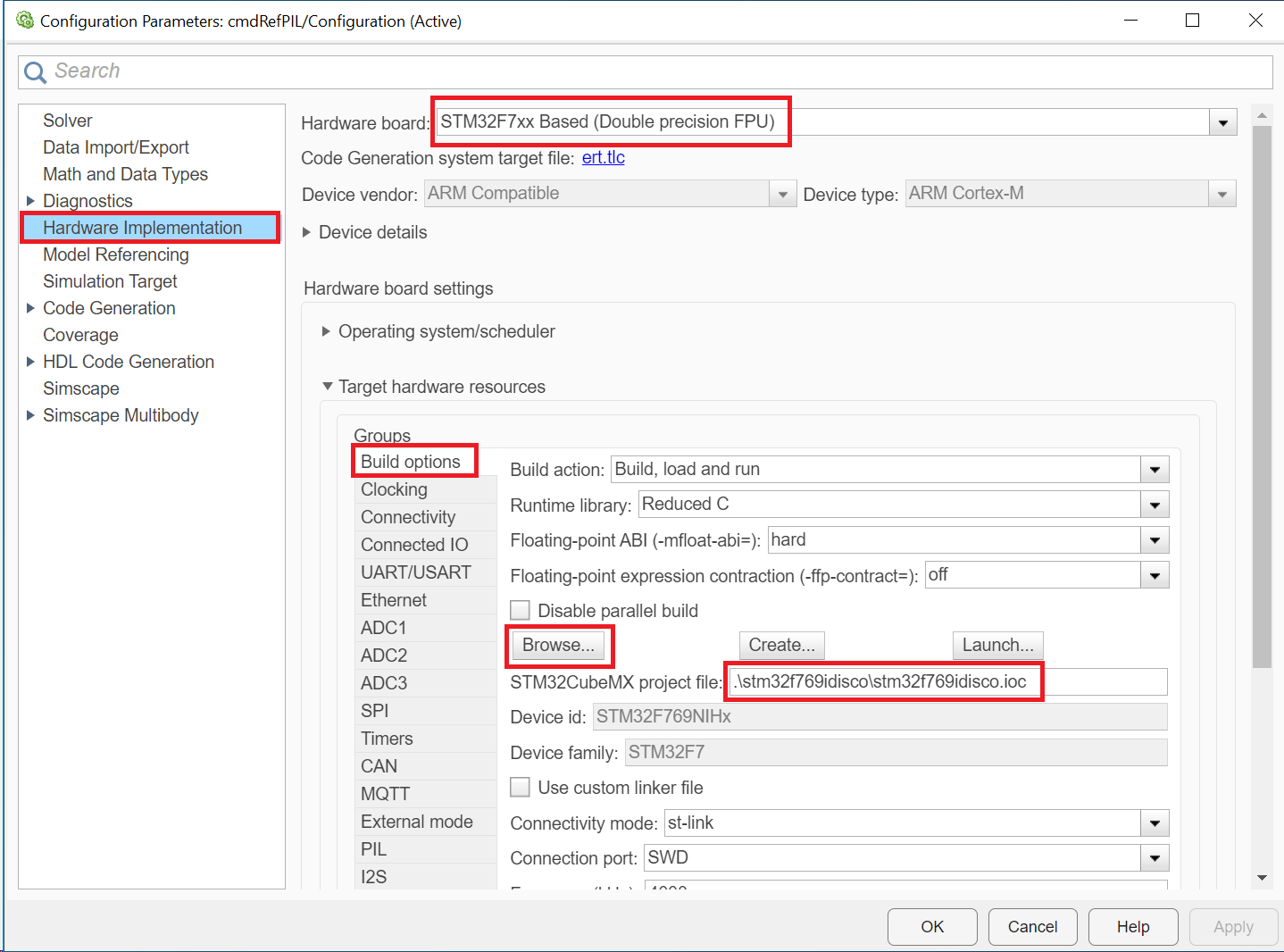
Set the Hardware board parameter to STM32F7xx Based (Double precision FPU). Under Hardware board settings, navigate to Target hardware resources and enter the serial port number to which your ARM Cortex-M hardware is connected.
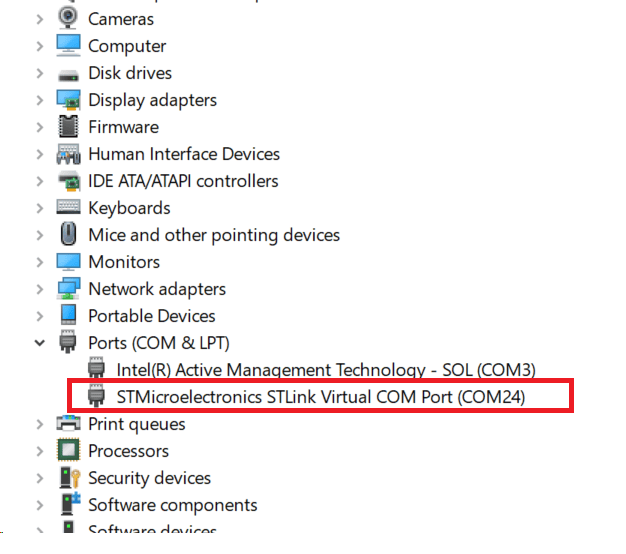
To find the serial port number on a Windows computer, open Device Manager and go to Ports (COM & LPT). Locate the entry labeled STMicroelectronic STLink Virtual COM Port (COMx). Use COMx as the serial port number.
Go to Build options and click Browse to select an existing STM32CubeMX project file for the STM32F769I‑Discovery board.
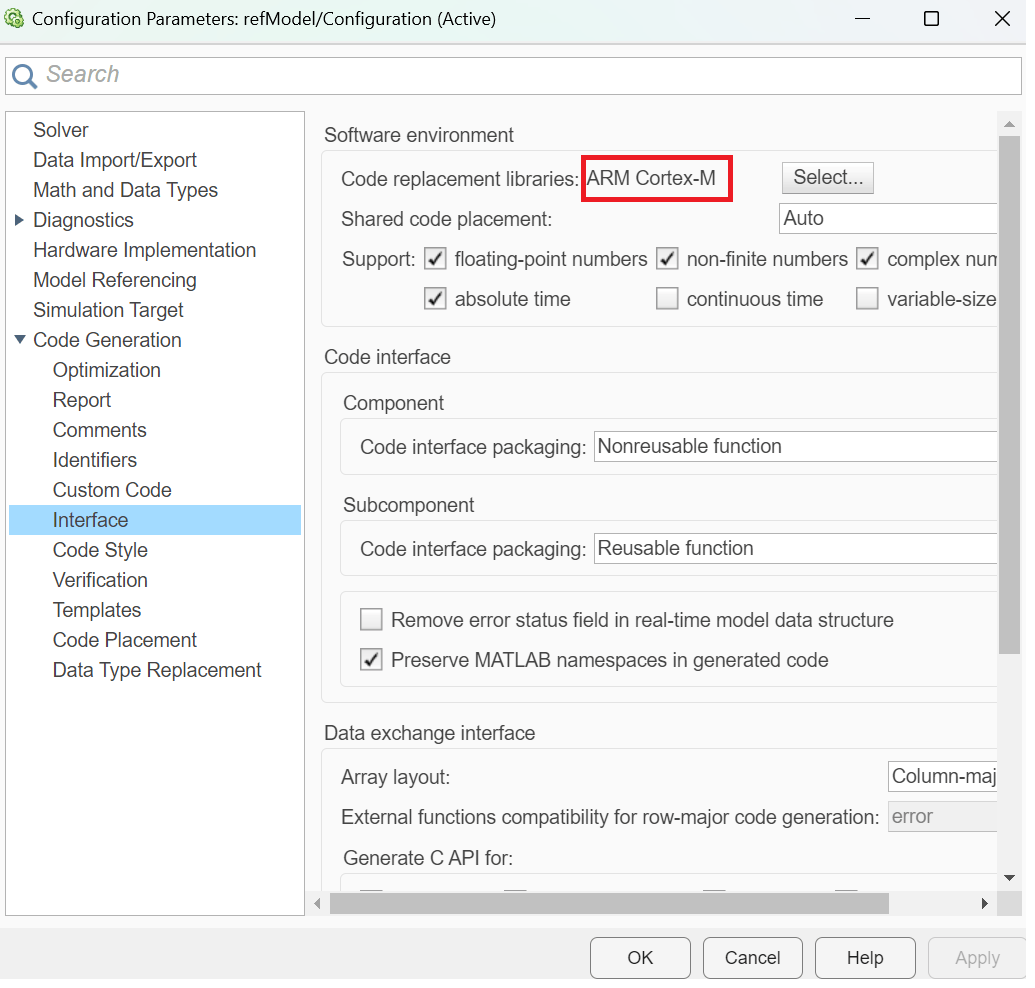
To generate optimized code for your ARM Cortex-M hardware, set the Code replacement libraries to ARM Cortex-M.
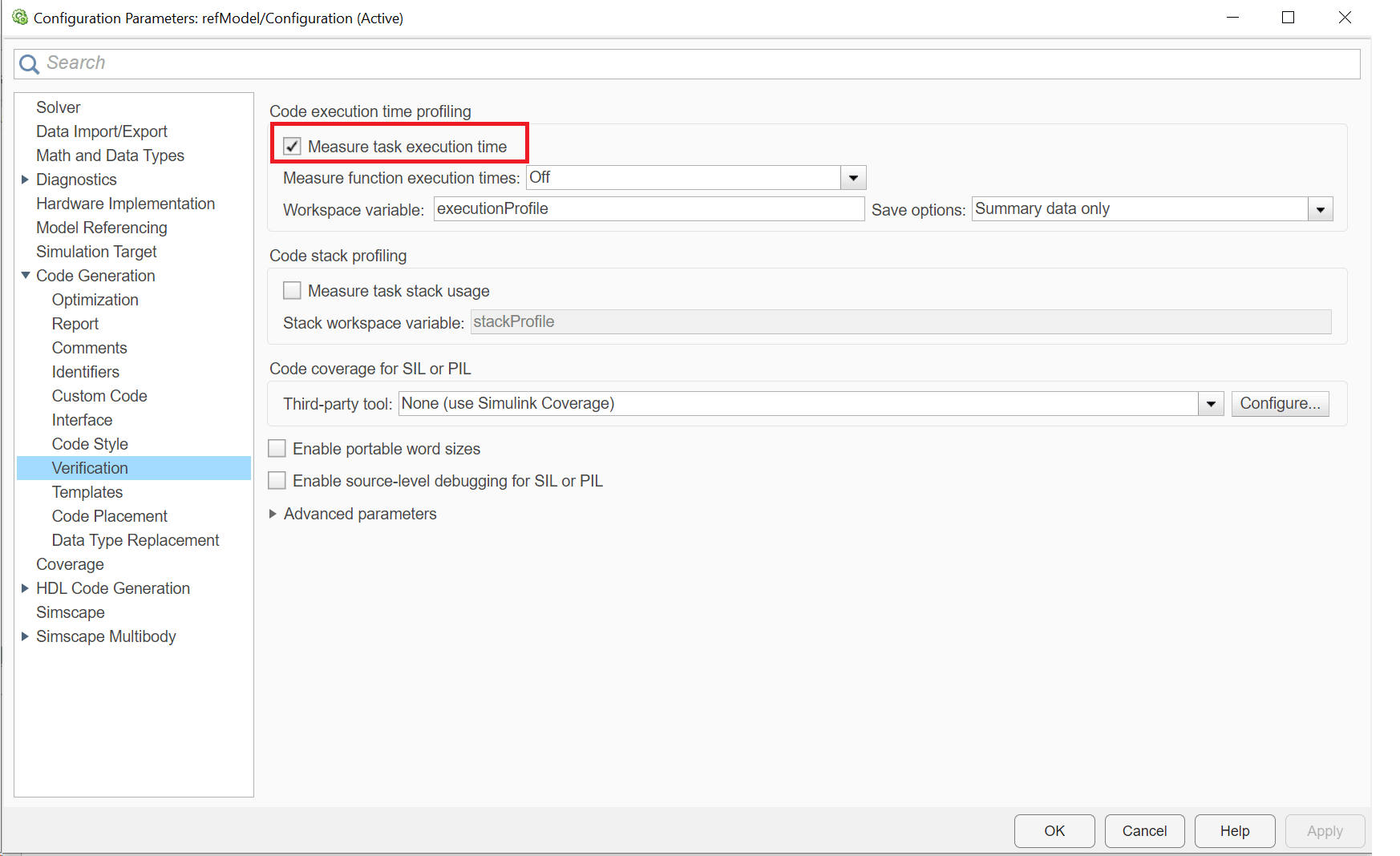
To profile generated code on the hardware, enable Measure task execution time.
Save the reference model.
Top-Level Model Configuration with Reference Model
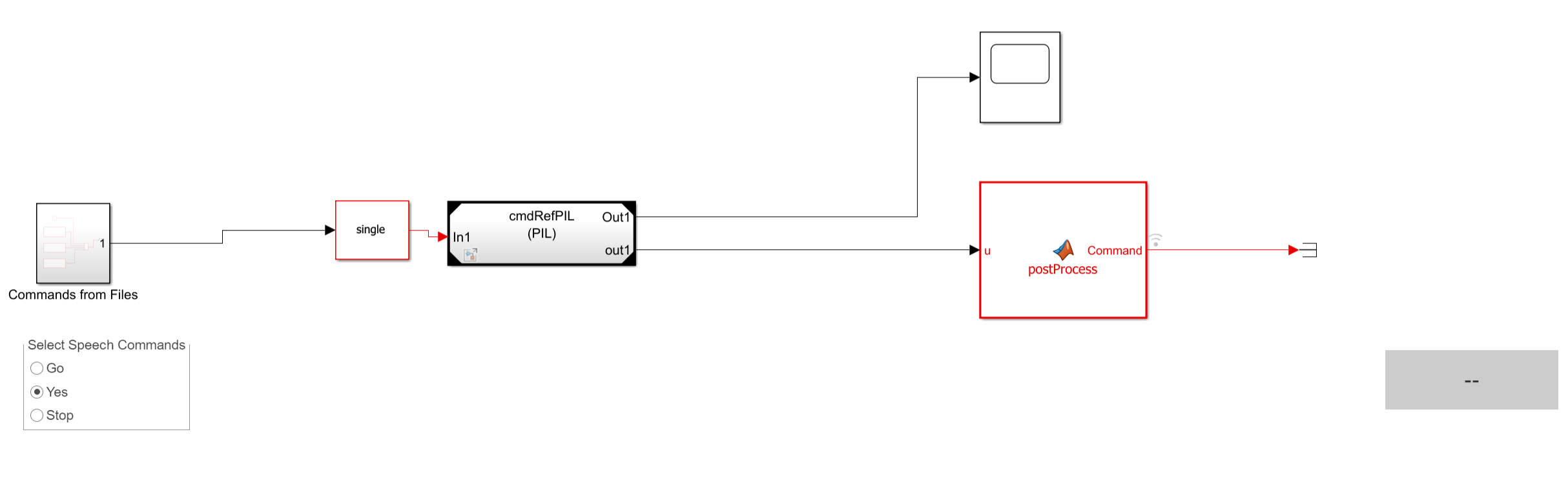
Modify the top-level model to include the reference model using a Model block. Read commands stored in audio files. For commands on file, use the rotary switch to select one of three commands (Go, Yes, or Stop).
Run Top-level Model
Simulate the model for 20 seconds.
model = "cmdRecogTop";
open_system(model);
open_system(model + "/Time Scope");
set_param(model, 'StopTime', '20');
sim(model);
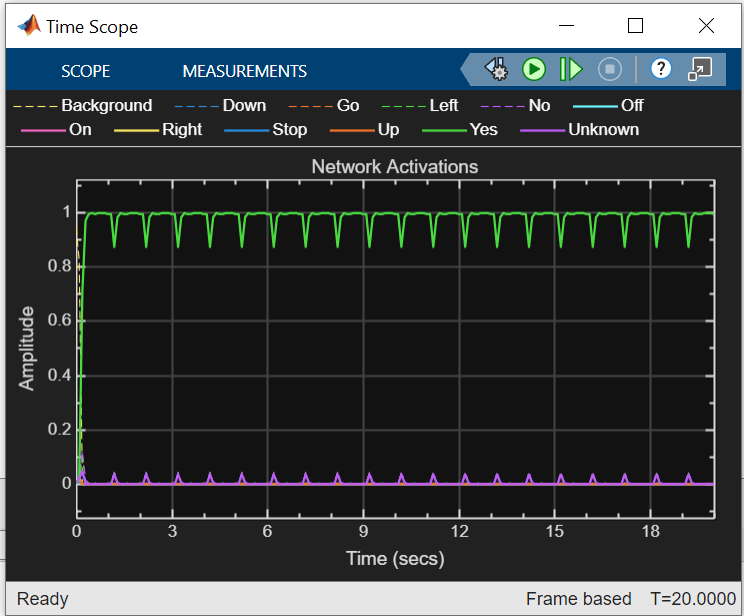
The Display block shows the recognized speech command, and the Time Scope block displays the network activations, which indicate the confidence level for each supported command.
Compare Generated Code Performance for Deep Learning Network
Compare the execution time of the generated code with and without the ARM Cortex-M CRL on the hardware. To measure the execution time with the CRL, configure the simulation mode of the cmdRefPIL model to processor-in-the-loop (PIL) using the SIL/PIL Manager, and run the simulation. Store the resulting execution time in a variable named output_withCRL.
Alternatively, you can execute these commands to configure and run the model programmatically.
set_param(cmdRefPIL, 'StopTime', '1');
set_param(cmdRefPIL,'SimulationMode','processor-in-the-loop');
set_param(cmdRefPIL, 'CodeReplacementLibrary', 'ARM Cortex-M');
output_withCRL = sim(cmdRefPIL);
To get the execution time of the generated code without the CRL, set the Code replacement libraries parameter in the Configuration Parameters dialog box to None while configuring the cmdRefPIL model and run the model.
set_param(cmdRefPIL,'CodeReplacementLibrary','None');
output_withoutCRL = sim(cmdRefPIL);
To compare the execution time of the generated code with and without ARM Cortex-M CRL, run the compareExecutionTimesPlot function.
compareExecutionTimesPlot(output_withoutCRL, output_withCRL);
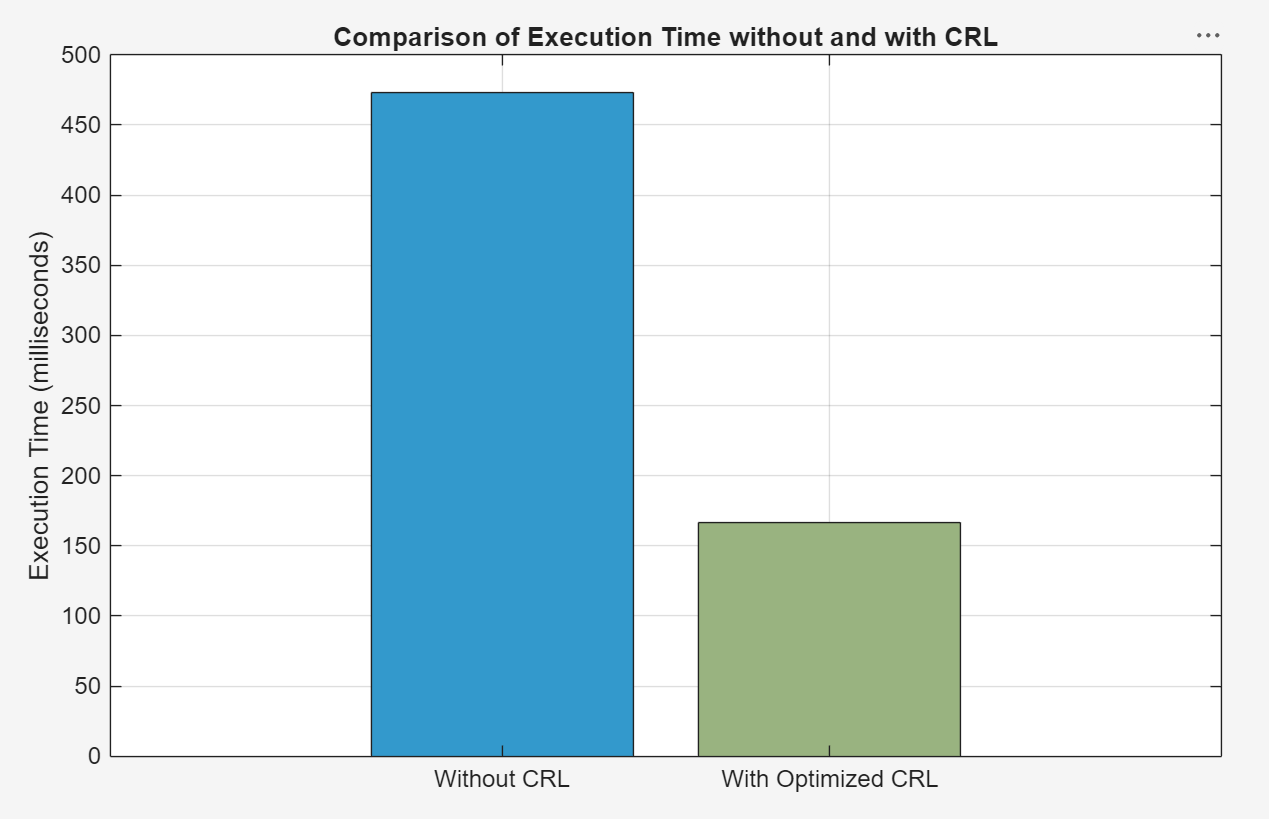
Utilizing the CRL leads to a substantial improvement in generated code performance, achieving around 2.8x increase compared to scenarios where the CRL is not employed.
Close Model
To close the top-level model, run this command.
bdclose('all')References
[1] Warden, Pete. "Speech Commands: A Public Dataset for Single-Word Speech Recognition", 2017. Available from https://storage.googleapis.com/download.tensorflow.org/data/speech_commands_v0.01.tar.gz. Copyright Google 2017. The Speech Commands Dataset is licensed under the Creative Commons Attribution 4.0 license, available here: https://creativecommons.org/licenses/by/4.0/legalcode.
Supporting Functions
Augment Data Set with Background Noise
function augmentDataset(datasetloc)
adsBkg = audioDatastore(fullfile(datasetloc,"background"));
fs = 16e3; % Known sample rate of the data set
segmentDuration = 1;
segmentSamples = round(segmentDuration*fs);

volumeRange = log10([1e-4,1]);

numBkgSegments = 4000;
numBkgFiles = numel(adsBkg.Files);
numSegmentsPerFile = floor(numBkgSegments/numBkgFiles);

fpTrain = fullfile(datasetloc,"train","background");
fpValidation = fullfile(datasetloc,"validation","background");

if ~datasetExists(fpTrain)

    % Create directories.
    mkdir(fpTrain)
    mkdir(fpValidation)

    for backgroundFileIndex = 1:numel(adsBkg.Files)
        [bkgFile,fileInfo] = read(adsBkg);
        [~,fn] = fileparts(fileInfo.FileName);

        % Determine starting index of each segment.
        segmentStart = randi(size(bkgFile,1)-segmentSamples,numSegmentsPerFile,1);

        % Determine gain of each clip.
        gain = 10.^((volumeRange(2)-volumeRange(1))*rand(numSegmentsPerFile,1) + volumeRange(1));

        for segmentIdx = 1:numSegmentsPerFile

            % Isolate the randomly chosen segment of data.
            bkgSegment = bkgFile(segmentStart(segmentIdx):segmentStart(segmentIdx)+segmentSamples-1);

            % Scale the segment by the specified gain.
            bkgSegment = bkgSegment*gain(segmentIdx);

            % Clip the audio between -1 and 1.
            bkgSegment = max(min(bkgSegment,1),-1);

            % Create a filename.
            afn = fn + "_segment" + segmentIdx + ".wav";

            % Randomly assign background segment to either the training or
            % validation set.
            if rand > 0.85 % Assign 15% to the validation data set.
                dirToWriteTo = fpValidation;
            else % Assign 85% to the training data set.
                dirToWriteTo = fpTrain;
            end

            % Write the audio to the file location.
            ffn = fullfile(dirToWriteTo,afn);
            audiowrite(ffn,bkgSegment,fs)

        end

        % Print progress.
        fprintf('Progress = %d (%%)\n',round(100*progress(adsBkg)))

    end
end
end
Create Training and Validation Datastores
function [adsTrain, adsValidation] = createDatastores(dataset,commands)

% Create training datastore
ads = audioDatastore(fullfile(dataset,"train"), ...
    IncludeSubfolders=true, ...
    FileExtensions=".wav", ...
    LabelSource="foldernames");

background = categorical("background");

isCommand = ismember(ads.Labels,commands);
isBackground = ismember(ads.Labels,background);
isUnknown = ~(isCommand|isBackground);

includeFraction = 0.2; % Fraction of unknowns to include
idx = find(isUnknown);
idx = idx(randperm(numel(idx),round((1-includeFraction)*sum(isUnknown))));
isUnknown(idx) = false;

ads.Labels(isUnknown) = categorical("unknown");

adsTrain = subset(ads,isCommand|isUnknown|isBackground);
adsTrain.Labels = removecats(adsTrain.Labels);

% Create validation datastore
ads = audioDatastore(fullfile(dataset,"validation"), ...
    IncludeSubfolders=true, ...
    FileExtensions=".wav", ...
    LabelSource="foldernames");

isCommand = ismember(ads.Labels,commands);
isBackground = ismember(ads.Labels,background);
isUnknown = ~(isCommand|isBackground);

includeFraction = 0.2; % Fraction of unknowns to include
idx = find(isUnknown);
idx = idx(randperm(numel(idx),round((1-includeFraction)*sum(isUnknown))));
isUnknown(idx) = false;

ads.Labels(isUnknown) = categorical("unknown");

adsValidation = subset(ads,isCommand|isUnknown|isBackground);
adsValidation.Labels = removecats(adsValidation.Labels);
end
Extract Features
function [XTrain, XValidation, TTrain, TValidation] = extractFeatures(adsTrain, adsValidation)

fs = 16e3; % Known sample rate of the data set

segmentDuration = 1;
frameDuration = 0.025;
hopDuration = 0.010;

FFTLength = 512;
numBands = 50;

segmentSamples = round(segmentDuration*fs);
frameSamples = round(frameDuration*fs);
hopSamples = round(hopDuration*fs);
overlapSamples = frameSamples - hopSamples;

% Create an audioFeatureExtractor object to perform the feature extraction.
afe = audioFeatureExtractor( ...
    SampleRate=fs, ...
    FFTLength=FFTLength, ...
    Window=hann(frameSamples,"periodic"), ...
    OverlapLength=overlapSamples, ...
    barkSpectrum=true);
setExtractorParameters(afe,"barkSpectrum",NumBands=numBands,WindowNormalization=false);

% Pad the audio to a consistent length, extract the features, and then apply a logarithm.
transform1 = transform(adsTrain,@(x)[zeros(floor((segmentSamples-size(x,1))/2),1);x;zeros(ceil((segmentSamples-size(x,1))/2),1)]);
transform2 = transform(transform1,@(x)extract(afe,x));
transform3 = transform(transform2,@(x){log10(x+1e-6)});

% Read all data from the datastore. The output is a numFiles-by-1 cell array. Each element corresponds to the auditory spectrogram extracted from a file.
XTrain = readall(transform3);

numFiles = numel(XTrain);
numFiles = 28463;
[numHops,numBands,numChannels] = size(XTrain{1});
numHops = 98;
numBands = 50;
numChannels = 1;

% Convert the cell array to a 4-dimensional array with auditory spectrograms along the fourth dimension.
XTrain = cat(4,XTrain{:});
[numHops,numBands,numChannels,numFiles] = size(XTrain);
numHops = 98;
numBands = 50;
numChannels = 1;
numFiles = 28463;

% Perform the feature extraction steps described above on the validation set.
transform1 = transform(adsValidation,@(x)[zeros(floor((segmentSamples-size(x,1))/2),1);x;zeros(ceil((segmentSamples-size(x,1))/2),1)]);
transform2 = transform(transform1,@(x)extract(afe,x));
transform3 = transform(transform2,@(x){log10(x+1e-6)});
XValidation = readall(transform3);
XValidation = cat(4,XValidation{:});

TTrain = adsTrain.Labels;
TValidation = adsValidation.Labels;

end
Create Calibration Data Set
Create a calibration data set containing n elements from each label given training data.
function XCalibration = createCalibrationSet(XTrain, TTrain, n, labels)

XCalibration = [];

for i=1:numel(labels)
    % Find logical index of label in the training set.
    idx = (TTrain == labels(i));

    % Create subset data corresponding to logical indices.
    label_subset = XTrain(:,:,:,idx);

    % Select the first n samples of the current label.
    first_n_labels = label_subset(:,:,:,1:n);

    % Concatenate the selected samples to the calibration set.
    XCalibration = cat(4, XCalibration, first_n_labels);
end
end
Calculate Network Accuracy
Calculate the final accuracy of the network on the training and validation sets using minibatchpredict. Then use confusionchart to plot the confusion matrix.
function [trainAccuracy, validationAccuracy] = networkAccuracy(net,XTrain,TTrain,XValidation,TValidation,classes,commands,chartTitle)
scores = minibatchpredict(net,XValidation);
YValidation = scores2label(scores,classes);
validationAccuracy = mean(YValidation == TValidation);
scores = minibatchpredict(net,XTrain);
YTrain = scores2label(scores,classes);
trainAccuracy = mean(YTrain == TTrain);

disp(["Training Accuracy: " + trainAccuracy*100 + "%";"Validation Accuracy: " + validationAccuracy*100 + "%"])

% Plot the confusion matrix for the validation set. Display the precision and recall for each class by using column and row summaries.
figure(Units="normalized",Position=[0.4,0.4,0.7,0.7]);
cm = confusionchart(TValidation,YValidation, ...
    Title= chartTitle, ...
    ColumnSummary="column-normalized",RowSummary="row-normalized");
sortClasses(cm,[commands,"unknown","background"])
end

