bitget
Get bits at certain positions
Syntax
Description
Examples
Consider the following unsigned fixed-point fi number with a value of 85, word length 8, and fraction length 0:
a = fi(85,0,8,0); disp(bin(a))
01010101
Get the binary representation of the bit at position 4:
c = bitget(a,4);
bitget returns the bit at position 4 in the binary representation of a.
Begin with a signed fixed-point 3-by-3 matrix with word length 4 and fraction length 0.
a = fi([2 3 4;6 8 2;3 5 1],0,4,0); disp(bin(a))
0010 0011 0100 0110 1000 0010 0011 0101 0001
Get the binary representation of the bits at a specified position.
c = bitget(a,fi(2))
c =
1 1 0
1 0 1
1 0 0
DataTypeMode: Fixed-point: binary point scaling
Signedness: Unsigned
WordLength: 1
FractionLength: 0
MATLAB® returns a matrix of the bits in position fi(2) of a. The output matrix has the same dimensions as a, and a word length of 1.
Begin with a signed fixed-point vector with word length 16, fraction length 4.
a = fi([86 6 53 8 1],0,16,4); disp(bin(a))
0000010101100000 0000000001100000 0000001101010000 0000000010000000 0000000000010000
Create a vector that specifies the positions of the bits to get.
bit = [1,2,5,7,4]
bit = 1×5
1 2 5 7 4
Get the binary representation of the bits of a at the positions specified in bit.
c = bitget(a,bit)
c =
0 0 1 0 0
DataTypeMode: Fixed-point: binary point scaling
Signedness: Unsigned
WordLength: 1
FractionLength: 0
bitget returns a vector of the bits of a at the positions specified in bit. The output vector has the same length as inputs, a and bit, and a word length of 1.
Create a default fi object with a value of pi.
a = fi(pi); disp(bin(a))
0110010010001000
The default object is signed with a word length of 16.
Create a vector of the positions of the bits you want to get in a, and get the binary representation of those bits.
bit = fi([15,3,8,2]); c = bitget(a,bit)
c =
1 0 1 0
DataTypeMode: Fixed-point: binary point scaling
Signedness: Unsigned
WordLength: 1
FractionLength: 0
MATLAB® returns a vector of the bits in a at the positions specified by the index vector, bit.
Input Arguments
Input array, specified as a scalar, vector, matrix, or multidimensional
array of fixed-point fi objects. If a
and bit are both nonscalar, they must have the same
dimension. If a has a signed
numerictype, the bit representation of the stored
integer is in two's complement representation.
Data Types: fixed-point
fi
Bit index, specified as a scalar, vector, matrix or multidimensional array
of fi objects or built-in data types. If
a and bit are both nonscalar, they
must have the same dimension. bit must contain integer
values between 1 and the word length of
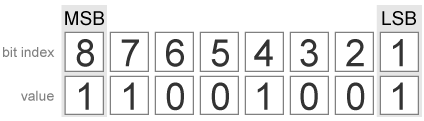
a, inclusive. The LSB (right-most
bit) is specified by bit index 1 and the
MSB (left-most bit) is specified by the word length
of a. bit does not need to be a vector
of sequential bit positions; it can also be a variable index value.
a = fi(pi,0,8); a.bin
11001001

Data Types: fi |
single | double |
int8 | int16 |
int32 | int64 |
uint8 | uint16 |
uint32 | uint64
Output Arguments
Output array, specified as an unsigned scalar, vector, matrix, or
multidimensional array with WordLength 1.
If a is an array and bit is a
scalar, c is an unsigned array with word length 1. This
unsigned array comprises the values of the bits at position
bit in each fixed-point element in
a.
If a is a scalar and bit is an
array, c is an unsigned array with word length 1. This
unsigned array comprises the values of the bits in a at
the positions specified in bit.
Extended Capabilities
C/C++ Code Generation
Generate C and C++ code using MATLAB® Coder™.
For VHDL®, generates the slice operator: a(idx).
For Verilog®, generates the slice operator: a[idx].
Version History
Introduced before R2006a
MATLAB Command
You clicked a link that corresponds to this MATLAB command:
Run the command by entering it in the MATLAB Command Window. Web browsers do not support MATLAB commands.
选择网站
选择网站以获取翻译的可用内容,以及查看当地活动和优惠。根据您的位置,我们建议您选择:。
您也可以从以下列表中选择网站:
如何获得最佳网站性能
选择中国网站(中文或英文)以获得最佳网站性能。其他 MathWorks 国家/地区网站并未针对您所在位置的访问进行优化。
美洲
- América Latina (Español)
- Canada (English)
- United States (English)
欧洲
- Belgium (English)
- Denmark (English)
- Deutschland (Deutsch)
- España (Español)
- Finland (English)
- France (Français)
- Ireland (English)
- Italia (Italiano)
- Luxembourg (English)
- Netherlands (English)
- Norway (English)
- Österreich (Deutsch)
- Portugal (English)
- Sweden (English)
- Switzerland
- United Kingdom (English)