Resolve Unexpected Values from Data Type Conversion
R2026bWhen you represent numbers with finite precision, not every number can be represented exactly. Quantization must occur to use fixed-point data types in Simulink® which can sometimes yield unexpected values. You can use strategies to improve the numerical accuracy of fixed-point calculations. For a more detailed explanation of how quantization occurs, see Understand Unexpected Results from Data Type Conversion.
Issue
Even if you use data types that can accurately represent values in the simulation
range, your model might produce an unexpected result due to quantization. For
example, this model shows the value 0.5 converted from
sfix16_Sp1 to sfix16_En7. The new data
type should be able to represent the value 0.5, but the value is
quantized to 0.4921875.
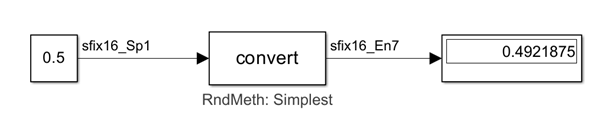
In some cases, you might expect that the fixed-point data types used in your model
cannot represent all the values in the range exactly, but the result you see is
still further from the ideal value than you expect. For example, this model shows
the value 9.81 converted from sfix16_Sp00125
to sfix32_En15.
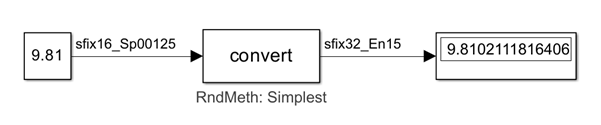
This number line shows stored integers and corresponding values that can be used
to approximate 9.81 using the sfix32_En15 data
type. The value shown in the shaded area of the number line is the real-world value
calculated in this data type conversion operation, which is several stored integers
away from the most accurate available value.

Possible Solutions
Adjust Rounding Method
Changing the Rounding Method value of the Data
Type Conversion block to Nearest,
Round, or Convergent
can produce more accurate results. In the case of the first example model, using
Nearest rounding produces the expected value
0.5.
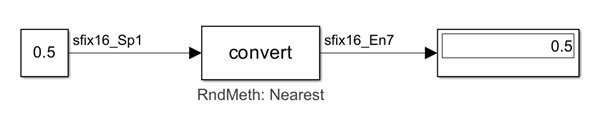
Adjusting the rounding method does not work in every case, though. In the
second example, no change occurs from using Nearest
rounding.
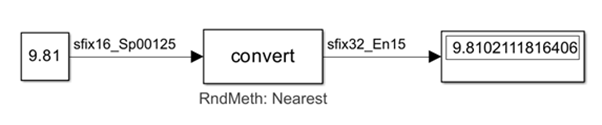
Additionally, if you are generating code, enforcing a rounding method rather
than leaving it set to Simplest can be less efficient, as it
results in additional generated code.
Use Division for Net Slope Computation
The model parameter Use division for fixed-point net slope computation can improve accuracy because it uses
a rational approximation for the net scaling. The resulting integer division,
multiplication, and addition avoid rounding, which can reduce quantization
error. Setting this parameter to 'On'improves the
accuracy for both example models.
In the first example, the result of data type conversion is now the expected
value 0.5

In the second example model, enabling the parameter now produces the expected value when converting between fixed-point types.

The resulting real-world value and stored integer are shown in the shaded area
on the number line. The data type conversion now uses a stored integer that is
as close as possible to the ideal value for the data type
sfix32_En15.

The example models in this topic explore issues related specifically to Data Type Conversion blocks. However, similar principles apply when data types change between other Simulink blocks, such as Gain and Product. You should start troubleshooting unexpected values from fixed-point data types by adjusting rounding methods and exploring settings that can reduce rounding errors.
See Also
Rounding Modes | Use division for fixed-point net slope computation

