Optimize Wi-Fi Network
R2026bThis example shows how to place access points (APs) in a region so that each wireless station (STA) in the Wi-Fi network receives its required throughput. The locations of the STAs are fixed. The problem is to find a set of locations for the APs so the throughput requirement is met. To formulate this problem, use the Problem-Based Optimization Workflow to define the problem of minimizing the required number of APs, and use WLAN Toolbox™ functions to calculate the throughputs of the STAs. Then use the surrogateopt function (Global Optimization Toolbox) to solve the resulting problem.
Wireless System
Assume the following for the network configuration:
Each AP operates on a dedicated 20 MHz channel in the 5 GHz band, and each STA uses the same channel as its closest associated AP (in Euclidean distance).
Each WLAN node uses a fixed MCS of 9, a single spatial stream, and a transmission power of 10 dBm. According to the IEEE® 802.11ax™ specification, a node can deliver a maximum physical layer (PHY) data rate of 97.5 Mbps under these conditions.
Each AP generates continuous, downlink, full-buffer application traffic.
The example models a random TGax fading channel between nodes using the
hSLSTGaxMultiFrequencySystemChannelhelper function.
To simulate the network, use the simulateWLANNetwork helper function, located at the end of this example. This function uses the System-Level Simulation (WLAN Toolbox) capabilities of WLAN Toolbox. For more information, refer to the example Get Started with WLAN System-Level Simulation in MATLAB (WLAN Toolbox). For this example, simulate 1 second in the throughput calculation.
simulationTime = 1;
Wireless Station Locations
The problem has 16 STAs at pseudorandom locations in a 40-by-40 meter square. Assume that the z-coordinate of each STAs is 3.
rngSeed = 1;
rng(rngSeed,"combRecursive") % For reproducibility
numSTAs = 16;
staPositions = [randi([0,40],numSTAs,2) 3*ones(numSTAs,1)]; % 16 random 2-D integer points from 0 to 40, z = 3
Optimization Variables
Assume that the system can have up to 7 APs. Each AP has integer x- and y-coordinates from 0 through 40 and a z-coordinate of 3. Create optimization variables representing the x- and y-coordinates of each AP.
maxNumAPs = 7;
apXPosition = optimvar("apXPosition",maxNumAPs,LowerBound=0,UpperBound=40,Type="integer");
apYPosition = optimvar("apYPosition",maxNumAPs,LowerBound=0,UpperBound=40,Type="integer");
apPositions = [apXPosition apYPosition 3*ones(maxNumAPs,1)]; % z-coordinate is fixed at 3
Create a logical optimization variable vector that indicates which APs are available to use. When apEnable(i) = 1, AP(i) is available to use, and when apEnable(i) = 0, AP(i) is not available to use.
apEnable = optimvar("apEnable",maxNumAPs,LowerBound=0,UpperBound=1,Type="integer");
Create Optimization Problem
The objective function to minimize is the number of enabled APs.
problem = optimproblem(Objective=sum(apEnable));
The main constraint is that the throughput for each STA must be at least 20 Mbps. To formulate this constraint, convert the throughput calculation into an optimization expression using the fcn2optimexpr function, which converts a function handle to an optimization expression. For improved efficiency in this calculation, set the ReuseEvaluation name-value argument to true. Indicate that the calculation is a simulation, not an analytic function, by setting the Analysis name-value argument to "off". Save time by specifying the OutputSize argument; if you do not specify this argument, the software must run a trial to determine the output sizes of the function.
[staThroughput,numSTAsPerAP] = fcn2optimexpr(@simulateWLANNetwork,...
    apEnable,apPositions,staPositions,simulationTime,rngSeed,...
    ReuseEvaluation=true,Analysis="off",OutputSize={[1 numSTAs],[maxNumAPs 1]});
The throughput calculation is now an optimization expression. Incorporate the throughput constraint into problem.
problem.Constraints.LowerLimitofSTAThroughput = (staThroughput >= 20);
Include a constraint that at least one AP must be enabled, and a constraint that each enabled AP must serve at least one STA.
problem.Constraints.MustHaveOneAP = (sum(apEnable) >= 1);
problem.Constraints.NumSTAsPerAP = (numSTAsPerAP >= apEnable);
Solve Optimization Problem
This problem has integer variables and a nonlinear objective function. Two optimization solvers apply to this problem: surrogateopt and ga. The problem has a relatively time-consuming objective and constraint, so surrogateopt is likely the best choice of solver. To save time, set options to use parallel computing. To increase the chances of finding a good solution, specify a number of initial sample points that is larger than the default.
opts = optimoptions("surrogateopt", ...
    MaxFunctionEvaluations=500, ... % Maximum evaluations of the objective before stopping
    MinSurrogatePoints=40, ... % Minimum number of initial sample points
    UseParallel=true); % Parallel evaluations
To help the solver, specify an initial feasible design with all APs enabled and spread out evenly around the square.
x0 = struct(apEnable=ones(maxNumAPs,1),...
    apXPosition=[0;12;28;40;28;12;20],...
    apYPosition=[20;0;0;20;40;40;20]);
Call the surrogateopt solver and time the solution process.
tic
[sol,fval] = solve(problem,x0,Solver="surrogateopt",Options=opts)
Solving problem using surrogateopt.
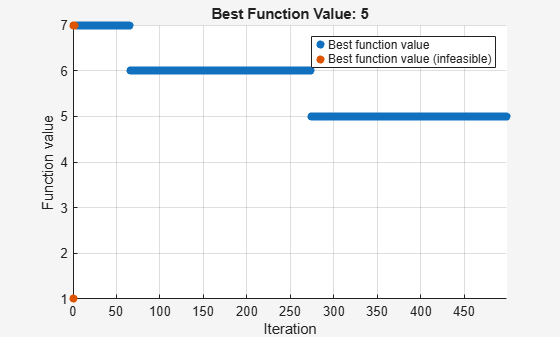
surrogateopt stopped because it exceeded the function evaluation limit set by
'options.MaxFunctionEvaluations'.
sol = struct with fields:
       apEnable: [7×1 double]
    apXPosition: [7×1 double]
    apYPosition: [7×1 double]
fval =
5
toc
Elapsed time is 12875.599167 seconds.
The optimized configuration has five enabled APs, two fewer than the initial seven. Display the enabled APs.
sol.apEnable
ans = 7×1

    0
    1
    0
    1
    1
    1
    1
View the optimized positions of the APs, plotted along with the STAs.
xpos = sol.apXPosition(logical(sol.apEnable))
xpos = 5×1

     5
     7
    38
     2
    26
ypos = sol.apYPosition(logical(sol.apEnable))
ypos = 5×1

    28
    22
    36
    38
     0
plot(xpos,ypos,"o",staPositions(:,1),staPositions(:,2),"*")
legend("AP","STA",Location="best")
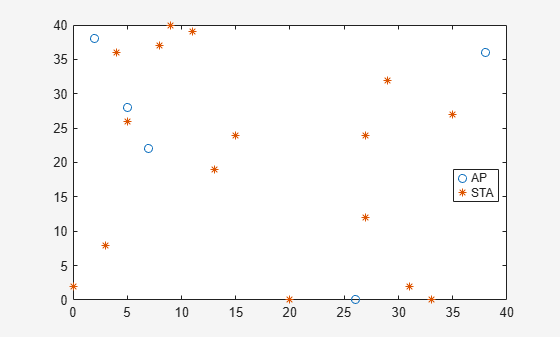
In summary, surrogateopt was successful in lowering the number of APs (shown as o) required to serve the STAs (shown as *).
Helper Functions
This code creates the simulateWLANNetwork helper function.
function [stationThroughput,numSTAsPerAP] = simulateWLANNetwork(enableAP,apPositions,staPositions,simulationTime,rngSeed)
%simulateWLANNetwork Simulate Wi-Fi network
%
%   [stationThroughput,numSTAsPerAP] = simulateWLANNetwork(enableAP,
%   apPositions,staPositions,simulationTime,rngSeed) simulates the Wi-Fi
%   network with the specified layout of APs and STAs.
%
%   stationThroughput is a vector representing the throughput values in
%   Mbps.
%
%   numSTAsPerAP is a vector representing the number of STAs served by each AP.
%
%   enableAP is specified as an M-by-1 array of logical values, where 0
%   indicates that the AP is disabled and 1 indicates that the AP is
%   enabled. This variable is an optimization variable in the example.
%
%   apPositions is specified as an M-by-3 array of integers, where M
%   indicates the maximum number of APs and 3 indicates the number of
%   dimensions (x-, y-, and z-coordinates). This variable is an optimization
%   variable in the example.
%
%   staPositions is specified as an N-by-3 array of integers, where N
%   indicates the number of STAs and 3 indicates the number of dimensions
%   (x-, y-, and z-coordinates). This variable is a fixed variable in the example.
%
%   simulationTime is the duration of the simulation in seconds.
%
%   rngSeed is the seed used for the random number generator.

numAPs = size(apPositions,1);
numSTAs = size(staPositions,1);
numSTAsPerAP = zeros(numAPs,1); % Number of STAs associated with each AP
stationThroughput = zeros(1,numSTAs);

% Return if no APs are enabled
if sum(enableAP) == 0
    return
end

% Simulation configuration
rng(rngSeed,"combRecursive");
mcsIndex = 9;
txPower = 10;

% For each AP, assign a 20 MHz channel in the 5 GHz band.
channels = [36 40 44 48 52 56 60 64 100 104 108 112 116 120 124 128 132 136 140 144 149 153 157 161 165 169 173 177];
numChannels = numel(channels);
if numAPs <= numChannels
    apOperatingChannels = [5*ones(numAPs,1) channels(1:numAPs)'];
else % When the number of APs exceeds the number of available channels, reuse channels.
    numLoops = floor(numAPs/numChannels);
    for idx=1:numLoops
        apOperatingChannels(1+numChannels*(idx-1):idx*numChannels,:) = [5*ones(numChannels,1) channels(1:numChannels)'];
    end
    numExtraAPs = mod(numAPs,numChannels);
    if numExtraAPs > 0
        apOperatingChannels(1+numChannels*numLoops:numExtraAPs+numChannels*numLoops,:) = [5*ones(numExtraAPs,1) channels(1:numExtraAPs)'];
    end
end

% Initialize the wireless network simulator.
networkSimulator = wirelessNetworkSimulator.init;

% Configure the APs.
for idx = 1:numAPs
    accessPointCfg = wlanDeviceConfig(Mode="AP",MCS=mcsIndex,...
        TransmitPower=txPower,BandAndChannel=apOperatingChannels(idx,:)); % AP device configuration
    accessPoint(idx) = wlanNode(Name="AP" + idx,Position=apPositions(idx,:),...
        DeviceConfig=accessPointCfg);
end

% Configure the STAs.
for staId = 1:numSTAs
    % Find the nearest enabled AP and associate with that AP
    enabledAPIndices = find(enableAP);
    apID = findNearestAP(apPositions,staPositions(staId,:),enabledAPIndices);

    % Create the STA.
    stationCfg = wlanDeviceConfig(Mode="STA",MCS=mcsIndex,...
        TransmitPower=txPower,BandAndChannel=apOperatingChannels(apID,:)); % STA device configuration
    station(staId) = wlanNode(Name="STA" + staId,Position=staPositions(staId,:),...
        DeviceConfig=stationCfg);

    % Associate the station with the selected AP.
    associateStations(accessPoint(apID),station(staId),FullBufferTraffic="DL");
    numSTAsPerAP(apID) = numSTAsPerAP(apID) + 1;
end

% Set of WLAN nodes
nodes = [accessPoint station];

% Add the channel model.
% hSLSTGaxMultiFrequencySystemChannel.m is a supporting file when you run this example.
channel = hSLSTGaxMultiFrequencySystemChannel(nodes);
addChannelModel(networkSimulator,channelFunction(channel))

% Add nodes to the simulator and run the simulation.
addNodes(networkSimulator,nodes);
run(networkSimulator,simulationTime);

% Get statistics.
stats = statistics(nodes);

% Calculate the MAC layer throughput (in Mbps) at the STAs. Use the
% 'ReceivedPayloadBytes' statistic, which counts the total number of MSDU
% (MAC service data unit) bytes sent to an STA and received at the MAC layer.
% bytes of payload
for idx = 1:numSTAs
    stationThroughput(idx) = (stats(idx+numAPs).MAC.ReceivedPayloadBytes*8)/(simulationTime*1e6);
end
end
This code creates the findNearestAP helper function, which is included in the preceding helper function.
function nearestAPIndex = findNearestAP(apPositions,stationPosition,enabledAPIndices)
% findNearestAP Returns the index of the nearest enabled AP for each
% specified STA position.
%
%   nearestAPIndex = findNearestAP(apPositions,stationPosition,
%   enabledAPIndices) takes a list of AP positions and finds the position
%   that is nearest to the specified station position.
%
%   nearestAPIndex is the index of the AP in the specified apPositions vector
%   that is nearest to the stationPosition.
%
%   apPositions is a matrix of size M-by-3 representing a list of AP
%   positions, where M is the number of points and 3 is the number of
%   dimensions (x-, y-, and z- coordinates).
%
%   stationPosition is a vector of size 1-by-3 representing a specific
%   station position, where 3 is the number of dimensions (x-, y-, and
%   z- coordinates).
%
%   enabledAPIndices specifies the indices of the APs in apPositions that are
%   enabled for use.

% Initialize the variables.
minDistance = Inf;
nearestAPIndex = -1;

% Find the nearest enabled AP.
for apID = enabledAPIndices'
    % Calculate the distance for each reference point.
    distance = norm(apPositions(apID, :) - stationPosition);
    if distance < minDistance
        minDistance = distance;
        nearestAPIndex = apID;
    end
end
end
See Also
Topics
- Optimize Wi-Fi Networks Using MATLAB (WLAN Toolbox)

