AXI 主设备
R2026b从 MATLAB® 或 Simulink® 访问 FPGA 板上的 AXI 从设备内存
注意
MATLAB AXI 主已重命名为 AXI 主设备。在软件和文档中,术语“管理器”和“从属设备”分别被“主设备”和“从设备”取代。
通过使用 FPGA 设计中的 AXI 主设备 IP,从 MATLAB 或 Simulink 访问板载内存位置。此 IP 连接到板上的从设备内存位置。此 IP 还通过 JTAG、PCI Express® 或 PL 以太网接口响应来自 MATLAB 或 Simulink 的读取和写入命令。
对象
aximanager | Read and write memory locations on FPGA board from MATLAB |
intelsoc | Connection to processor on Altera SoC board to perform basic Linux shell operations or program the board (自 R2022a 起) |
函数
setupAXIManagerForQuartus | Add AXI manager IP path to Quartus project |
readmemory | Read data out of AXI4 memory-mapped subordinates |
writememory | Write data to AXI4 memory-mapped subordinates |
release | Release JTAG or Ethernet cable resource |
copyImageToHostSDCardPath | Copy board-specific SD card image files to host SD card location |
programFPGA | Program FPGA and set corresponding device tree from processor on SoC board (自 R2022a 起) |
模块
 | AXI Manager Read | Read memory locations on FPGA board from Simulink |
 | AXI Manager Write | Write memory locations on FPGA board from Simulink |
主题
概述
- Set Up AXI Manager
High-level steps for accessing memory-mapped locations on an FPGA board from MATLAB or Simulink.
AXI 主设备需求和准备
- Set Up FPGA Design Software Tools
Set the MATLAB path to AMD®, Microchip, and Intel® software. - Configure Logic Analyzer
Adjust settings in the Logic Analyzer.
AXI 主设备过程
- JTAG AXI Manager
Integrate and configure JTAG AXI manager. - Ethernet AXI Manager
Integrate and configure Ethernet AXI manager for Intel devices. - PCI Express AXI Manager
Integrate and configure AXI manager IP over PCI Express. - Use Simulink to Access FPGA Locations
Access memory-mapped locations on an FPGA board from Simulink. - AXI Manager Simulation
Simulate AXI manager using the Vivado® simulator.
精选示例
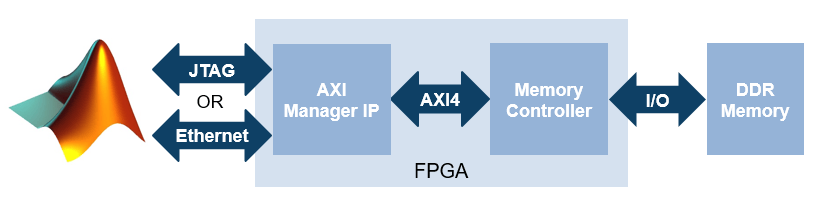
Access FPGA External Memory Using AXI Manager
Use AXI manager to access external DDR memories connected to an FPGA.
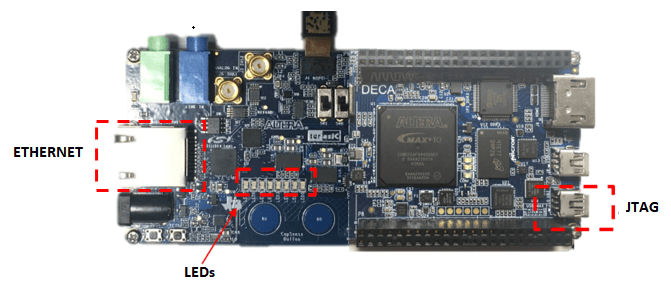
IP Core Generation Workflow with Ethernet-Based AXI Manager
Use Ethernet AXI manager IP to access HDL Coder™ product generated registers.

