Replace MATLAB Functions with Custom Code for HLS Code Generation
R2026bA Code Replacement Library (CRL) maps MATLAB® functions to custom C/C++ implementations. During HLS code generation, the code generator replaces calls to the specified MATLAB functions with the corresponding library implementations. Use a CRL when you want to target hardware-optimized libraries or replace generic MATLAB functions with custom implementations that are more efficient for your target platform.
To create and use a CRL:
Define a replacement table entry in the Code Replacement Tool.
Register the library.
Generate HLS code using HDL Coder.
This example uses the mmultiply function defined in
matrixMultiply.m as the MATLAB function that you want to replace. The mmultiply function
multiplies two matrices of type double and returns a matrix of type double. The source file
externalMatrixMultiply.cpp and the header file
externalMatrixMultiply.hpp define the replacement function
myMatrixMultiply. This function performs the same matrix multiplication
but returns void and passes both input and output arguments by pointer.
You need an Embedded Coder® license to use the Code Replacement Tool.
Interactively Develop a Code Replacement Library
Open the Code Replacement Tool (Embedded Coder) by using the
crtoolfunction in the MATLAB command line:crtool
Create a function replacement table. From the toolstrip of the Code Replacement Tool, click New > Table.
To create a new table entry, click New > Entry > Function Entry.
Create parameters for the new entry. From the Function drop-down list, select
Custom. Function information appears in the Code Replacement Tool, in the Function name box, entermmultiply.Create the conceptual representation. The conceptual representation describes the signature of the function that you want to replace. In the Conceptual function subsection of the Code Replacement Tool, add the return argument
y1, and the input argumentsu1andu2. For each argument, set Data Type todouble, and Argument Type toMatrix.Create the implementation representation. The implementation representation describes the signature of the replacement function. For this example, to specify that the implementation arguments have the same order and properties as the conceptual arguments, add the arguments
u1,u2, andy1.In the Replacement function section, specify Name as
myMatrixMultiply. Select the Function returns void check box. Select the Pointer check box for each argument.Specify build information. Click the Build Information tab to open the build requirements pane. Specify the files (source, header, object) that the code generator requires for code replacement. For this example, specify the header file
externalMatrixMultiply.hppand the source fileexternalMatrixMultiply.cppin the build information tab.Validate and save the table. Click the Mapping Information tab and verify that the fields are filled in correctly. Click Apply, then click Validate entry. On the toolstrip, click Save and save the table as
MatrixMultiplyTable.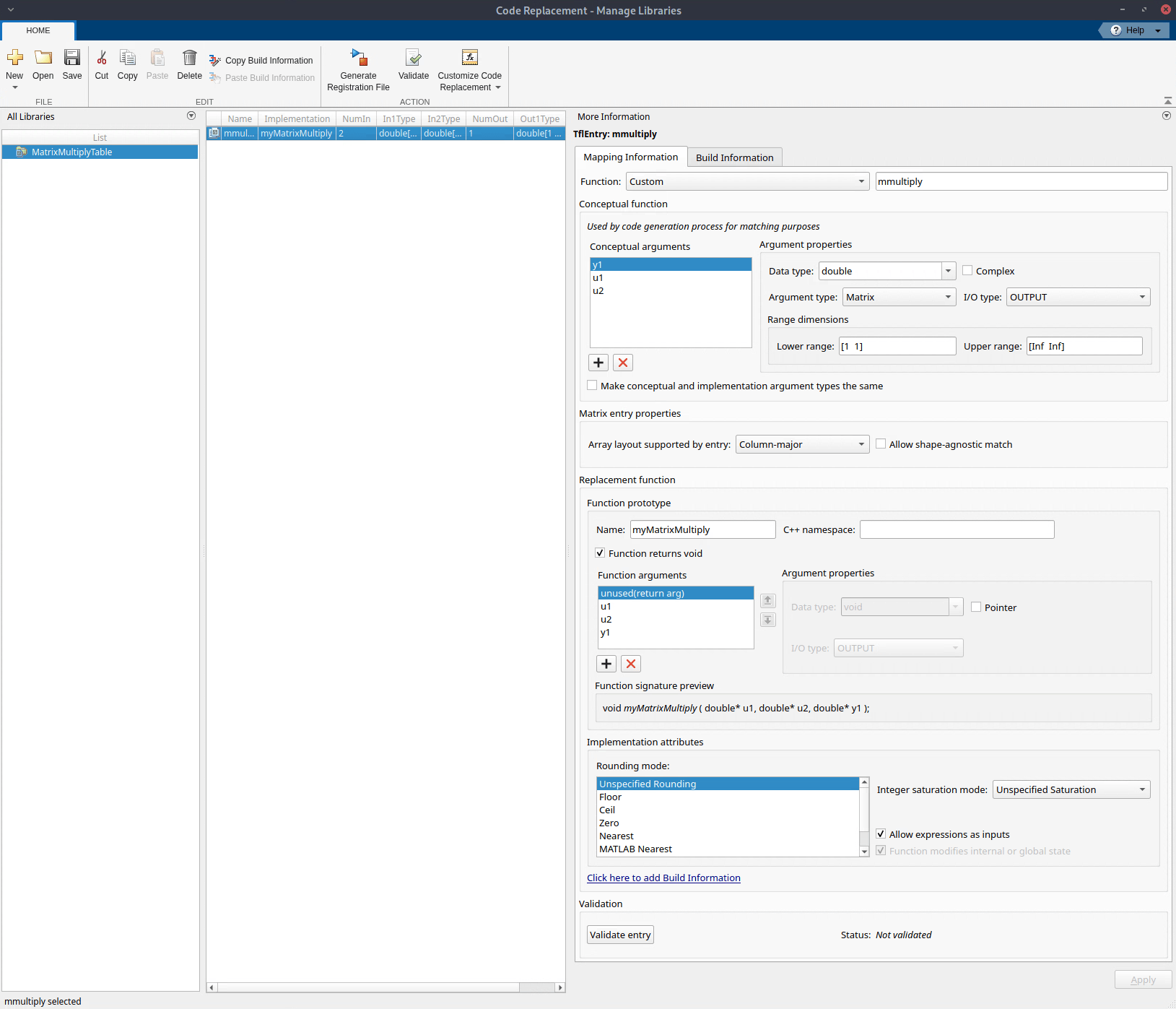
Register a library composed of the tables that you specify. Click Generate Registration File. In the Generate Registration File dialog box, fill in these fields:
Registry name —
CRL for Matrix
                    Multiply
Table list —
MatrixMultiplyTableBase CRL —
NoneTarget HW device —
*Description —
Example code
                    replacement library
Click OK to create the registration file in the current working directory.
Open the
rtwTargetInfo.mfile and add this code at the end of the file to ensure the library appears for HLS code generation:this(1).IsHLSOnly = true;
To use your CRL, refresh this MATLAB session with this command:
RTW.TargetRegistry.getInstance("reset");To verify the CRL, open the library by using the Code Replacement Viewer (Embedded Coder) and verify that the table and entry are correctly specified. For more information, see Verify Code Replacement Library (Embedded Coder).
To use the CRL during HLS code generation, specify the name of the CRL in the Code Replacement Library option in the HLS Code Generation > Advanced tab of the HDL Workflow Advisor, or in the
CodeReplacementLibraryproperty of thecoder.HlsConfigobject. Generate code and verify that replacement occurs as expected. If unexpected behavior occurs, examine the hit and miss logs to troubleshoot the issues.
Generate HLS Code by Using Custom Code Replacement Library
This example shows how to use the CRL created in the previous section to generate HLS code for matrixMultiply.m.
Open the HDL Workflow Advisor by running this command:
coder -hdlcoder -new matrixMultiply
In the HDL Workflow Advisor task:
Set Code Generation Workflow to
MATLAB to HLS.Set Fixed-Point Conversion to
Keep original types.
In the Define Input Types task, add the design and test bench files:
For MATLAB Function, click Browse and select
matrixMultiply.m.For MATLAB Test Bench, click the + button and select
matrixMultiply_tb.m.
In the HLS Code Generation task, on the Advanced tab:
Set Code Replacement Library to
CRL for Matrix Multiply.
To generate HLS code, right-click the HLS Code Generation task and select Run to selected task.
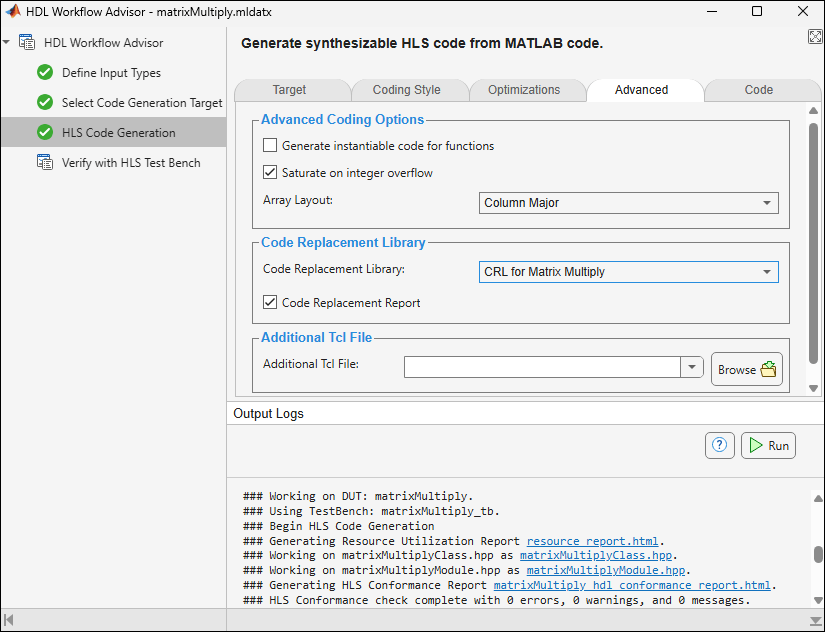
To view the generated HLS code, click matrixMultiplyClass.hpp in the Output pane. Verify that the generated code calls myMatrixMultiply instead of mmultiply.
See Also
Workflow Advisor | coder.replace (Embedded Coder) | codegen | coder.HlsConfig

