Configure a Hydraulic Lift Model for Real-Time Simulation
R2026bThis example shows how to configure a model for real-time simulation. To simulate in real-time, you must convert the model into a fixed-step model. In this example, you choose a step size, convert the model, examine the results, and test and adjust the model robustness.
Open The Model
Open the ConfigureHydraulicLiftForRealTime model, which is a simple model of a hydraulic lift. The most important part of building a fixed-step model is to first construct and parameterize a robust model that runs smoothly in a variable-step simulation. For more information on constructing the model that this example uses, see Simscape Simulation of Fluid Power Systems.
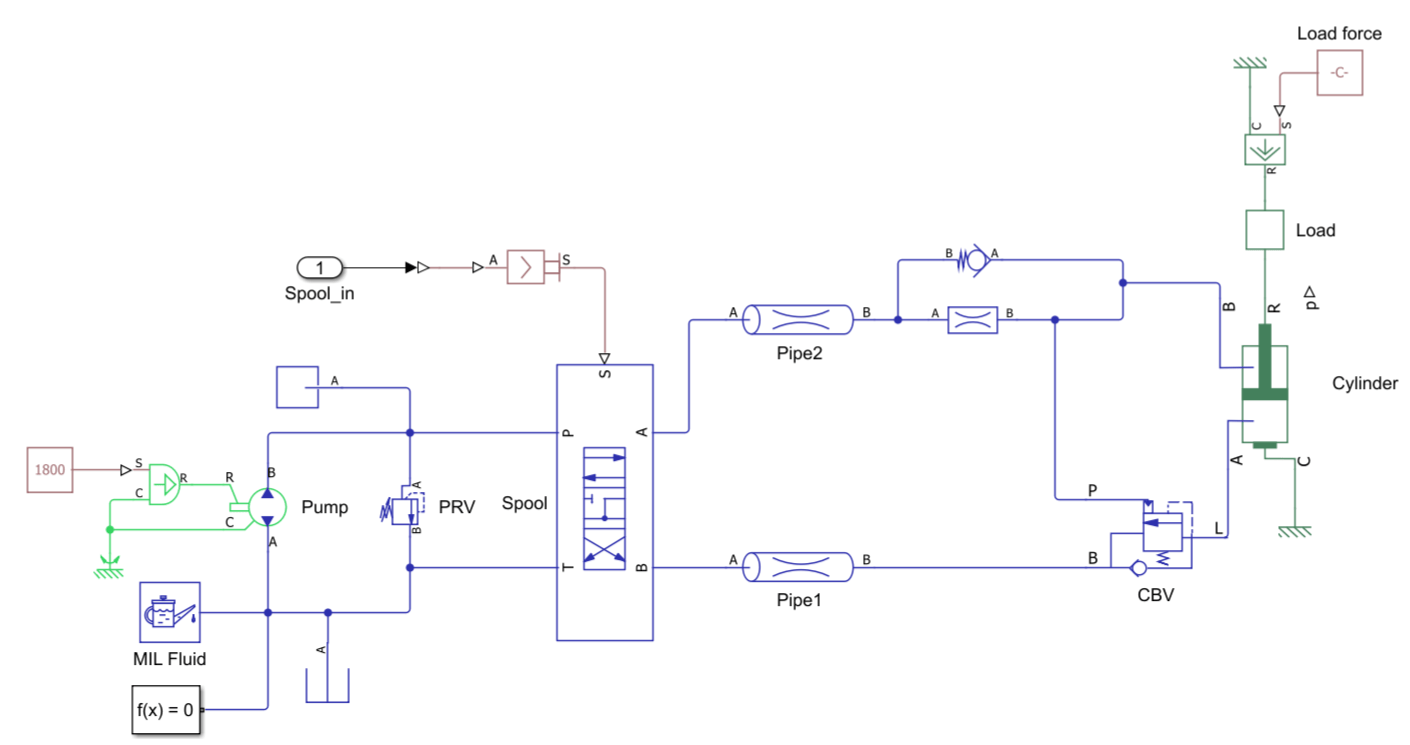
mdl = "ConfigureHydraulicLiftForRealTime";
open_system(mdl);
Use Variable-Step Model to Validate Results
Before you convert a variable-step model to a fixed-step model, store the baseline results for the original model. After you convert the model, you use this data to validate that the fixed-step model functions the same as the variable-step model.
First, configure the model input. The Spool_in Inport block outputs a time-dependent vector that describes the spool position during simulation. The model gets the value for this signal from the time and Spool_in vectors which you can see in the Configuration Parameters window, in the left pane, under Data Import/Export, as the Input parameter. To visualize the data the model uses, plot the time and Spool_in vectors.
figure
plot(time,Spool_in,"LineWidth", 2);
xlabel("Time [s]");
ylabel("Spool position [mm]")
![Figure contains an axes object. The axes object with xlabel Time [s], ylabel Spool position [mm] contains an object of type line.](../../examples/simscapefluids/ConfigureHydraulicLiftForRealTimeExample_02.png)
Run the model with a variable-step solver and an absolute and relative tolerance of 1e-5 and save the output. You will use this output as a baseline to validate the fixed-step model.
set_param(mdl, "AbsTol", "1e-5", "RelTol", "1e-5");
out = sim(mdl);
sim_variable = simlog_ConfigureHydraulicLiftForRealTime;
Next, use the results to determine the solver settings to run the model as a fixed-step model. Use the solverprofiler.profileModel function to run the Solver Profiler app. The app runs the model and inspects the solver profile. Alternatively, in the Simulink Toolstrip, in the Debug tab, set the button in the Performance section to Solver Profiler.
res = solverprofiler.profileModel(mdl);
solverprofiler.exploreResult(res.file);
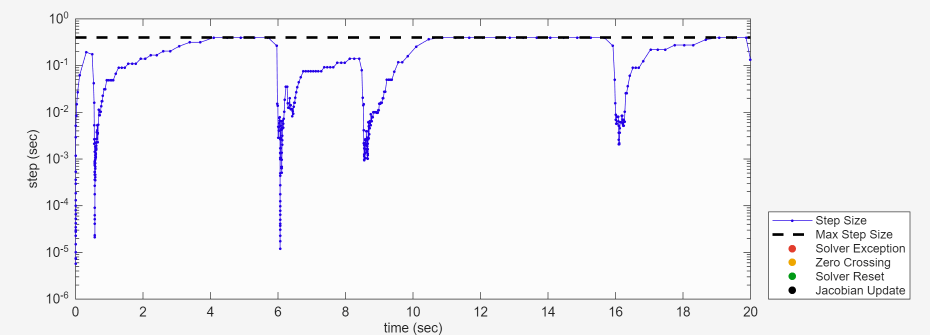
The average step-size is larger than 0.1 s for most of the simulation, but when the spool valve changes position the step size shrinks to between 1e-3 and 1e-5 s. Because the solver profiler shows no issues with the model at these tolerances, you can use the tolerance as a basis for the sample time when running in the model in fixed-step.
Run Model in Fixed-Step
Next, convert the model to a fixed-step model. To convert this model to a fixed-step model, open the Solver Configuration block. Select Use local solver, set the value of Sample time to 0.001, select Use fixed-cost runtime consistency iterations, and set Nonlinear iterations to 3. For more information on solver settings, see Solvers for Real-Time Simulation.
set_param(mdl+"/Solver Configuration", "UseLocalSolver", true, "LocalSolverSampleTime", "0.001", "DoFixedCost", true, "MaxNonlinIter", "3");
set_param(mdl, "SolverType", "Fixed-step");
Run the model and compare the cylinder interface position and velocity between the variable and fixed-step versions of the model.
out = sim(mdl);
sim_fixed = simlog_ConfigureHydraulicLiftForRealTime;
t_variable = sim_variable.Cylinder.chamber_A.interface_displacement.series.time;             % [s] Simulation time
t_fixed = sim_fixed.Cylinder.chamber_A.interface_displacement.series.time;                   % [s] Simulation time
pos_variable = sim_variable.Cylinder.chamber_A.interface_displacement.series.values("cm");   % [cm] Cylinder position
pos_fixed = sim_fixed.Cylinder.chamber_A.interface_displacement.series.values("cm");         % [cm] Cylinder position
vel_variable = sim_variable.Cylinder.chamber_A.interface_velocity.series.values("cm/s");     % [cm/s] Cylinder velocity
vel_fixed = sim_fixed.Cylinder.chamber_A.interface_velocity.series.values("cm/s");           % [cm/s] Cylinder velocity

figure;
subplot(2,1,1);
plot(t_fixed, pos_fixed, "-", "LineWidth", 2);
hold on;
plot(t_variable, pos_variable, "--", "LineWidth", 2);
xlabel("Time [s]");
ylabel("Position [cm]")
legend("Fixed-step", "Variable-step", "Location", "best");
title("Cylinder Position and Velocity")
hold off
subplot(2,1,2)
plot(t_fixed, vel_fixed, "-", "LineWidth", 2);
hold on;
plot(t_variable, vel_variable, "--", "LineWidth", 2);
xlabel("Time [s]");
ylabel("Velocity [cm/s]")
hold off
![Figure contains 2 axes objects. Axes object 1 with title Cylinder Position and Velocity, xlabel Time [s], ylabel Position [cm] contains 2 objects of type line. These objects represent Fixed-step, Variable-step. Axes object 2 with xlabel Time [s], ylabel Velocity [cm/s] contains 2 objects of type line.](../../examples/simscapefluids/ConfigureHydraulicLiftForRealTimeExample_04.png)
The results between the two versions of the model agree. Because the results agree at these solver settings, you can try reducing the number of nonlinear iterations to lower the simulation cost. In the Solver Configuration block, set Nonlinear iterations to 1, run the model, and compare the results to the variable-step model.
set_param(mdl+"/Solver Configuration", "MaxNonlinIter", "1");
out = sim(mdl);
sim_fixed = simlog_ConfigureHydraulicLiftForRealTime;
t_fixed = sim_fixed.Cylinder.chamber_A.interface_displacement.series.time;                   % [s] Simulation time
pos_fixed = sim_fixed.Cylinder.chamber_A.interface_displacement.series.values("cm");         % [cm] Cylinder position
vel_fixed = sim_fixed.Cylinder.chamber_A.interface_velocity.series.values("cm/s");           % [cm/s] Cylinder velocity

figure;
subplot(2,1,1);
plot(t_fixed, pos_fixed, "-", "LineWidth", 2);
hold on;
plot(t_variable, pos_variable, "--", "LineWidth", 2);
xlabel("Time [s]");
ylabel("Position [cm]")
title("Cylinder Position and Velocity")
legend("Fixed-step, Nonlinear iterations = 1", "Variable-step", "Location", "best");
hold off
subplot(2,1,2)
plot(t_fixed, vel_fixed, "-", "LineWidth", 2);
hold on;
plot(t_variable, vel_variable, "--", "LineWidth", 2);
xlabel("Time [s]");
ylabel("Velocity [cm/s]")
hold off
![Figure contains 2 axes objects. Axes object 1 with title Cylinder Position and Velocity, xlabel Time [s], ylabel Position [cm] contains 2 objects of type line. These objects represent Fixed-step, Nonlinear iterations = 1, Variable-step. Axes object 2 with xlabel Time [s], ylabel Velocity [cm/s] contains 2 objects of type line.](../../examples/simscapefluids/ConfigureHydraulicLiftForRealTimeExample_05.png)
This figure shows that the results still agree, even at a lower number of nonlinear iterations. Used these lower cost parameter settings for the rest of the example.
Examine How Fixed-Step Model Performs
Fixed-step models are more sensitive to many changes in the model. To test how the fixed-step model works in harsher conditions, adjust the values of the time and Spool_in variables. To measure how the model reacts when the spool hits the internal hard stop, adjust the variables to keep the spool at its most positive position, which corresponds to the lower chamber position. In the new values for the time vector, change the second largest time values from 16 to 18, which keeps the spool at its most positive position for two additional seconds.
time    =  [0.0 0.5  0.5  6.0 6.0 8.5 8.5 18.0 18.0 20.0]';  % [s] time
Spool_in = [0.0 0.0 -1.0 -1.0 0.0 0.0 1.0  1.0  0.0  0.0]';  % [mm] Spool position
figure
plot(time,Spool_in,"LineWidth", 2);
xlabel("Time [s]");
ylabel("Spool position [mm]")
![Figure contains an axes object. The axes object with xlabel Time [s], ylabel Spool position [mm] contains an object of type line.](../../examples/simscapefluids/ConfigureHydraulicLiftForRealTimeExample_06.png)
Revert the model to the variable-step model by restoring the solver and Solver Configuration parameters to their original states by running this code.
set_param(mdl, "SolverType", "Variable-step","AbsTol", "1e-5", "RelTol", "1e-5");
set_param(mdl+"/Solver Configuration", "UseLocalSolver", false, "DoFixedCost", false);
Confirm that the hard stop force engages by running the model with the new values for time and Spool_in.
set_param(mdl, "AbsTol", "1e-5", "RelTol", "1e-5");
out = sim(mdl);
sim_variable = simlog_ConfigureHydraulicLiftForRealTime;

t_variable = sim_variable.Cylinder.chamber_A.interface_displacement.series.time;           % [s] Simulation time
hardstop_f = sim_variable.Cylinder.hard_stop.f.series.values;                              % [N] hard stop force
figure
plot(t_variable, hardstop_f, "LineWidth", 2);
xlabel("Time [s]");
ylabel("Force [N]");
title("Hard Stop Contact Force")
![Figure contains an axes object. The axes object with title Hard Stop Contact Force, xlabel Time [s], ylabel Force [N] contains an object of type line.](../../examples/simscapefluids/ConfigureHydraulicLiftForRealTimeExample_07.png)
Change the solver and Solver Configuration settings back to the settings for a fixed-step model. Run the model again.
set_param(mdl+"/Solver Configuration", "UseLocalSolver", true, "LocalSolverSampleTime", "0.001", "DoFixedCost", true, "MaxNonlinIter", "1");
set_param(mdl, "SolverType", "Fixed-step");
out = sim(mdl, CaptureErrors="on");
sim_fixed = out.simlog_ConfigureHydraulicLiftForRealTime;
disp(out.ErrorMessage);
['ConfigureHydraulicLiftForRealTime/Solver Configuration']: At time 17.104000, one or more assertions are triggered. See causes for specific information.
Caused by:
    Pressure at port B must be greater than or equal to Minimum valid pressure. The assertion comes from:
Block path: ConfigureHydraulicLiftForRealTime/CBV
Assert location:
    o (location information is protected)
    o (location information is protected)
    o (location information is protected)

    Pressure at port A must be greater than or equal to Minimum valid pressure. The assertion comes from:
Block path: ConfigureHydraulicLiftForRealTime/CBV
Assert location:
    o (location information is protected)
    o (location information is protected)

    Pressure at port L must be greater than or equal to Minimum valid pressure. The assertion comes from:
Block path: ConfigureHydraulicLiftForRealTime/CBV
Assert location:
    o (location information is protected)

    Pressure of liquid volume must be greater than or equal to Minimum valid pressure. The assertion comes from:
Block path: ConfigureHydraulicLiftForRealTime/Cylinder
Assert location:
    o In between line: 264, column: 5 and line: 264, column: 11 in file: foundation.isothermal_liquid.elements.translational_mechanical_converter
    o In between line: 392, column: 17 and line: 402, column: 46 in file: fluids.isothermal_liquid.actuators.double_actuator

    Pressure at port A must be greater than or equal to Minimum valid pressure. The assertion comes from:
Block path: ConfigureHydraulicLiftForRealTime/Cylinder
Assert location:
    o In between line: 585, column: 5 and line: 585, column: 11 in file: fluids.isothermal_liquid.actuators.double_actuator
Running the model results in an error. To diagnose the source of the error, plot the chamber interface position, velocity, and pressure of the variable-step and fixed-step versions of the model.
t_variable = sim_variable.Cylinder.chamber_A.interface_displacement.series.time;
pos_variable = sim_variable.Cylinder.chamber_A.interface_displacement.series.values("cm");
vel_variable = sim_variable.Cylinder.chamber_A.interface_velocity.series.values("cm/s");
p_variable = sim_variable.Cylinder.chamber_A.p_I.series.values("bar");

t_fixed = sim_fixed.Cylinder.chamber_A.interface_displacement.series.time;
pos_fixed = sim_fixed.Cylinder.chamber_A.interface_displacement.series.values("cm");
vel_fixed = sim_fixed.Cylinder.chamber_A.interface_velocity.series.values('cm/s');
p_fixed = sim_fixed.Cylinder.chamber_A.p_I.series.values("bar");

figure;
subplot(2,1,1)
plot(t_variable, pos_variable, "LineWidth", 2);
hold on
grid on;
plot(t_fixed, pos_fixed, "-", "LineWidth", 2);
xlabel("Time [s]");
ylabel("Position [cm]")
title("Hard Stop Collision Failure")
subplot(2,1,2)
plot(t_variable, p_variable, "LineWidth", 2);
hold on
grid on;
plot(t_fixed, p_fixed, "-", "LineWidth", 2);
xlabel("Time [s]");
ylabel("Pressure [bar]")
![Figure contains 2 axes objects. Axes object 1 with title Hard Stop Collision Failure, xlabel Time [s], ylabel Position [cm] contains 2 objects of type line. Axes object 2 with xlabel Time [s], ylabel Pressure [bar] contains 2 objects of type line.](../../examples/simscapefluids/ConfigureHydraulicLiftForRealTimeExample_08.png)
The error and the figure show that just before 17 seconds the cylinder pressure becomes negative. The negative pressure occurs because the fixed-step solver steps past the hard stop and exceeds the dead volume in side A of the chamber, which results in a negative pressure. The variable-step solver prevents this situation by detecting the negative pressure and reducing the step size.
Improve Robustness of the Fixed-Step Model
To prevent the negative pressure error in the fixed-step model, you must improve the model robustness. You can soften the contact response by increasing the value of the cylinder Dead Volume parameter or decrease the simulation step-size.
Increase Dead Volume in the Cylinder
If you increase the volume in both cylinder chambers, the fluid compressibility provides extra cushion near the hard stop. In the Double-Acting Actuator (IL) block named Cylinder, change the value of Dead volume in chamber A and the Dead volume in chamber B to 0.1. Because the error in the previous simulation occurred at 16.94 seconds, plot the time period between 16.93 and 16.95 seconds to see the updated simulation results.
set_param(mdl + "/Cylinder", "dead_volume_A", "0.1", "dead_volume_A_unit", "l")
set_param(mdl + "/Cylinder", "dead_volume_B", "0.1", "dead_volume_B_unit", "l")
out_deadvol = sim(mdl, "SolverType", "Fixed-step");
sim_deadvol = out_deadvol.simlog_ConfigureHydraulicLiftForRealTime;

t_deadvol = sim_deadvol.Cylinder.chamber_A.interface_velocity.series.time();
vel_deadvol = sim_deadvol.Cylinder.chamber_A.interface_velocity.series.values('cm/s');
p_dvol = sim_deadvol.Cylinder.chamber_A.p_I.series.values('bar');

figure
subplot(2,1,1)
plot(t_fixed, vel_fixed, "LineWidth", 2);
hold on
plot(t_deadvol, vel_deadvol, "LineWidth", 2);
grid on
xlim([16.93 16.95]);
xlabel("Time [s]");
ylabel("Velocity [cm/s]");
legend("Default dead volume", "Increased dead volume")
title("Cylinder Velocity and Pressure")
subplot(2,1,2)
plot(t_fixed, p_fixed, "LineWidth", 2);
hold on
plot(t_deadvol, p_dvol, "LineWidth", 2);
grid on
xlim([16.93 16.95]);
xlabel("Time [s]");
ylabel("Pressure [bar]");
![Figure contains 2 axes objects. Axes object 1 with title Cylinder Velocity and Pressure, xlabel Time [s], ylabel Velocity [cm/s] contains 2 objects of type line. These objects represent Default dead volume, Increased dead volume. Axes object 2 with xlabel Time [s], ylabel Pressure [bar] contains 2 objects of type line.](../../examples/simscapefluids/ConfigureHydraulicLiftForRealTimeExample_09.png)
When the cylinder rod strikes the hard stop, it bounces and causes the pressure in chamber A to dip. Increasing the dead volume delays the impact and softens the rebound, which allows the simulation to run without error.
You can also increase the model robustness by simulating the model with a smaller step size. Revert the changes to the dead volume.
set_param(mdl + "/Cylinder", "dead_volume_A", "1e-5", "dead_volume_A_unit", "m^3")
set_param(mdl + "/Cylinder", "dead_volume_B", "1e-5", "dead_volume_B_unit", "m^3")
Simulate With a Smaller Step Size
You can also decrease the simulation step size to prevent the solver error. In the Solver Configuration block, set Sample time to 0.0001. Run the model. Plot the chamber interface position and velocity, and the difference between those values and the values from the variable-step model.
set_param(mdl+"/Solver Configuration", "LocalSolverSampleTime", "0.0001");
out_smallstep = sim(mdl, "SolverType", "Fixed-step");
sim_smallstep = out_smallstep.simlog_ConfigureHydraulicLiftForRealTime;

t_smallstep = sim_smallstep.Cylinder.chamber_A.interface_displacement.series.time;
pos_smallstep = sim_smallstep.Cylinder.chamber_A.interface_displacement.series.values("cm");
vel_smallstep = sim_smallstep.Cylinder.chamber_A.interface_velocity.series.values("cm/s");

figure;
subplot(2,1,1)
plot(t_variable, pos_variable, "-", "LineWidth", 2);
hold on;
plot(t_smallstep, pos_smallstep, "--", "LineWidth", 2);
xlabel("Time [s]");
ylabel("Position [cm]")
legend("Variable-step", "Fixed-step, sample time = .0001", "Location", "best");
title("Cylinder Position and Position Delta Between Solvers")
subplot(2,1,2)
pos_variable_samp = interp1(t_variable, pos_variable, t_smallstep);
plot(t_smallstep, pos_variable_samp-pos_smallstep, "LineWidth", 2);
hold on;
xlabel("Time [s]");
ylabel("Delta Position [cm]")
![Figure contains 2 axes objects. Axes object 1 with title Cylinder Position and Position Delta Between Solvers, xlabel Time [s], ylabel Position [cm] contains 2 objects of type line. These objects represent Variable-step, Fixed-step, sample time = .0001. Axes object 2 with xlabel Time [s], ylabel Delta Position [cm] contains an object of type line.](../../examples/simscapefluids/ConfigureHydraulicLiftForRealTimeExample_10.png)
figure;
subplot(2,1,1);
plot(t_variable, vel_variable, "-",  "LineWidth", 2);
hold on;
plot(t_smallstep, vel_smallstep, "--", "LineWidth", 2);
xlabel("Time [s]");
ylabel("Velocity [cm/s]")
legend("True", "HIL", "Location", "best");
title("Cylinder Position and Position Delta Between Solvers")
subplot(2,1,2)
vel_variable_samp = interp1(t_variable, vel_variable, t_smallstep);
plot(t_smallstep, vel_variable_samp-vel_smallstep, '-',"LineWidth", 2);
hold on;
xlabel("Time [s]");
ylabel("Delta Velocity [cm/s]")
![Figure contains 2 axes objects. Axes object 1 with title Cylinder Position and Position Delta Between Solvers, xlabel Time [s], ylabel Velocity [cm/s] contains 2 objects of type line. These objects represent True, HIL. Axes object 2 with xlabel Time [s], ylabel Delta Velocity [cm/s] contains an object of type line.](../../examples/simscapefluids/ConfigureHydraulicLiftForRealTimeExample_11.png)
With a smaller step size, the fixed-step model can run to completion and the results agree very closely with the variable step model. However, the smaller step size increases the computational cost of the model. Compare the run time for the model that uses a smaller step size and the model with increased dead volume.
out_deadvol.SimulationMetadata.TimingInfo.TotalElapsedWallTime
ans =
3.8251
out_smallstep.SimulationMetadata.TimingInfo.TotalElapsedWallTime
ans =
8.9710
It takes longer to run the model with the smaller step size. Over longer run times or for larger models, this behavior can have a large impact on performance.

