imbilatfilt
R2026b使用高斯核的图像双边滤波
语法
描述
J = imbilatfilt(I,degreeOfSmoothing)degreeOfSmoothing 是小值时,imbilatfilt 会对小方差邻域(均匀区域)进行平滑处理,但不会对大方差邻域进行平滑处理,例如强边缘。当 degreeOfSmoothing 的值增大时,imbilatfilt 同时对均匀区域和具有较大方差的邻域进行平滑处理。
J = imbilatfilt(I,degreeOfSmoothing,spatialSigma)spatialSigma。spatialSigma 的值越大,更远相邻像素的权重就越大,从而有效地增大了邻域大小。
J = imbilatfilt(___,Name=Value)
示例
读取并显示灰度图像。观察天空区域中的水平条带伪影。
I = imread('cameraman.tif');
imshow(I)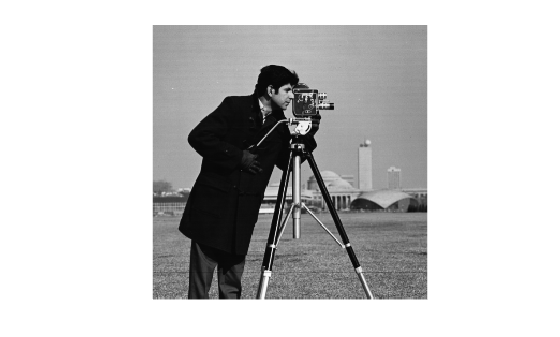
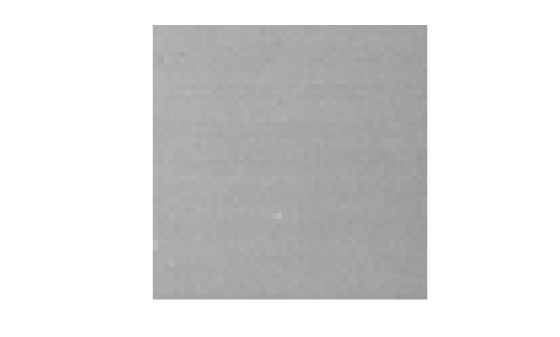
检查天空区域的一个图像块。计算该图像块的方差,该方差逼近噪声的方差。
patch = imcrop(I,[170, 35, 50 50]);
imshow(patch)
patchVar = std2(patch)^2;
使用双边滤波对图像进行滤波。将平滑度设置为大于噪声的方差。
DoS = 2*patchVar;
J = imbilatfilt(I,DoS);
imshow(J)
title(['Degree of Smoothing: ',num2str(DoS)])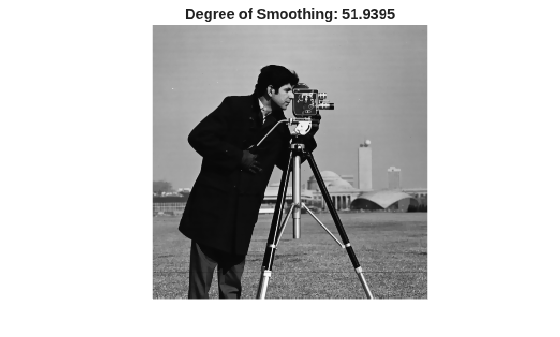
条带伪影减少,但并未消除。为了改进平滑效果,将 spatialSigma 的值增加到 2,以便较远的相邻像素对高斯平滑核的权重更大。这会有效增大双边滤波器的空间范围。
K = imbilatfilt(I,DoS,2);
imshow(K)
title(['Degree of Smoothing: ',num2str(DoS),', Spatial Sigma: 2'])
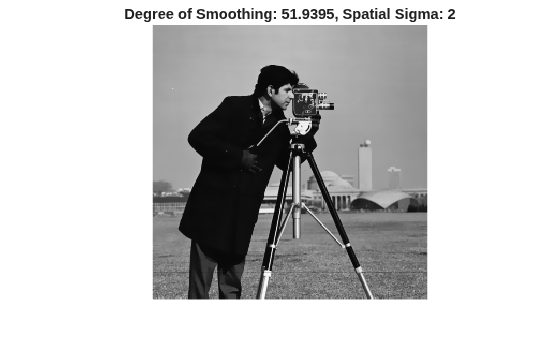
天空中的条带伪影已成功去除。强边缘(如男人的轮廓)和纹理区域(如图像前景中的草地)的锐度得以保留。
读取一个 RGB 图像。
imRGB = imread("coloredChips.png");
imshow(imRGB)
将图像转换为 L*a*b* 颜色空间,以便双边滤波器对感知上相似的颜色进行平滑处理。
imLAB = rgb2lab(imRGB);
提取不含锐边的图像块。计算 L*a*b* 颜色空间中距原点的欧几里德距离的方差。
patch = imcrop(imLAB,[34,71,60,55]);
patchSq = patch.^2;
edist = sqrt(sum(patchSq,3));
patchVar = std2(edist).^2;
在 L*a*b* 颜色空间中使用双边滤波对图像进行滤波。将 DegreeOfSmoothing 设置为高于图像块的方差的值。
DoS = 2*patchVar;
smoothedLAB = imbilatfilt(imLAB,DoS);
将图像转换回 RGB 颜色空间,并显示平滑处理后的图像。
smoothedRBG = lab2rgb(smoothedLAB,OutputType="uint8");
montage({imRGB,smoothedRBG})
title("Original Image vs. Filtered Image with Degree of Smoothing: "+num2str(DoS))

塑料片和黑色笔的颜色看起来更均匀,但桌子上的水平纹理仍可见。增大滤波器的空间范围,使滤波器的有效邻域跨水平纹理之间的空间(此距离约为七个像素)。同时增大 DegreeOfSmoothing 以对这些区域进行更强的平滑处理。
DoS2 = 4*patchVar;
sigma = 7;
smoothedLAB2 = imbilatfilt(imLAB,DoS2,sigma);
smoothedRBG2 = lab2rgb(smoothedLAB2,OutputType="uint8");
montage({imRGB,smoothedRBG2})
title("Original Image vs. Filtered Image with Degree of Smoothing: "+num2str(DoS)+ ...
    " and Spatial Sigma: "+sigma)

木桌的颜色在使用更大邻域和更大平滑度后更加均匀。塑料片和笔的边缘锐度得以保留。
输入参数
名称-值参数
输出参量
提示
degreeOfSmoothing的值对应于双边滤波器的值域高斯核的方差 [1]。值域高斯应用于一个像素值与其相邻像素值的欧几里德距离。为了平滑处理 RGB 图像的感知上接近的颜色,在应用双边滤波器之前,使用
rgb2lab将图像转换为 CIE L*a*b* 空间。要查看结果,请使用lab2rgb将滤波后的图像转换为 RGB。增大
spatialSigma会增大NeighborhoodSize,从而增大滤波器执行时间。您可以指定较小的NeighborhoodSize以牺牲准确性换取更快的执行时间。
参考
[1] Tomasi, C., and R. Manduchi. "Bilateral Filtering for Gray and Color Images". Proceedings of the 1998 IEEE® International Conference on Computer Vision. Bombay, India. Jan 1998, pp. 836–846.
扩展功能
版本历史记录
在 R2018a 中推出另请参阅
imdiffusefilt | imgaussfilt | imguidedfilter | imfilter | nlfilter | locallapfilt | imnlmfilt

