linkviewers
R2026bDescription
linkviewers( links the camera properties
of all the viewers in vList)vList and initially synchronizes them to the
camera properties of the first viewer in vList. Once you link the
viewers, you can change the camera properties of all viewers synchronously by changing the
camera properties of any one viewer in the figure window. Note that
linkviewers does not synchronize camera properties if you change them
programmatically or by using the Property Inspector. For more information on camera
properties in a viewer, see Camera Controls.
linkviewers( removes the link
between the viewers in vList,"off")vList. Once you remove the link, changing the
properties of a viewer in vList no longer synchronizes those changes
across any other viewers. However, if a viewer in vList is linked to
any viewers not in vList, changing the properties of the linked viewers
not in vList synchronizes that change to the linked viewer in
vList.
For example, linkviewers([v1 v2 v3]) links viewers
v1, v2, and v3. If you remove the
link between viewers v1 and v2 using
linkviewers([v1 v2],"off"), changing the properties of
v1 does not synchronize those changes in v2 or
v3. Similarly, changing the properties of v2 does
not synchronize those changes in v1 or v3. However,
changing the properties of v3, synchronizes those changes in
v1 and v2.
Examples
Read an image into the workspace.
I = imread("coins.png");Identify edges in the input image.
Iedge = edge(I);
Apply edge-preserving smoothing to the input image.
Ismooth = imbilatfilt(I);
Create a grid layout for three images.
g = uigridlayout;
v1 = viewer2d(g,ScaleBar="off");
v2 = viewer2d(g,ScaleBar="off");
v3 = viewer2d(g,ScaleBar="off");
v1.Layout.Row = 1;
v1.Layout.Column = 1;
v1.Title = "Input Image";
v2.Layout.Row = 1;
v2.Layout.Column = 2;
v2.Title = "Edge Image";
v3.Layout.Row = 1;
v3.Layout.Column = 3;
v3.Title = "Smooth Image";
Visualize the input image, the edge image, and the smooth image in the grid layout.
imageshow(I,Parent=v1)
imageshow(Iedge,Parent=v2)
imageshow(Ismooth,Parent=v3)
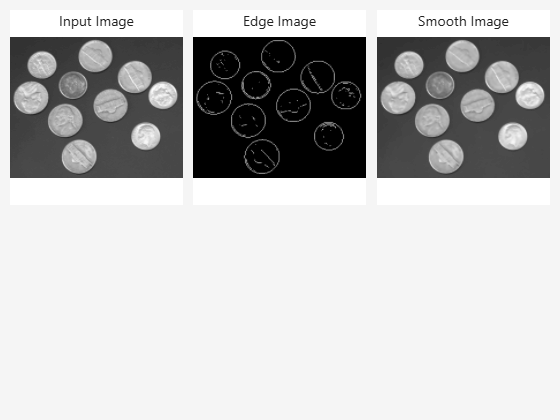
Link the viewers of all the images. When you zoom or pan any of the images, the linked viewers replicate the pan and zoom settings for the other images.
linkviewers([v1 v2 v3])
Input Arguments
Version History
Introduced in R2026a

