主要内容

zmximport

Import optical system from ZMX file

Since R2026a

    Description

    Add-On Required: This feature requires the Optical Design and Simulation Library for Image Processing Toolbox add-on.

    opsys = zmximport(filename) imports the optical system from the ZMX file filename.

    example

    [opsys,materialCatalogInfo] = zmximport(filename) returns the materials used in the optical system along with their resolved entries in the glass library.

    [opsys,materialCatalogInfo,surfaceIndexMap] = zmximport(filename) returns the mapping between surface indices in the imported optical system and the ZMX file.

    Examples

    collapse all

    Import an optical system from a ZMX file into the workspace.

    opsys = zmximport("PhotographicLens.zmx")
    opsys = 
      opticalSystem with properties:
    
       Main properties
                          Name: "CN 108535851 Example 1 (Venus Laowa 10-18mm f4.5-5.6 Zoom)"
             PrimaryWavelength: 587.5618
                   Wavelengths: [486.1327 587.5618 656.2725]
                   FieldPoints: [1×4 optics.fieldpoint.FieldPoint]
                    Components: [13×1 optics.component.Component]
           FlattenedComponents: [13×1 optics.component.Component]
                     Materials: [16×1 opticalMaterial]
                      Surfaces: [28×1 optics.surface.Surface]
                  SurfaceTable: [28×13 table]
    
       Extended properties
                      UserData: []
                   ObjectPlane: [1×1 optics.component.ObjectPlane]
        PrimaryWavelengthIndex: 2
               AmbientMaterial: [1×1 opticalMaterial]
                      Coatings: [0×1 opticalCoating]
             ConstructionFrame: [4×4 double]
                      Position: [0 0 0]
                    TiltAngles: [0 0 0]


    Display a 2-D visualization of the optical system.

    view2d(opsys)
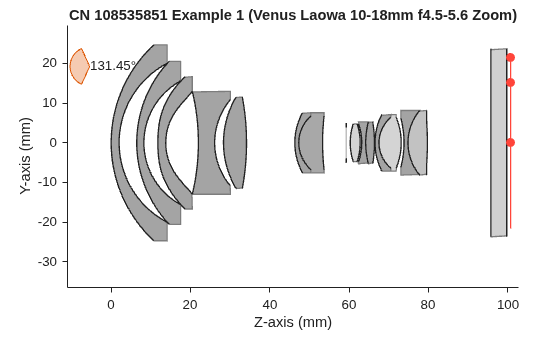
    Figure contains an object of type optics.ui.opticalsystemviewer2d. The chart of type optics.ui.opticalsystemviewer2d has title CN 108535851 Example 1 (Venus Laowa 10-18mm f4.5-5.6 Zoom).

    ans = 
      OpticalSystemViewer2D with properties:
    
                Title: ""
        OpticalSystem: [1×1 opticalSystem]
               Labels: "none"
          FieldPoints: "on"
                 Rays: [0×0 optics.ui.Rays2D]
               Parent: [1×1 Figure]
    
      Show all properties


    Input Arguments

    collapse all

    Filename of the ZMX file, specified as a string scalar or character vector. You can specify the filename as an absolute or relative path of a ZMX file.

    Data Types: char | string

    Output Arguments

    collapse all

    Imported optical system, returned as an opticalSystem object.

    Material catalog information, returned as a table. The first column of the table lists the names of the materials used in the optical system as string scalars. The second column of the table lists the name of the corresponding resolved catalog in the glass library as string scalars. If a material is unresolved, the corresponding entry in the second column is an empty string. You can add the unresolved materials to the glass library using the addGlassCatalog function.

    Data Types: table

    Surface index map between the optical system and the ZMX file, returned as a structure with these fields.

    • OpticalSystem2File — Surface index mapping from the imported optical system to the ZMX file, returned as a dictionary.

    • File2OpticalSystem — Surface index mapping from the ZMX file to the imported optical system, returned as a dictionary.

    The mapping between surfaces from the ZMX file and the imported optical system might not be one-to-one for reasons such as these.

    • The zmximport function ignores dummy surfaces in the ZMX file. Dummy surfaces are surfaces that do not have any defined material and might have been placed as placeholders in the ZMX file.

    • If two refractive surfaces have zero distance between and are of the same type and radius, the zmximport function treats them as a single surface.

    You can use the surface index mapping details for reconciliation between the ZMX file and the imported optical system.

    Data Types: struct

    Limitations

    • This function supports only sequential mode optical systems. Nonsequential mode optical systems are not supported. For more information on the modes of optical systems, see the explanation of the Mode field of the info argument of the zmxinfo function.

    • This function supports surfaces of only types "STANDARD" (standard), "XOSPHERE" (extended odd asphere), "XASPHERE" (extended asphere), and "EVENASPH" (even asphere). Surfaces of other types are not supported.

    • Surfaces of type "XOSPHERE" of order greater than 20 are not supported.

    • Surfaces of type "XASPHERE" or "EVENASPH" of order greater than 10 are not supported.

    • Composite surfaces created using 2 or more surfaces are not supported.

    • Field points defined by field angles, object height, and real image height are supported. Field points defined by paraxial image height are not supported.

    Version History

    Introduced in R2026a