从文本文件中导入日期和时间
R2026b要从列向表格数据中导入格式化的日期和时间(例如 "01/01/01" 或 "12:30:45"),有如下三种方法可以选择。
导入工具 - 以交互方式选择并导入日期和时间。
readtable函数 - 自动检测包含日期和时间的变量,并将其导入到表中。导入选项 - 将
readtable函数与detectImportOptions配合使用,以便对日期和时间变量的导入实行更多控制。例如,可以指定FillValue和DatetimeFormat等属性。
此示例说明如何使用以上各种方法从文本文件中导入日期和时间。
导入工具
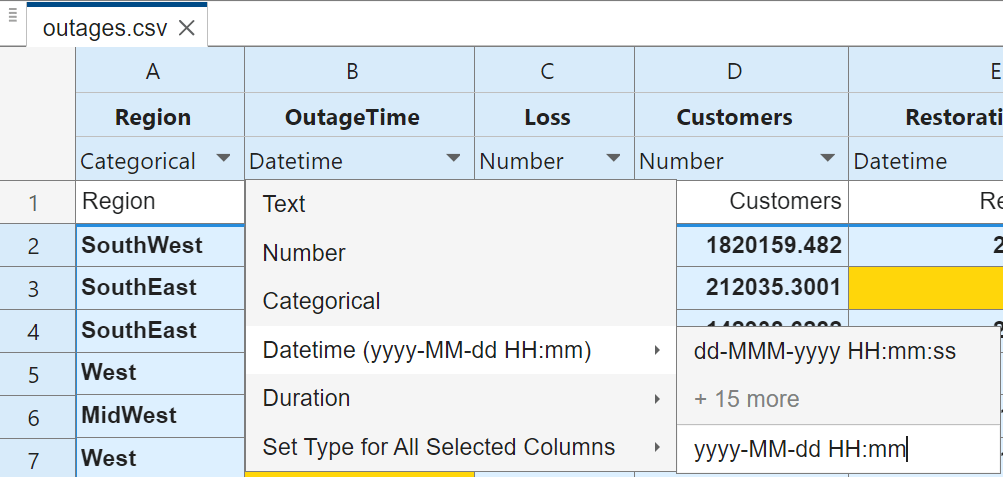
使用导入工具打开文件 outages.csv。使用每列的下拉菜单指定日期和时间的格式。您可以从预定义的日期格式中选择,或者输入自定义格式。要导入 OutageTime 列,请指定自定义格式 yyyy-MM-dd HH:mm。然后,点击导入所选内容按钮,将数据导入到工作区中。
readtable 函数
使用 readtable 函数并显示 OutageTime 变量的前 10 行。readtable 会自动检测日期时间变量和格式。
filename = "outages.csv";
T = readtable(filename);
T.OutageTime(1:10)
ans = 10×1 datetime
2002-02-01 12:18
2003-01-23 00:49
2003-02-07 21:15
2004-04-06 05:44
2002-03-16 06:18
2003-06-18 02:49
2004-06-20 14:39
2002-06-06 19:28
2003-07-16 16:23
2004-09-27 11:09
导入选项
使用导入选项对象,对日期和时间变量的导入实行更多控制。例如,更改日期时间显示格式,或指定缺失日期的填充值。
为 outages.csv 文件创建导入选项对象,并显示变量 RestorationTime 的变量导入选项。detectImportOptions 函数会自动检测变量的数据类型。
opts = detectImportOptions(filename);
getvaropts(opts,"RestorationTime")
ans =
DatetimeVariableImportOptions with properties:
Variable Properties:
Name: 'RestorationTime'
Type: 'datetime'
FillValue: NaT
TreatAsMissing: {}
QuoteRule: 'remove'
Prefixes: {}
Suffixes: {}
EmptyFieldRule: 'missing'
Datetime Options:
DatetimeFormat: 'preserveinput'
DatetimeLocale: 'en_US'
InputFormat: ''
TimeZone: ''
导入数据并显示变量 RestorationTime 的前 10 行。第二行包含一个 NaT,指示缺失的日期和时间值。
T = readtable(filename,opts);
T.RestorationTime(1:10)
ans = 10×1 datetime
   2002-02-07 16:50
   NaT
   2003-02-17 08:14
   2004-04-06 06:10
   2002-03-18 23:23
   2003-06-18 10:54
   2004-06-20 19:16
   2002-06-07 00:51
   2003-07-17 01:12
   2004-09-27 16:37
要使用其他日期和时间显示格式,请更新 DatetimeFormat 属性,然后通过使用 FillValue 属性,将缺失的值替换为当前的日期和时间。显示更新的变量选项。
opts = setvaropts(opts,"RestorationTime", ...
                       DatetimeFormat="MMM d, yyyy HH:mm:ss Z", ...
                       FillValue="now");
getvaropts(opts,"RestorationTime")
ans =
  DatetimeVariableImportOptions with properties:

   Variable Properties:
              Name: 'RestorationTime'
              Type: 'datetime'
         FillValue: Aug 7, 2026 00:50:14 *
    TreatAsMissing: {}
         QuoteRule: 'remove'
          Prefixes: {}
          Suffixes: {}
    EmptyFieldRule: 'missing'

   Datetime Options:
    DatetimeFormat: 'MMM d, yyyy HH:mm:ss Z'
    DatetimeLocale: 'en_US'
       InputFormat: ''
          TimeZone: ''
使用更新的导入选项读取数据,并显示变量的前 10 行。
T = readtable(filename,opts);
T.RestorationTime(1:10)
ans = 10×1 datetime
   Feb 7, 2002 16:50:00 *
   Aug 7, 2026 00:50:14 *
   Feb 17, 2003 08:14:00 *
   Apr 6, 2004 06:10:00 *
   Mar 18, 2002 23:23:00 *
   Jun 18, 2003 10:54:00 *
   Jun 20, 2004 19:16:00 *
   Jun 7, 2002 00:51:00 *
   Jul 17, 2003 01:12:00 *
   Sep 27, 2004 16:37:00 *
有关 datetime 变量选项的详细信息,请参阅 setvaropts 参考页。
另请参阅
导入工具 | readtable | detectImportOptions | setvaropts | readmatrix | readcell | readvars | readtimetable

