linestyleorder
R2026b语法
描述
linestyleorder( 设置当前图窗的线型序列。线型序列是 MATLAB® 在同一坐标区中绘制多个数据序列时使用的线型列表。linestyles)
linestyleorder( 指定线型循环方法。线型循环方法控制 MATLAB 在坐标区中绘制多个数据序列时如何循环使用线型。有效值为 linestyles,cyclingmethod)"aftercolor"、"beforecolor" 和 "withcolor"。如果您省略循环方法,linestyleorder 将使用 "withcolor"。
lso = linestyleorder(___) 以字符向量元胞数组形式返回线型序列。
示例
创建一个包含 10 列 y 坐标的矩阵。
Y = (10:15)'- (0:9)
Y = 6×10

    10     9     8     7     6     5     4     3     2     1
    11    10     9     8     7     6     5     4     3     2
    12    11    10     9     8     7     6     5     4     3
    13    12    11    10     9     8     7     6     5     4
    14    13    12    11    10     9     8     7     6     5
    15    14    13    12    11    10     9     8     7     6
使用默认线型序列(由一种线型(实线)组成)绘制该矩阵。
plot(Y,LineWidth=1)
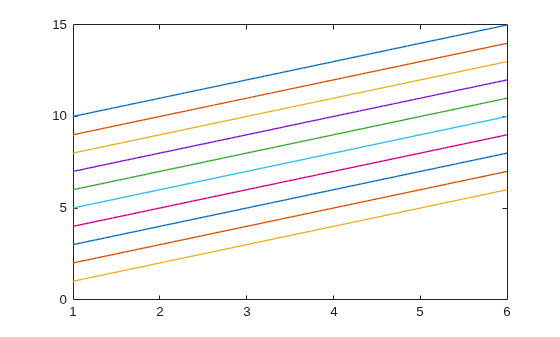
将线型序列更改为 "mixedstyles"。
linestyleorder("mixedstyles")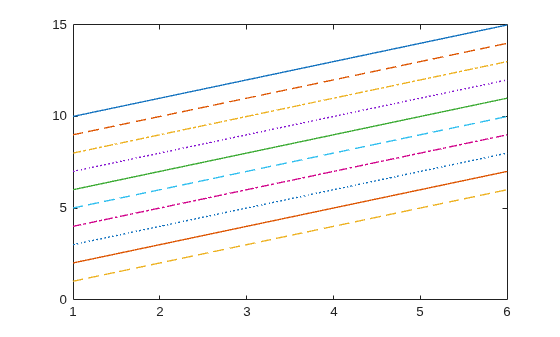
将线型序列更改为 "mixedmarkers"。
linestyleorder("mixedmarkers")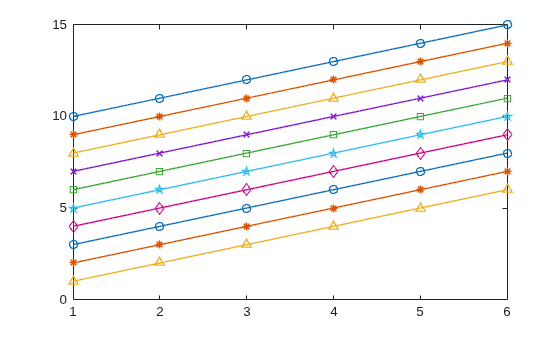
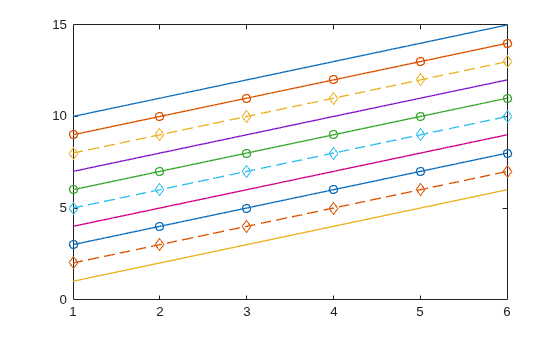
指定使用不同线条和标记设定符组合的自定义线型序列。
linestyles = ["-","-o","--d"];
linestyleorder(linestyles)
创建一个包含六列 y 坐标的矩阵。
Y = (10:15)'- (0:5)
Y = 6×6

    10     9     8     7     6     5
    11    10     9     8     7     6
    12    11    10     9     8     7
    13    12    11    10     9     8
    14    13    12    11    10     9
    15    14    13    12    11    10
使用默认线型序列(由一种线型(实线)组成)绘制该矩阵。
plot(Y,LineWidth=1)
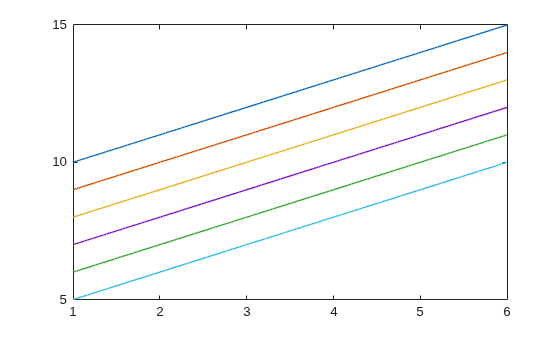
指定自定义线型序列,但不指定线型循环方法。默认情况下,linestyleorder 使用 "withcolor" 方法。此方法使用来自预定义调色板的下一种颜色和来自 linestyles 数组的下一种线型来创建每条后续线条。在此绘图中,第一个线条位于绘图顶部,最后一个线条位于底部。
linestyles = ["-","--","-o"];
linestyleorder(linestyles)
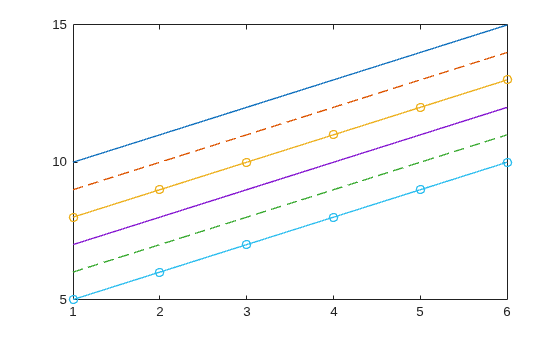
更改调色板,使其仅包含来自 gem 调色板的两种颜色。您可以看到颜色和线型的所有六种组合。
colors = orderedcolors("gem");
colororder(colors(1:2,:))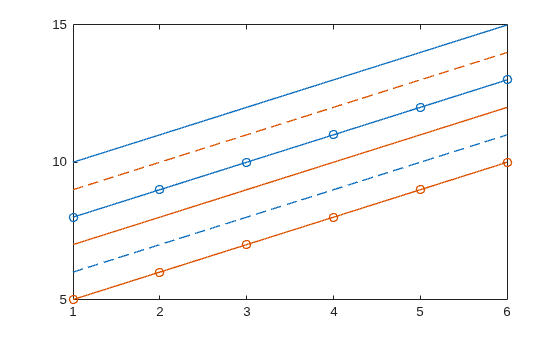
将线型循环方法更改为 "beforecolor"。线条在循环到下一种颜色之前先循环使用所有线型。
linestyleorder(linestyles,"beforecolor")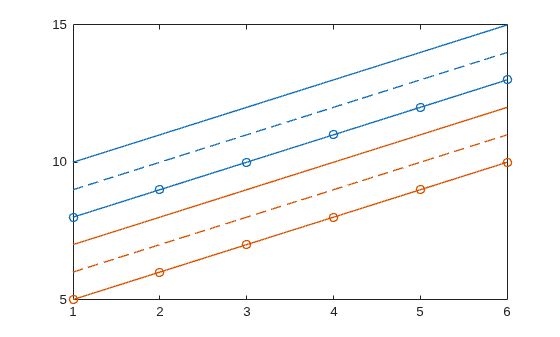
将线型循环方法更改为 "aftercolor"。线条在循环到下一种线型之前先循环使用所有颜色。
linestyleorder(linestyles,"aftercolor")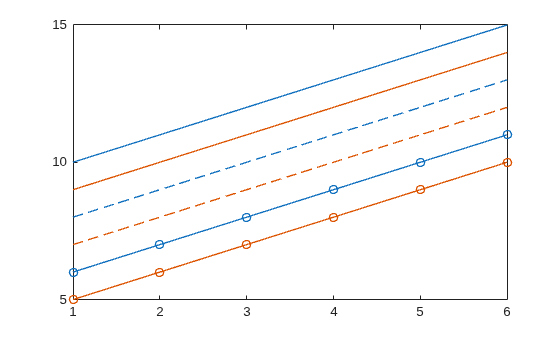
创建一个包含六列 y 坐标的矩阵。
Y = (10:15)'-(0:5)
Y = 6×6

    10     9     8     7     6     5
    11    10     9     8     7     6
    12    11    10     9     8     7
    13    12    11    10     9     8
    14    13    12    11    10     9
    15    14    13    12    11    10
在一个分块图布局的两个不同坐标区中绘制该矩阵。两个绘图看起来相同。
tiledlayout(2,1)
ax1 = nexttile;
plot(ax1,Y,LineWidth=1)
ax2 = nexttile;
plot(ax2,Y,LineWidth=1)
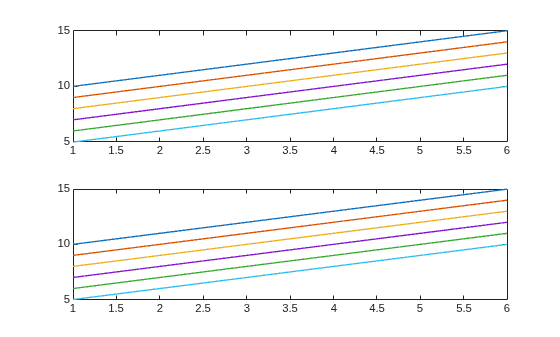
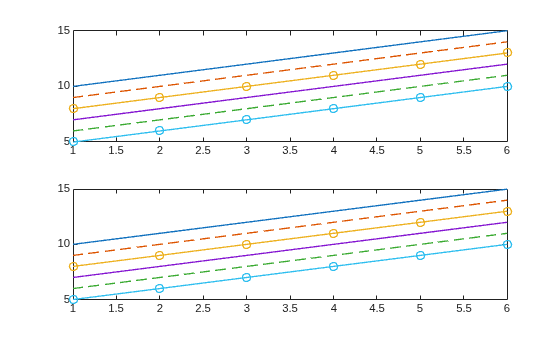
通过调用 linestyleorder 函数而不指定目标对象,更改当前图窗中所有坐标区的线型序列。结果,两个绘图使用相同的线型集。
linestyles1 = ["-","--","-o"];
linestyleorder(linestyles1)
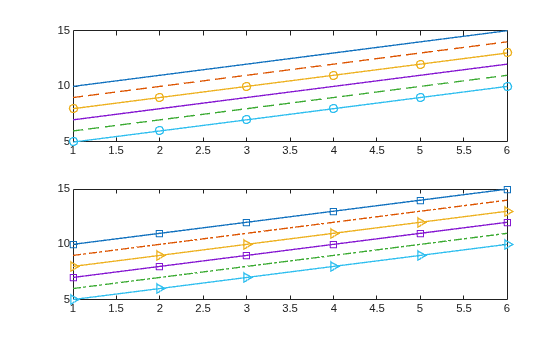
定义一组不同线型,并通过将第二个坐标区 (ax2) 指定为目标对象,将该组线型分配给第二个绘图。
linestyles2 = ["-s","-.","->"];
linestyleorder(ax2,linestyles2)
输入参数
线型,指定为以下值之一:
"mixedstyles"- MATLAB 将线型序列设置为["-","--","-.",":"]。"mixedmarkers"- MATLAB 将线型序列设置为["-o","-*","-^","-x","-s","-p","-d"]。线条和标记设定符的组合 - 您指定一个字符串数组或字符向量元胞数组,其中数组的每个元素都是来自下列各表的线条设定符或标记设定符。您可以在一个元素中组合使用线型和标记设定符。例如,
["-o","--",":square"]指定带圆形标记的实线、不带标记的虚线和带方形标记的点线。
线条设定符
| 线型 | 描述 | 表示的线条 |
|---|---|---|
"-" | 实线 |
|
"--" | 虚线 |
|
":" | 点线 |
|
"-." | 点划线 |
|


标记设定符
| 标记 | 描述 | 生成的标记 |
|---|---|---|
"o" | 圆圈 |
|
"+" | 加号 |
|
"*" | 星号 |
|
"." | 点 |
|
"x" | 叉号 |
|
"_" | 水平线条 |
|
"|" | 垂直线条 |
|
"square" | 方形 |
|
"diamond" | 菱形 |
|
"^" | 上三角 |
|
"v" | 下三角 |
|
">" | 右三角 |
|
"<" | 左三角 |
|
"pentagram" | 五角形 |
|
"hexagram" | 六角形 |
|


示例: linestyleorder(["-","--","-o"]) 指定实线、虚线和带圆形标记的实线。
线型循环方法,指定为下表中的值之一。线型循环方法控制当坐标区的 ColorOrder 属性中有多种颜色时,MATLAB 在绘制多条线时如何循环使用线型。
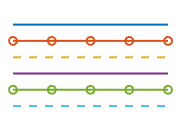
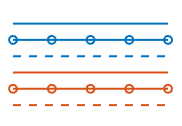
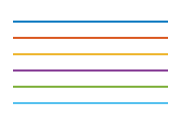
下表中的示例是使用 ColorOrder 属性中的默认颜色和三种线型 (["-","-o","--"]) 创建的。
| 值 | 描述 | 示例 |
|---|---|---|
"withcolor" | 在循环使用 |
|
"beforecolor" | 先循环使用线型再循环使用 |
|
| 先循环使用 这是大多数绘图在不使用 |
|
目标对象,指定为图窗或任何类型的坐标区对象,例如 Axes、PolarAxes 或 GeographicAxes 对象。如果您指定图窗,则该图窗中的所有坐标区都使用新线型序列。
版本历史记录
在 R2024a 中推出

