markdowndisp
R2026bDescription
markdowndisp( renders the
Markdown-formatted text in the Command Window or Live Editor. textToRender)
Examples
Render a string with bold and strikethrough Markdown formatting.
markdowndisp("**bold text** normal text ~~strikethrough text~~")
Render multi-line Markdown text by inserting line breaks between
elements. To insert line breaks, use either the sprintf function
or the newline function.
Create and render a Markdown string containing a heading, bold labels with
values, and a bulleted list. Use sprintf with
\n to insert line breaks between elements.
mdText = sprintf("## Status Report\n**Project:** Widget\n**Status:** Complete\n\n- Task A done\n- Task B done\n- Task C in progress\n");
markdowndisp(mdText)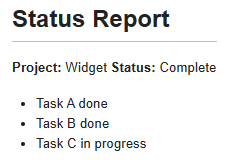
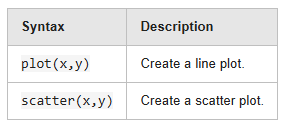
Create and render a Markdown string containing a table. Use
newline to insert line breaks between elements.
mdText = "| Syntax | Description |" + newline + "| ----------- | ----------- |" + newline + ...
    "| `plot(x,y)` | Create a line plot. |" + newline + "| `scatter(x,y)` | Create a scatter plot. |";
markdowndisp(mdText)
Render an inline LaTeX equation.
markdowndisp("$E=mc^2$")
Input Arguments
Tips
By default,
markdowndisprenders Markdown text in the Command Window. If you disable enhanced output or if MATLAB® is running with the-nodesktopor-nodisplayoption,markdowndispdisplays the Markdown source text instead of rendered output. For more information about enhanced output, see Show Enhanced Output in Command Window.
Version History
Introduced in R2026b

