Visualize Pin Diagram Using Arduino Explorer App
R2026bThe Arduino Explorer app displays the pinout diagram of the selected board in a panel at the bottom right corner of the app window.
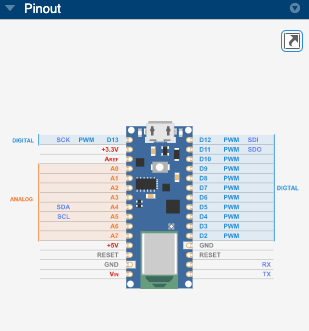
To view the pinout diagram more efficiently:
Increase the area of the Pinout panel — Maximize the panel by double-clicking it and collapse the other adjacent panels.
Open pinout panel in another window — Click the
 icon that appears at the top of the
pinout panel.
icon that appears at the top of the
pinout panel.
See Also
Topics
- Set Up and Connect to Arduino and Arduino-compatible Boards Using Arduino Explorer
- Connect to SPI Device Using Arduino Explorer App
- Connect to I2C Device Using Arduino Explorer App
- Connect to Serial Device Using Arduino Explorer App
- Visualize and Record Data from Arduino Pins Using Arduino Explorer App
- Generate MATLAB Script
- Customizable Views in the App

