Resonant Converter Gains
R2026bResonant Converter Gains block

To add a block to a model, double-click the canvas and start typing the block name. Then, select the block from the list.
Libraries:
Power Converter Control with Motor Control Blockset /
Control /
Resonant Converter
Description
The Resonant Converter Gains block computes discrete-time controller gains for the voltage regulation loop of an LLC resonant converter. It outputs a controller parameter bus for use with the Resonant Voltage Controller block.
The block supports three controller architectures. Select PI for a
proportional-integral controller, which is the simplest option and suitable for
converters with modest bandwidth requirements. Select 2P2Z (two poles,
two zeros) for a second-order compensator that provides additional loop-shaping
flexibility for tighter transient requirements. Select 3P3Z (three
poles, three zeros) for a third-order compensator offering the most precise loop shaping
for demanding applications with stringent phase margin or bandwidth targets.
The block supports three source modes for computing gains. Set
Source to Compute from dialog parameters
to enter the LLC resonant tank and transformer parameters directly and let the block
calculate the gains automatically at simulation initialization. Set
Source to Compute from input ports to provide
the same parameters at runtime through an input bus, which allows the gains to be
recomputed if operating conditions change. Set Source to
Custom inputs to enter gain values directly for full manual
control.
| Converter Type | Topology |
|---|---|
| Half-bridge LLC |
|
| Full-bridge LLC |
|
Examples
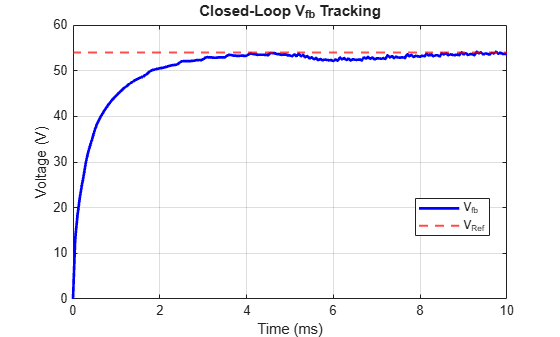
Simulate Resonant Converter Control
Configure and simulate control for half-bridge and full-bridge LLC power converter.
Ports
Input
Converter circuit parameters input bus, specified as a bus. The block uses the fields in this bus to compute controller gains at run time. The bus must contain the following fields:
Lr— resonant inductance (H)Cr— resonant capacitance (F)Lm— magnetizing inductance referred to primary (H)Cf— output filter capacitance (F)Resr— equivalent series resistance of filter capacitor (Ohm)n— transformer primary-to-secondary turns ratioVout— rated output voltage (V)Iout— rated output current (A)Vin— rated input voltage (V)TsVolt— voltage controller sample time (s)AdjustFactor— gain adjustment factor (dimensionless, between 1.0 and 10.0)
Dependencies
To enable this port, set Source to
Compute from input ports.
Data Types: bus
Output
Controller parameters output bus containing the computed gains and coefficients for the voltage control loop, returned as a bus. Connect this to the CtrlParams input of the Resonant Voltage Controller block. The bus contains the following fields:
kpvolt— proportional gain for the voltage controller (populated in PI mode only)kivoltTs— integral gain multiplied by the sample time for the voltage controller (populated in PI mode only)numecoef— numerator polynomial coefficients of the compensator transfer function (populated in 2P2Z and 3P3Z modes)dencoef— denominator polynomial coefficients of the compensator transfer function (populated in 2P2Z and 3P3Z modes)ctrltype— numeric code identifying the controller type: 1 for PI, 2 for 2P2Z, 3 for 3P3Z
Data Types: bus
Parameters
To edit block parameters interactively, use the Property Inspector. From the Simulink® Toolstrip, on the Simulation tab, in the Prepare gallery, select Property Inspector.
Select PI for a proportional-integral controller.
This is the simplest option and works well for converters with moderate bandwidth
requirements and predictable load profiles.
Select 2P2Z for a second-order compensator with
two poles and two zeros. Use this when you need additional loop-shaping
flexibility to achieve tighter transient response or phase margin requirements
that a PI controller cannot meet.
Select 3P3Z for a third-order compensator with
three poles and three zeros. Use this for the most demanding applications
requiring precise gain and phase characteristics across a wide frequency
range.
Programmatic Use
To set the block parameter value programmatically, use
the set_param function.
| Parameter: | CtrlType |
| Values: | "PI" (default) | "2P2Z" | "3P3Z" |
Example: set_param(gcb,"CtrlType","2P2Z")
Select Compute from dialog parameters to derive
gains automatically from circuit parameter values entered in the block
dialog. The circuit parameter fields become visible.
Select Compute from input ports to supply
circuit parameters at run time via the Params input bus. Use
this mode when the operating point can change during simulation and you want
the gains to update accordingly.
Select Custom inputs to directly specify gain
or coefficient values in the block dialog. Use this mode when you have
gains from an external design tool and want to bypass automatic
computation.
Programmatic Use
To set the block parameter value programmatically, use
the set_param function.
| Parameter: | CntrlParams |
| Values: | "Compute from dialog parameters" (default) | "Compute from input ports" | "Custom inputs" |
Example: set_param(gcb,"CntrlParams","Custom inputs")
Select Half-Bridge or
Full-Bridge to match your resonant converter
circuit configuration. The block uses this setting to apply the correct
voltage gain factor when computing the plant model.
Dependencies
This parameter is visible when Source is set to Compute from dialog parameters.
Programmatic Use
To set the block parameter value programmatically, use
the set_param function.
| Parameter: | SwthCkt |
| Values: | "Half-Bridge" (default) | "Full-Bridge" |
Example: set_param(gcb,"SwthCkt","Full-Bridge")
Resonant inductance in henries, specified as a positive scalar. The block uses this value along with the resonant capacitance to determine the converter resonant frequency and plant model for gain computation. Set this to match the series resonant inductor in your LLC tank circuit.
Dependencies
This parameter is visible when Source is set to Compute from dialog parameters.
Programmatic Use
To set the block parameter value programmatically, use
the set_param function.
| Parameter: | Lr |
| Values: | "1.6226e-04" (default) | positive scalar in quotes |
| Data Types: | char | string |
Example: set_param(gcb,"Lr","2e-04")
Resonant capacitance of the LLC tank circuit in farads, specified as a positive scalar. The block uses this value together with Lr (H) to determine the resonant frequency: f_r = 1 / (2π√(Lr×Cr)). Set this to match the series resonant capacitor in your LLC tank circuit.
Dependencies
This parameter is visible when Source is set to Compute from dialog parameters.
Programmatic Use
To set the block parameter value programmatically, use
the set_param function.
| Parameter: | Cr |
| Values: | "1.2089e-08" (default) | positive scalar in quotes |
| Data Types: | char | string |
Example: set_param(gcb,"Cr","1.5e-08")
Magnetizing inductance of the LLC transformer referred to the primary side in henries, specified as a positive scalar. The block uses this value to determine the gain characteristic of the LLC resonant tank; the ratio of Lm to Lr shapes the gain curve. Set this to the measured or datasheet magnetizing inductance of your transformer.
Dependencies
This parameter is visible when Source is set to Compute from dialog parameters.
Programmatic Use
To set the block parameter value programmatically, use
the set_param function.
| Parameter: | Lm |
| Values: | "0.0025" (default) | positive scalar in quotes |
| Data Types: | char | string |
Example: set_param(gcb,"Lm","0.003")
Output filter capacitance in farads, specified as a positive scalar. The block uses this value to determine the dominant pole in the plant transfer function. This value also determines the output voltage ripple at the switching frequency. Set this to match the output filter capacitor in your resonant converter.
Dependencies
This parameter is visible when Source is set to Compute from dialog parameters.
Programmatic Use
To set the block parameter value programmatically, use
the set_param function.
| Parameter: | Cf |
| Values: | "3.0237e-5" (default) | positive scalar in quotes |
| Data Types: | char | string |
Example: set_param(gcb,"Cf","4e-5")
Equivalent series resistance of the output filter capacitor in ohms, specified as a positive scalar. The block uses this value to model the output impedance and the resulting zero in the plant transfer function.
Dependencies
This parameter is visible when Source is set to Compute from dialog parameters.
Programmatic Use
To set the block parameter value programmatically, use
the set_param function.
| Parameter: | Esr |
| Values: | "15e-3" (default) | positive scalar in quotes |
| Data Types: | char | string |
Example: set_param(gcb,"Esr","20e-3")
Transformer primary-to-secondary turns ratio, specified as a positive scalar. The block uses this value to refer secondary-side circuit parameters to the primary side for gain computation. Set this to the actual winding ratio (np/ns) of your isolation transformer.
Dependencies
This parameter is visible when Source is set to Compute from dialog parameters.
Programmatic Use
To set the block parameter value programmatically, use
the set_param function.
| Parameter: | n |
| Values: | "4.3269" (default) | positive scalar in quotes |
| Data Types: | char | string |
Example: set_param(gcb,"n","5")
Rated DC output voltage of the LLC converter in volts, specified as a positive scalar. The block uses this value to define the operating point at which the controller gains are computed. Set this to the nominal regulated output voltage of your converter.
Dependencies
This parameter is visible when Source is set to Compute from dialog parameters.
Programmatic Use
To set the block parameter value programmatically, use
the set_param function.
| Parameter: | VOut |
| Values: | "54" (default) | positive scalar in quotes |
| Data Types: | char | string |
Example: set_param(gcb,"VOut","48")
Rated DC output current of the LLC converter in amperes, specified as a positive scalar. The block uses this value together with Rated VOut (V) to define the rated output power for the operating point gain computation. Set this to the nominal full-load output current of your converter.
Dependencies
This parameter is visible when Source is set to Compute from dialog parameters.
Programmatic Use
To set the block parameter value programmatically, use
the set_param function.
| Parameter: | IOut |
| Values: | "2" (default) | positive scalar in quotes |
| Data Types: | char | string |
Example: set_param(gcb,"IOut","5")
Rated input voltage of the converter in volts, specified as a positive scalar. The block uses this value along with the output voltage and turns ratio to determine the operating point for gain computation. This is typically the output voltage of the PFC stage that feeds the LLC stage. Set this to match the nominal DC bus voltage at the input of your resonant converter.
Dependencies
This parameter is visible when Source is set to Compute from dialog parameters.
Programmatic Use
To set the block parameter value programmatically, use
the set_param function.
| Parameter: | VIn |
| Values: | "400" (default) | positive scalar in quotes |
| Data Types: | char | string |
Example: set_param(gcb,"VIn","380")
Sample time for the voltage control loop in seconds, specified as a positive scalar. The block uses this value to discretize the controller during gain computation. Set this to match the sample time at which your voltage control loop executes.
Dependencies
This parameter is visible when Source is set to Compute from dialog parameters.
Programmatic Use
To set the block parameter value programmatically, use
the set_param function.
| Parameter: | TsVolt |
| Values: | "50e-6" (default) | positive scalar in quotes |
| Data Types: | char | string |
Example: set_param(gcb,"TsVolt","100e-6")
Scaling factor applied to the computed controller gains to adjust control
loop aggressiveness, specified as a positive scalar between 1.0 and 10.0.
The block multiplies the automatically computed gains by this factor. A
value of 1.0 uses the computed gains directly. Increase toward 10.0 for
more aggressive control response, or decrease for more conservative
behavior. This parameter is controlled by a UI panel and is available
when Source is set to
Compute from dialog parameters.
Programmatic Use
To set the block parameter value programmatically, use
the set_param function.
| Parameter: | AdjsFactor |
| Values: | "1.0" (default) | positive scalar in quotes |
| Data Types: | char | string |
Example: set_param(gcb,"AdjsFactor","5.0")
This parameter is read-only.
Computed proportional gain for the voltage controller, displayed as a read-only reference. The block calculates this value from the circuit parameters and adjustment factor. Use this value to verify the computed gains before running your simulation.
Dependencies
This parameter is visible when Source is set to Compute from dialog parameters.
Programmatic Use
To get the block parameter value
programmatically, use the get_param function.
| Parameter: | Kpdisplay |
| Values: | Read-only: "1069.7391" (default) |
| Data Types: | char | string |
Example: get_param(gcb,"Kpdisplay")
This parameter is read-only.
Computed integral gain for the voltage controller, displayed as a read-only reference. The block calculates this value from the circuit parameters and adjustment factor. Use this value to verify the computed gains before running your simulation.
Dependencies
This parameter is visible when Source is set to Compute from dialog parameters.
Programmatic Use
To get the block parameter value
programmatically, use the get_param function.
| Parameter: | Kidisplay |
| Values: | Read-only: "1310314.0729" (default) |
| Data Types: | char | string |
Example: get_param(gcb,"Kidisplay")
Proportional gain for the voltage controller in custom mode, specified as a positive scalar. The block passes this value directly to the output bus without modification. Higher values increase the speed of the voltage response but may reduce stability margin.
Dependencies
This parameter is visible when Source is set to
Custom inputs.This parameter is visible when Controller type is set to
PI.
Programmatic Use
To set the block parameter value programmatically, use
the set_param function.
To get the block parameter value
programmatically, use the get_param function.
| Parameter: | Kpvolt |
| Values: | "1500" (default) | positive scalar in quotes |
| Data Types: | char | string |
Example: set_param(gcb,"Kpvolt","2000")
Integral gain for the voltage controller in custom mode, specified as a positive scalar. The block passes this value directly to the output bus without modification. Higher values reduce steady-state voltage error faster but may cause overshoot.
Dependencies
This parameter is visible when Source is set to
Custom inputs.This parameter is visible when Controller type is set to
PI.
Programmatic Use
To set the block parameter value programmatically, use
the set_param function.
To get the block parameter value
programmatically, use the get_param function.
| Parameter: | Kivolt |
| Values: | "400000" (default) | positive scalar in quotes |
| Data Types: | char | string |
Example: set_param(gcb,"Kivolt","500000")
Numerator polynomial coefficients of the 2P2Z compensator transfer
function, specified as a three-element vector [b0 b1 b2] in descending
powers of z. The block places these coefficients in the numecoef
field of the output bus.
Dependencies
This parameter is visible when Source is set to
Custom inputs.This parameter is visible when Controller type is set to
2P2Z.
Programmatic Use
To set the block parameter value programmatically, use
the set_param function.
To get the block parameter value
programmatically, use the get_param function.
| Parameter: | NumeCoefi2p2z |
| Values: | "[1 0.2 0.1]" (default) | three-element numeric vector in quotes |
| Data Types: | char | string |
Example: set_param(gcb,"NumeCoefi2p2z","[1 0.3 0.15]")
Denominator polynomial coefficients of the 2P2Z compensator transfer
function, specified as a three-element vector [a0 a1 a2] in descending
powers of z. The block places these coefficients in the dencoef
field of the output bus.
Dependencies
This parameter is visible when Source is set to
Custom inputs.This parameter is visible when Controller type is set to
2P2Z.
Programmatic Use
To set the block parameter value programmatically, use
the set_param function.
To get the block parameter value
programmatically, use the get_param function.
| Parameter: | DenCoefi2p2z |
| Values: | "[1 0.5 0.2]" (default) | three-element numeric vector in quotes |
| Data Types: | char | string |
Example: set_param(gcb,"DenCoefi2p2z","[1 0.6 0.25]")
Numerator polynomial coefficients of the 3P3Z compensator transfer
function, specified as a four-element vector [b0 b1 b2 b3] in descending
powers of z. The block places these coefficients in the numecoef
field of the output bus.
Dependencies
This parameter is visible when Source is set to
Custom inputs.This parameter is visible when Controller type is set to
3P3Z.
Programmatic Use
To set the block parameter value programmatically, use
the set_param function.
| Parameter: | NumeCoefi3p3z |
| Values: | "[1 0.5 0.2 0.1]" (default) | four-element numeric vector in quotes |
| Data Types: | char | string |
Example: set_param(gcb,"NumeCoefi3p3z","[1 0.6 0.3 0.15]")
Denominator polynomial coefficients of the 3P3Z compensator transfer
function, specified as a four-element vector [a0 a1 a2 a3] in descending
powers of z. The block places these coefficients in the dencoef
field of the output bus.
Dependencies
This parameter is visible when Source is set to
Custom inputs.This parameter is visible when Controller type is set to
3P3Z.
Programmatic Use
To set the block parameter value programmatically, use
the set_param function.
| Parameter: | DenCoefi3p3z |
| Values: | "[1 0.5 0.2 0]" (default) | four-element numeric vector in quotes |
| Data Types: | char | string |
Example: set_param(gcb,"DenCoefi3p3z","[1 0.6 0.3 0]")
Proportional gain for the voltage controller in custom mode, specified as a nonnegative scalar. The block passes this value directly to the output bus. Increasing this value speeds up the voltage transient response but may reduce stability margin.
Dependencies
This parameter is visible when Source is set to Custom inputs.
Programmatic Use
To set the block parameter value programmatically, use
the set_param function.
| Parameter: | KpvoltTsc |
| Values: | "0" (default) | nonnegative scalar in quotes |
| Data Types: | char | string |
Example: set_param(gcb,"KpvoltTsc","1500")
Integral gain for the voltage controller in custom mode, specified as a nonnegative scalar. The block passes this value directly to the output bus. Increasing this value reduces steady-state voltage error faster but may cause overshoot.
Dependencies
This parameter is visible when Source is set to Custom inputs.
Programmatic Use
To set the block parameter value programmatically, use
the set_param function.
| Parameter: | KivoltTsc |
| Values: | "0" (default) | nonnegative scalar in quotes |
| Data Types: | char | string |
Example: set_param(gcb,"KivoltTsc","400000")
Block execution sample time in seconds, specified as a positive scalar. The block uses this value to set the discrete execution rate for the controller output when using custom gains. Set this to match the sample time of your voltage control loop.
Dependencies
This parameter is visible when Source is set to Custom inputs.
Programmatic Use
To set the block parameter value programmatically, use
the set_param function.
| Parameter: | TsVolt1 |
| Values: | "50e-6" (default) | positive scalar in quotes |
| Data Types: | char | string |
Example: set_param(gcb,"TsVolt1","100e-6")
Extended Capabilities
C/C++ Code Generation
Generate C and C++ code using Simulink® Coder™.
Version History
Introduced in R2026b
See Also
MATLAB Command
You clicked a link that corresponds to this MATLAB command:
Run the command by entering it in the MATLAB Command Window. Web browsers do not support MATLAB commands.


选择网站
选择网站以获取翻译的可用内容,以及查看当地活动和优惠。根据您的位置,我们建议您选择:。
您也可以从以下列表中选择网站:
如何获得最佳网站性能
选择中国网站(中文或英文)以获得最佳网站性能。其他 MathWorks 国家/地区网站并未针对您所在位置的访问进行优化。
美洲
- América Latina (Español)
- Canada (English)
- United States (English)
欧洲
- Belgium (English)
- Denmark (English)
- Deutschland (Deutsch)
- España (Español)
- Finland (English)
- France (Français)
- Ireland (English)
- Italia (Italiano)
- Luxembourg (English)
- Netherlands (English)
- Norway (English)
- Österreich (Deutsch)
- Portugal (English)
- Sweden (English)
- Switzerland
- United Kingdom (English)