利用 SPMD 计算实现并行前缀扫描
R2026b本示例演示了如何利用并行工作单元实现一种基于 SPMD、可重用且可扩展的前缀扫描算法。您还将该实现应用于两个工作流:对分布式数组的累积求和,以及一个有状态扫描,该扫描在视线 (LOS) 分析中同时跟踪运行最大值及其索引。
前缀扫描利用一个关联二元运算符及其元素,对一个序列计算累积结果,例如 plus 与元素 0,或 times 与元素 1。MATLAB® 支持对常见累积函数(如 cumsum、cummin、cummax 和 cumprod)进行分布式数组运算。对于其他运算符,或者当需要携带额外状态时,您可以使用 spmd 模块和复合数组来实现扫描操作。
理解算法
您可以使用复合数组和 spmd,在各个工作单元上执行可扩展的包含式或排除式前缀扫描。该算法基于 Blelloch[1] 中给出的描述。
首先,将数组分配给并行池中的各个工作单元,并在每个工作单元上提取数组的本地段。您在工作单元上将数组作为复合对象进行处理。然后执行以下步骤:
本地扫描和模块聚合:每个工作单元都会使用关联运算符对其本地模块执行一次全局扫描。最后一个本地扫描值即为模块聚合值。
简化:工作单元使用缩减函数
spmdCat交换模块聚合体。按工作单元计算的抵消额:每个工作单元都会根据模块聚合计算一个互斥前缀,从而形成一个针对每个工作单元的偏移量。
应用偏移量:每个工作单元都会将其偏移量应用于本地扫描的每个元素。
对于包容性扫描,当前元素会在偏移量计算之前被纳入本地扫描范围。对于独家扫描,您需要使用单位元将扫描在本地向右平移一位,除此之外,偏移逻辑保持不变。
定义并行前缀扫描函数
编写一个可重用的函数,用于扫描列输入 d-by-N,支持包含或排除的扫描模式,并保留输入的分布。下面定义的 parallelPrefixScan 辅助函数使用二元运算符 operatorFcn 以及运算符 identityVal 的恒等值,对 x 中的列元素进行前缀扫描。您可以将 scanMode 指定为 inclusive 或 exclusive。该运算符必须具有结合律,且 id 必须是该运算符函数的正确恒等式。当二元运算符接受多个参量时,x 可以包含多行。该函数接受本地数组或分布式数组。
function y = parallelPrefixScan(x,operatorFcn,identityVal,scanMode)
%   y = parallelPrefixScan(x,operatorFcn,identityVal,scanMode)
%   Inputs:
%     x           : d-by-N local or distributed.
%                   Each column is a d-by-1 input.
%     operatorFcn : function handle for an associative binary operator
%     identityVal : d-by-1 identity for operatorFcn,
%                   for example, 0 or [-inf; 0]).
%     scanMode    : "inclusive" or "exclusive".
%   Output:
%     y           : d-by-N, with the same distribution
%                   and codistributor as x.
%

inputWasDistributed = isdistributed(x);
if ~inputWasDistributed
% Default distribution along the last non-singleton dimension
    x = distributed(x);
end

spmd
    localInput = getLocalPart(x);

    % 1) Local scan and aggregate
    localScan = localInput;
    for k = 2:size(localInput,2)
        localScan(:,k) = operatorFcn(localScan(:,k-1),localInput(:,k));
    end
    localAggregate = localScan(:,end);

    if strcmp(scanMode,"exclusive")
        localScan = [identityVal localScan(:,1:end-1)];
    end

    % 2) Concatenate block aggregates in worker index order as columns
    % Each worker receives a d-by-NumWorkers matrix (columns)
    workerAggregates = spmdCat(localAggregate,2);

    % 3) Compute this worker's exclusive scan of previous aggregates
    prefixOffset = identityVal;
    for p = 1:spmdIndex-1
        prefixOffset = operatorFcn(prefixOffset,workerAggregates(:,p));
    end

    % 4) Apply the offset to the local scan
    localScanOffset = localScan;
    for k = 1:size(localScan,2)
        localScanOffset(:,k) = operatorFcn(prefixOffset,localScan(:,k));
    end

    % Reassemble distributed result
    codist = getCodistributor(x);
    yDistributed = codistributed.build(localScanOffset,codist);
end

if ~inputWasDistributed
    y = gather(yDistributed);
else
    y = yDistributed;
end
end
在分布式数组上计算前缀和
您可以通过将任意二进制函数与 parallelPrefixScan 辅助函数结合使用,来执行任何前缀扫描操作。例如,使用自定义函数 parallelPrefixScan 对分布式数组计算包含边界值的累积和。
创建一个由随机整数组成的分布式数组。
scanInput = randi([1 1000],1,1E5,"distributed");使用以下方式调用 parallelPrefixScan 辅助函数:
@plus作为加法运算符。0作为元素。加上零不会改变总和。"inclusive"作为扫描模式。
scanResult = parallelPrefixScan(scanInput,@plus,0,"inclusive");输出 y 包含 x 中所有元素的累积和。通过将 y 与内置函数 cumsum 的结果进行比较,来验证其正确性。该消息确认自定义扫描与内置函数匹配。
yTest = cumsum(scanInput);
if max(abs(scanResult-yTest)) < 1e-9
    disp("Passed prefix sum check");
end
Passed prefix sum check
使用自定义前缀扫描运算符跟踪值和索引
为了解决特定领域的难题,计算数组中的累积值并确定每个值出现的索引位置,往往会很有帮助。像 sum 这样的简单扫描运算符通常只处理值,因此若要同时追踪值及其位置,则需要使用自定义运算符。本示例演示了如何使用自定义运算符追踪累积最大值及其索引,并将该技术应用于合成地形剖面上的视线 (LOS) 问题。
定义自定义运算符
定义一个自定义运算符 maxLocOp,用于比较两对 [value,index],并返回值较大的一对;在值相同时,保留左侧操作数以保持最早的索引。
function c = maxLocOp(a,b)
if (a(1) > b(1)) || (a(1) == b(1))
    c = a;
elseif a(1) < b(1)
    c = b;
end
end
解决视线问题
视线问题涉及一张地形图,该地形图被表示为沿一条光线采样得到的一维海拔剖面。假设有一名观察者位于特定高度,判断地形上的特定点是否从该观察点可见。如果一个点的仰角大于该光线上的所有先前角度,则该点是可见的。为了高效地进行检查,应计算仰角的累积最大值,并将每个点与该值进行比较。
首先,通过指定网格大小、采样间距和观察者高度来定义地形。然后,使用本示例中提供的 generateTerrain 辅助函数生成一个简单的地形剖面。
numSamples = 1E5;
sampleSpacing = 50.0;
observerHeight = 0;
[dist,elev] = generateTerrain(numSamples,sampleSpacing,observerHeight);
通过将高差除以距离,计算出角度的斜率。
slopeTan = (elev-observerHeight)./dist;
定义用于沿地形追踪位置的向量,并将其与切向量拼接,以生成 parallelPrefixScan 辅助函数的输入。
sampleIdxs = distributed(1:numSamples);
scanInput = [slopeTan;sampleIdxs];
将 parallelPrefixScan 辅助函数与 maxLocOp 自定义运算符和恒等式 [-inf;0] 结合使用。该恒等式对确保了初始最大斜率为负无穷大,且初始索引为零,因此第一次比较总能正确更新。
id = [-inf;0];
scanResult = parallelPrefixScan(scanInput,@maxLocOp,id,"inclusive");
扫描结果返回一个 2-by-numSamples 矩阵,其中第一行记录迄今为止遇到的最大斜率,第二行记录该最大斜率出现的位置。
runningMaxSlopeTan = scanResult(1,:);
idxRunningMaxSlope = scanResult(2,:);
利用这些结果来确定沿地形分布的目标的可见状态。
从位置向量的最后 90% 部分中选取三个等间距的点。
numTargets = 3;
targetIdxs = round(linspace(numSamples*0.1,numSamples,numTargets));
对于每个目标,计算并收集:
从观察者到目标的斜率,
targetSlopeTan。在目标处遇到的最大坡度,
maxSlopeTanAtTarget。出现最大斜率的点位于
maxSlopeIdxAtTarget。
targetSlopeTan = gather(slopeTan(targetIdxs));
maxSlopeTanAtTarget = gather(runningMaxSlopeTan(targetIdxs));
maxSlopeIdxAtTarget = gather(idxRunningMaxSlope(targetIdxs));
如果目标的坡度大于或等于其所在位置的当前最大坡度,则该目标可见。
isVisible = targetSlopeTan >= maxSlopeTanAtTarget;
如果目标被遮挡,则遮挡点位于 maxSlopeIdxAtTarget,即斜率达到最大值的位置。该点位于高于目标视线高度的地形上。计算阻塞点和坡度。
obstructionPoint = maxSlopeIdxAtTarget;
obstructionSlopeTan = maxSlopeTanAtTarget;
使用 plotLOSTargets 辅助函数绘制地形和目标的可见范围。该图显示了地形剖面、观察点、目标以及任何障碍点。绿色标记表示可见目标,并带有实心的视线 (LOS) 线。红色标记表示被阻挡的目标,阻挡点用菱形标出,虚线表示阻挡的视线 (LOS)。您可以确认只有两个目标可见,并确定导致阻挡的确切地形点。plotLOSTargets 函数作为辅助文件附在示例中。
plotLOSTargets(dist,elev,observerHeight,targetIdxs,isVisible, ...
    obstructionPoint,obstructionSlopeTan);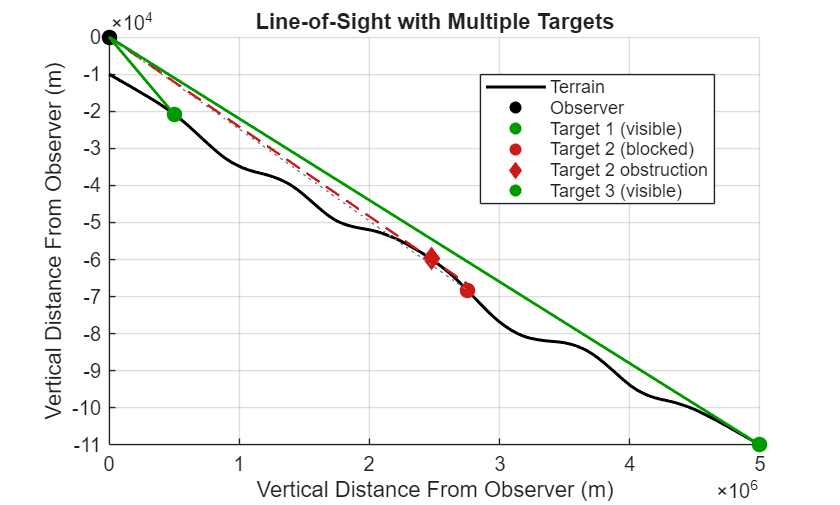
参考资料
[1] 盖伊·E·布莱洛克 (Guy E. Blelloch),前缀和及其应用。技术报告 CMU-CS-90-190。卡内基梅隆大学计算机科学学院,1990 年。https://www.cs.cmu.edu/~guyb/papers/Ble93.pdf
另请参阅
distributed | spmdCat | Composite

