propagationPaths
R2026bSyntax
Description
Add-On Required: This feature requires the Underwater Acoustic Channels add-on.
propPaths = propagationPaths(bhModel,fc,srcLocation,rxLocation)
propagationPaths(
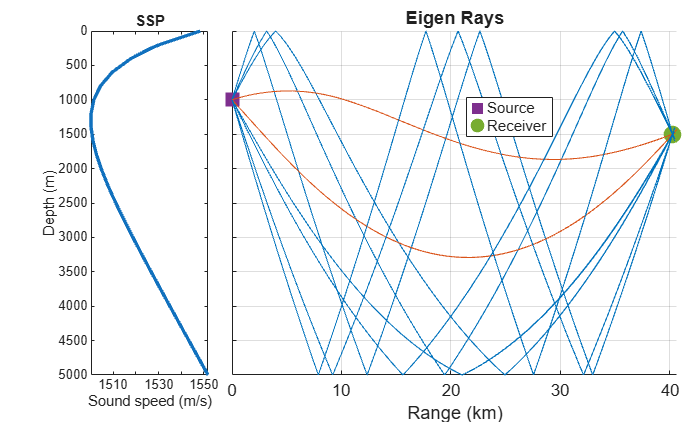
with no output arguments plots eigenrays between an underwater source and receiver.bhModel,fc,srcLocation,rxLocation)
Examples
To run this example, you must have Bellhop installed, and you must also configure MATLAB with the Bellhop executable path by using the bellhopConfiguration function.
Create a bellhopModel object with the default configuration.
bhModel = bellhopModel
bhModel =
  bellhopModel handle with properties:

                       SoundSpeed: [27×1 double]
                  SoundSpeedDepth: [27×1 double]
           SSPInterpolationMethod: "linear"
          BottomBathymetryProfile: "flat"
     BottomReflectionCoefficients: [181×2 double]
          SurfaceAltimetryProfile: "flat"
    SurfaceReflectionCoefficients: -1

  Show all properties
Calculate the propagation paths from a source at (0, 40, 1000) m with an operating frequency of 1000 Hz to a receiver at (20000, 35000, 1500) m.
fc = 1000;
srcLocation = [0;40;1e3];
rxLocation = [20e3;35e3;1.5e3];
propPaths = propagationPaths(bhModel,fc,srcLocation,rxLocation)
propPaths = 9×7 table
    PathLoss    PathDelay    PhaseShift    AngleOfDeparture    AngleOfArrival    NumSurfaceReflections    NumBottomReflections
    ________    _________    __________    ________________    ______________    _____________________    ____________________

     87.628       26.84            90        0    -2.8651       0    -3.4277               0                       0
     89.403      26.791             0        0     9.7373       0    -9.9433               0                       0
     96.489      27.378        108.71        0     17.501       0     17.612               1                       1
     96.834       27.18        94.175        0    -16.733       0     -16.82               1                       1
     97.168      27.752       -38.287        0    -19.547       0     19.641               2                       1
     98.455      26.874       -125.13        0     15.284       0    -15.376               0                       1
     111.64      28.868        162.11        0     25.236       0    -25.301               1                       2
     113.84      29.425       -14.018        0    -27.367       0    -27.427               2                       2
     114.57      29.738       -12.728        0     28.364       0     28.421               2                       2
Plot the eigenrays at the receiver location.
propagationPaths(bhModel,fc,srcLocation,rxLocation)
Input Arguments
Output Arguments
Limitations
The
bellhopModelobject uses a temporary directory to store Bellhop input files whilepropagationPathsis running. The Fortran implementation of Bellhop errors if the file path length exceeds 80 characters. If you encounter this error, change the temporary directory to a path with fewer characters. For more information, see How do I change the Temporary Directory that MATLAB uses?.
Version History
Introduced in R2026b

