主要内容

transmissionLoss

R2026b

Calculate transmission loss in underwater environment

Since R2026b

    Description

    Add-On Required: This feature requires the Underwater Acoustic Channels add-on.

    transmissionLoss(bhModel,fc,srcLocation) plots the transmission loss from an underwater source.

    example

    transmissionLoss(bhModel,fc,srcLocation,rxLocation) plots the transmission loss at the receiver location.

    tl = transmissionLoss(bhModel,fc,srcLocation) returns the transmission loss for an equally spaced grid across the underwater environment defined by bhModel.

    tl = transmissionLoss(bhModel,fc,srcLocation,rxLocation) returns the transmission loss at the receiver location.

    tl = transmissionLoss(___,InterferenceMode=intMode) specifies how Bellhop treats the phase of each beam.

    example

    Examples

    collapse all

    To run this example, you must have Bellhop installed, and you must also configure MATLAB with the Bellhop executable path by using the bellhopConfiguration function.

    Create a bellhopModel object with a maximum ray tracing range limit of 20 km.

    bhModel = bellhopModel(RayTraceRangeLimit=20e3);

    Plot the transmission loss from a source at (500, 300, 700) m with an operating frequency of 1000 Hz.

    fc = 1000;
    srcLocation = [500;300;700];
    transmissionLoss(bhModel,fc,srcLocation)
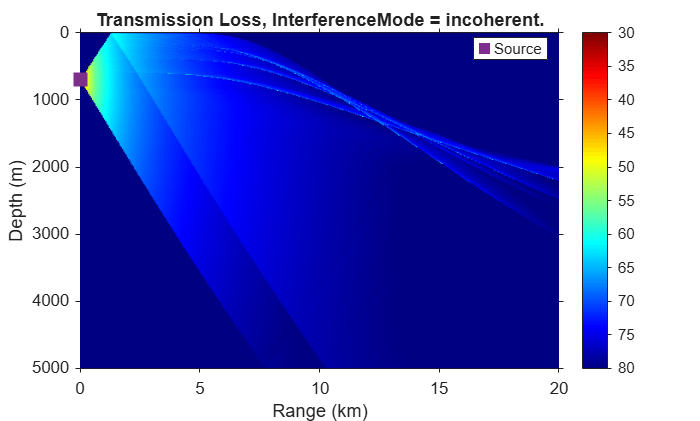
    Figure Bellhop Transmission Loss contains an axes object. The axes object with title Transmission Loss, InterferenceMode = incoherent., xlabel Range (km), ylabel Depth (m) contains 2 objects of type surface, line. One or more of the lines displays its values using only markers This object represents Source.

    Calculate the transmission loss for a receiver at (400, 3720, 2330) m.

    rxLocation = [400;3720;2330];
    tl = transmissionLoss(bhModel,fc,srcLocation,rxLocation)
    tl = 
    71.6842
    

    To run this example, you must have Bellhop installed, and you must also configure MATLAB with the Bellhop executable path by using the bellhopConfiguration function.

    Create a bellhopModel object that uses 3000 rays for ray tracing, with with a maximum ray tracing range limit of 6 km.

    bhModel = bellhopModel(RayTraceRangeLimit=6e3,NumRays=3000);

    Plot the transmission loss from a source at (500, 400, 300) m with an operating frequency of 1000 Hz.

    fc = 1000;
    srcLocation = [500;400;300];
    transmissionLoss(bhModel,fc,srcLocation)
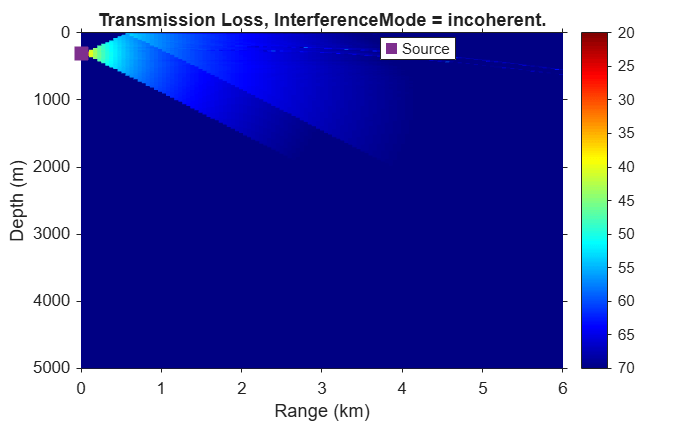
    Figure Bellhop Transmission Loss contains an axes object. The axes object with title Transmission Loss, InterferenceMode = incoherent., xlabel Range (km), ylabel Depth (m) contains 2 objects of type surface, line. One or more of the lines displays its values using only markers This object represents Source.

    Use the coherent interference mode to retain ray phases when calculating transmission loss.

    transmissionLoss(bhModel,fc,srcLocation,InterferenceMode="coherent")
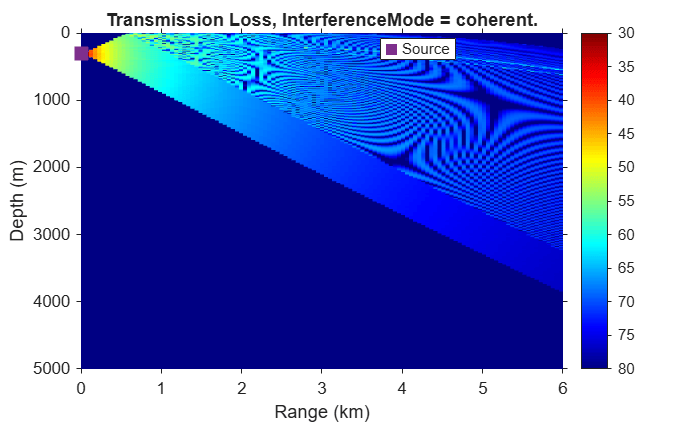
    Figure Bellhop Transmission Loss contains an axes object. The axes object with title Transmission Loss, InterferenceMode = coherent., xlabel Range (km), ylabel Depth (m) contains 2 objects of type surface, line. One or more of the lines displays its values using only markers This object represents Source.

    Input Arguments

    collapse all

    The bellhopModel object that interfaces with Bellhop. If you do not specify rxLocation, you must set the RayTraceRangeLimit property of bhModel.

    Operating frequency of the source in Hz, specified as a positive scalar.

    Data Types: double | single

    Source location in underwater environment, specified as a 3-by-1 column vector. Specify the location as an (x, y, z) position in the three-dimensional environment, where x, y, and z are global Cartesian coordinates. The z-coordinate is positive in the downward direction. The z value must be greater than 0 and must not exceed the maximum depth specified by the SoundSpeedProfile property of bhModel. The transmissionLoss function internally converts coordinates to a local cylindrical coordinate system. For more information on coordinate systems, see Global and Local Coordinate Systems.

    Data Types: double | single

    Receiver location in underwater environment, specified as a 3-by-1 column vector. Specify the location as an (x, y, z) position in the three-dimensional environment, where x, y, and z are global Cartesian coordinates. The z-coordinate is positive in the downward direction. The z value must be greater than 0 and must not exceed the maximum depth specified by the SoundSpeedProfile property of bhModel. The transmissionLoss function internally converts coordinates to a local cylindrical coordinate system. For more information on coordinate systems, see Global and Local Coordinate Systems.

    The range between the srcLocation and rxLocation must be less than or equal to the maximum range defined by the RayTraceRangeLimit property of bhModel.

    Data Types: double | single

    Phase interference mode, specified as either "incoherent" or "coherent".

    When you specify intMode as "incoherent", Bellhop drops the phase information of each beam at the receiver location. When you specify intMode as "coherent", Bellhop includes the phase of each beam when computing the transmission loss.

    Data Types: char | string

    Output Arguments

    collapse all

    Transmission loss from source in dB, returned as a scalar or matrix. If you specify rxLocation, tl is the transmission loss in dB from the source to the receiver. If you do not specify rxLocation, tl is a matrix of transmission losses on an equally spaced grid across the depth and range defined in bhModel.

    Version History

    Introduced in R2026b