phased.CovarianceEstimator
R2026bDescription
The phased.CovarianceEstimator
System object™ creates a maximum-likelihood estimator of the sample covariance matrix (SCM).
The sample covariance matrix is derived from statistically independent and identically
distributed (i.i.d.) data snapshots of complex Gaussian random vectors. You can use the SCM in
array processing algorithms such as direction of arrival estimation, beamforming, adaptive
coherence estimation, and space-time adaptive processing, because of its simplicity and
statistical efficiency. The algorithm always assumes sufficient training data is
available.
To estimate the sample covariance matrix of vector:
Create the
phased.CovarianceEstimatorobject and set its properties.Call the object with arguments, as if it were a function.
To learn more about how System objects work, see What Are System Objects?
Creation
Description
creates a
estimator = phased.CovarianceEstimatorphased.CovarianceEstimator
System object with default property values.
estimator = phased.CovarianceEstimator(Name=Value)phased.CovarianceEstimator
System object with each property Name set to a specified
Value. You can specify additional name-value arguments in any order
as (Name1=Value1,...,NameN=ValueN).
Example: estimator =
phased.CovarianceEstimator(Mode="Update",Method="SCM").
Properties
Usage
Description
covmat = estimator(xadd)covmat, from the input snapshots
xadd. In this syntax, you can use the object function in either
Batch mode or Update mode.
If you set the
Modeproperty to"Batch"or leave it unspecified, the object operates inBatchmode and computes the covariance fromxadd.If you set the
Modeproperty to"Update", the object updates the current covariance estimate using the snapshotsxadd.
covmat = estimator(xadd,xrem)xadd and
removing the snapshots in xrem. To use this syntax, set the
Mode property to "Update and downdate". You can
use an empty value [] matrix for xadd or for
xrem to indicate that the object applies no updates or downdate
using these arguments.
Input Arguments
Output Arguments
Object Functions
To use an object function, specify the
System object as the first input argument. For
example, to release system resources of a System object named obj, use
this syntax:
release(obj)
Examples
Theoretical and Empirical Covariance of Received Signal
Simulate receiving a signal at a 2-by-2 uniform rectangular array (URA). The elements are spaced 1/4-wavelength apart. Specify the four corners of the array.
pos = 0.25*[0 0 0 0; -1 1 -1 1; -1 -1 1 1]
pos = 3×4

         0         0         0         0
   -0.2500    0.2500   -0.2500    0.2500
   -0.2500   -0.2500    0.2500    0.2500
Define the noise power independently for each of the four array elements. Each entry in ncov is the noise power of an array element. This element position is the corresponding column in pos. Assume the noise is uncorrelated across elements.
ncov = db2pow([-9 -10 -10 -11]);
Simulate 100 snapshots of the received signal at the array, and store the theoretical and empirical covariance matrices. Assume that one incoming signal originates from 30° azimuth and 10° elevation. A second incoming signal originates from 50° azimuth and 0° elevation. The signals have a power of 1 W and are uncorrelated.
nsamp = 100;
arrival_ang1 = [30;10];
arrival_ang2 = [50;0];
angs = [arrival_ang1,arrival_ang2];
rng default
Covariance matrix from sensorsig
[x,rt,cov] = sensorsig(pos,nsamp,angs,ncov);
disp(cov)
   2.2107 + 0.0000i  -0.7342 - 1.6392i   1.9447 - 0.5481i  -1.2582 - 1.5304i
  -0.7342 + 1.6392i   1.9858 + 0.0000i  -0.2426 + 1.4967i   1.7761 - 0.4745i
   1.9447 + 0.5481i  -0.2426 - 1.4967i   2.1762 + 0.0000i  -0.7315 - 1.6525i
  -1.2582 + 1.5304i   1.7761 + 0.4745i  -0.7315 + 1.6525i   2.0000 + 0.0000i
Sample covariance matrix from phased.CovarianceEstimator
covest = phased.CovarianceEstimator;
disp(covest(x))
   2.2107 + 0.0000i  -0.7342 - 1.6392i   1.9447 - 0.5481i  -1.2582 - 1.5304i
  -0.7342 + 1.6392i   1.9858 + 0.0000i  -0.2426 + 1.4967i   1.7761 - 0.4745i
   1.9447 + 0.5481i  -0.2426 - 1.4967i   2.1762 + 0.0000i  -0.7315 - 1.6525i
  -1.2582 + 1.5304i   1.7761 + 0.4745i  -0.7315 + 1.6525i   2.0000 + 0.0000i
The two covariance matrices agree.
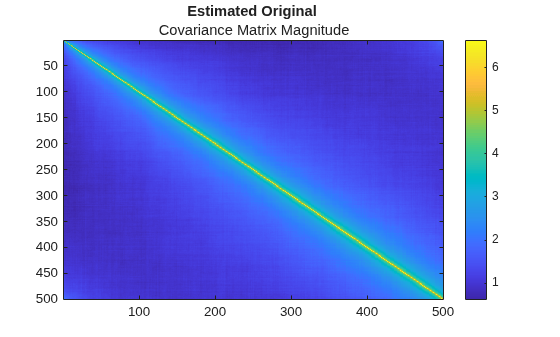
Create pink noise and display its covariance matrix.
Configure a dsp.ColoredNoise System object™ to create complex pink noise.
N = 500;
P = 1e4;
color = "pink";
pinkNoiseGen = dsp.ColoredNoise(Color=color, ...
    SamplesPerFrame=N,NumChannels=P);
sig = pinkNoiseGen() + 1i*pinkNoiseGen();
Display the original covariance matrix.
covest = phased.CovarianceEstimator(Mode="Update and downdate", ...
    DiagonalLoading="Input port");
Set the diagonal loading factor to 0.1.
dlf = 0.1;
covMatrix = covest(sig.',[],dlf);
imagesc(abs(covMatrix))
colorbar
title("Estimated Original ", ...
    "Covariance Matrix Magnitude")
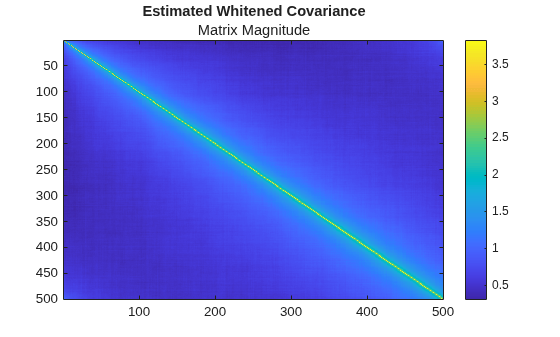
Apply whitening to the signal
w = whiteningmat(covMatrix);
sigwhite = w*sig;
Display the whitened covariance matrix.
covMatrixWhiten = covest(sigwhite.',[],dlf);
imagesc(abs(covMatrixWhiten))
colorbar
title("Estimated Whitened Covariance", ...
    "Matrix Magnitude")
More About
References
[1] Gini, Fulvio, and Maria Greco. “Covariance Matrix Estimation for CFAR Detection in Correlated Heavy Tailed Clutter.” Signal Processing, vol. 82, no. 12, Dec. 2002, pp. 1847–59.
[2] Pascal, F., et al. “Performance Analysis of Covariance Matrix Estimates in Impulsive Noise.” IEEE Transactions on Signal Processing, vol. 56, no. 6, June 2008, pp. 2206–17.
[3] De Maio, Antonio, and Maria Sabrina Greco, editors. Modern Radar Detection Theory. Institution of Engineering and Technology, 2015.
Extended Capabilities
Version History
Introduced in R2026b

