主要内容

addShape

R2026b

Display shape in point cloud viewer

Since R2026b

    Description

    roi = addShape(pcview,shape,position) displays one or more shapes in the point cloud viewer specified by pcview. Specify the shape type and location with shape and position, respectively. You can control the properties of the displayed shape or shapes after creation by using the corresponding shape object in roi.

    roi = addShape(___,Name=Value) specifies options using one or more name-value arguments in addition to the input arguments from the previous syntax. For example, Color="yellow" sets the color of each shape to yellow.

    Examples

    collapse all

    Read an aerial lidar point cloud, remove the ground, and segment the remaining points into clusters.

    reader = lasFileReader("aerialLidarData.laz");
    ptCloud = readPointCloud(reader);
    
    groundIdx = segmentGroundSMRF(ptCloud);
    nonGroundPc = select(ptCloud, ~groundIdx);
    
    [labels, numClusters] = pcsegdist(nonGroundPc,1,NumClusterPoints=50);

    Compute properties for each cluster including oriented bounding boxes, centroids, principal axis lengths, and sphericity.

    clusterProps = pcclusterprops(nonGroundPc,labels,"All");
    cuboids = vertcat(clusterProps.OrientedBoundingBox);
    centroids = vertcat(clusterProps.Centroid);
    axLengths = vertcat(clusterProps.PrincipalAxisLength);

    Visualize the point cloud and overlay oriented bounding boxes for the five largest clusters by volume.

    volumes = cuboids(:,4) .* cuboids(:,5) .* cuboids(:,6);
    [~, sortIdx] = sort(volumes,"descend");
    
    pcview = pcviewer(nonGroundPc);
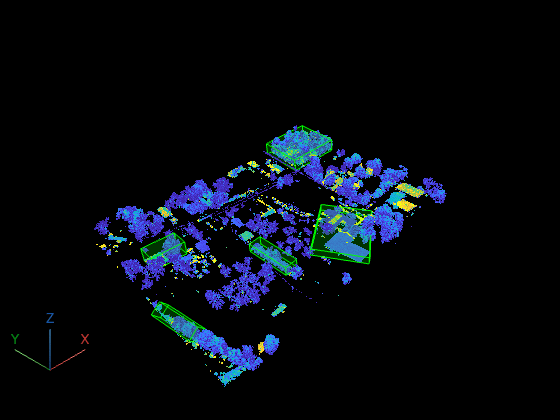
    rois = addShape(pcview,"cuboids",cuboids(sortIdx(1:5),:),Color="green");

    Identify the ten most spherical clusters and annotate them with spheres. Display both the bounding boxes and spheres together.

    sphericity = [clusterProps.Sphericity]';
    [~, sphereIdx] = sort(sphericity,"descend");
    top10 = sphereIdx(1:10);
    
    sphereData = zeros(10, 4);
    for i = 1:10
        sphereData(i,:) = [centroids(top10(i),:), max(axLengths(top10(i),:))/2];
    end
    
    pcview2 = pcviewer(nonGroundPc);
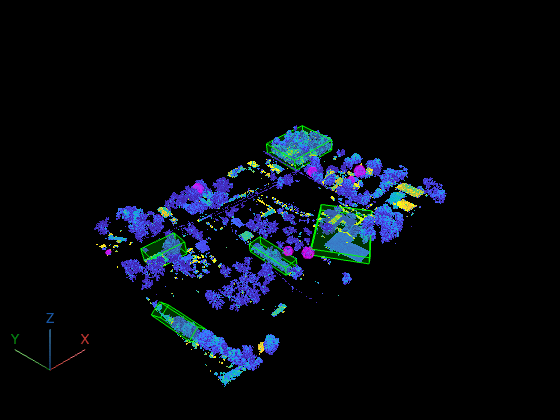
    addShape(pcview2, "cuboids", cuboids(sortIdx(1:5),:), Color="green");
    addShape(pcview2, "spheres", sphereData, Color="magenta");

    Input Arguments

    collapse all

    Point cloud viewer in which to display shape, specified as a pcviewer object.

    Type of shape to display, specified as one of these values:

    • "points"

    • "cuboids"

    • "lines"

    • "polylines"

    • "spheres"

    • "cylinders"

    • "planes"

    • "arrows"

    • "plusses"

    • "ellipsoids"

    Position of the shape in the display, specified as one of these options:

    ShapeDimensionDescription
    "points"M-by-3 matrixEach row specifies the [x y z] location of one point.
    "cuboids"

    If you specify a matrix, each row specifies one cuboid in the form [xctr yctr zctr xlen ylen zlen xrot yrot zrot], where the values define the cuboid center, dimensions, and orientation.
    "lines"M-by-6 matrixEach row specifies one line segment in the form [x1 y1 z1 x2 y2 z2].
    "polylines"M-by-3 matrixEach row specifies one polyline vertex in the form [x y z]. You must separate individual polylines with rows of NaN values.
    "spheres"

    If you specify a matrix, each row specifies one sphere in the form [x y z radius], where [x y z] defines the sphere center.
    "cylinders"

    If you specify a matrix, each row specifies one cylinder in the form [x y z radius height ox oy oz], where [x y z] is the cylinder center and [ox oy oz] is the orientation vector.
    "planes"

    • M-by-8 matrix

    • M-element array of planeModel objects

    If you specify a matrix, each row specifies one plane in the form [x y z width height u v w], where [x y z] is a location on the plane and [u v w] is the normal vector.
    "arrows"M-by-6 matrixEach row specifies one arrow in the form [x y z u v w], where [x y z] is the arrow tail location and [u v w] is the direction vector.
    "plusses"M-by-3 matrixEach row specifies one plus symbol location in the form [x y z].
    "ellipsoids"M-by-9 matrixEach row specifies one ellipsoid in the form [x y z xsemi ysemi zsemi xrot yrot zrot], where the values define the ellipsoid center, semiaxis lengths, and orientation.

    Name-Value Arguments

    collapse all

    Specify optional pairs of arguments as Name1=Value1,...,NameN=ValueN, where Name is the argument name and Value is the corresponding value. Name-value arguments must appear after other arguments, but the order of the pairs does not matter.

    Example: addShape(pcview,shape,positionColor="yellow") sets the color of each shape to yellow.

    Shape color, specified as an RGB triplet, a short color name, a long color name, or an M-by-3 matrix of RGB triplets. When you specify a single color, the function applies that color to all shapes. When you specify multiple colors, the number of colors must match the number of shapes specified by position.

    Shape opacity, specified as a numeric scalar in the range [0, 1]. When you set Alpha to 1, the shapes are fully opaque. When you set Alpha to 0, the shapes are fully transparent.

    Shape visibility, specified as "on" or "off", or as a numeric or logical 1 (true) or 0 (false). The visibility value applies to all shapes. A value of "on" is equivalent to true, and "off" is equivalent to false. Thus, you can use the value of the property set by this argument as a logical value. The value is stored as an on/off logical value of type OnOffSwitchState.

    Output Arguments

    collapse all

    Added shape, returned as a shape object or an M-element array of shape objects. The type of object or objects returned in roi depends on the value of the shape argument and returned as one of:

    • Points — Points object

    • Lines — Lines object

    • Polyines — Polylines object

    • Cuboids — Cuboids object

    • Angles — Angles object

    • Elevations — Elevations object

    • Circles — Circles object

    • Freehand — Freehand object

    Version History

    Introduced in R2026b