sphereModel
R2026bObject for storing a parametric sphere model
Description
The sphereModel object stores the parameters of a parametric
sphere model. After you create a sphereModel object, you can extract sphere
surface points and points within the sphere using object functions. Sphere models are used to
store the output of the pcfitsphere function, which fits a sphere
over a point cloud.
Creation
There are two ways to create a sphereModel object.
Create a sphere model by specifying the sphere parameters in the
sphereModelobject.Fit a sphere model over a point cloud using the
pcfitspherefunction.
Description
model = sphereModel(parameters)parameters argument is a 1-by-4 numeric vector that determines the
value of the Parameters property.
Input Arguments
Properties
Object Functions
plot | Plot parametric model |
findPointsInModel | Find points in or on surface of geometric model |
transform | Transform geometric models between coordinate frames |
Examples
Load a point cloud into the workspace.
load("object3d.mat");Display the point cloud and label the figure.
figure
pcshow(ptCloud)
title("Detect a sphere in a point cloud")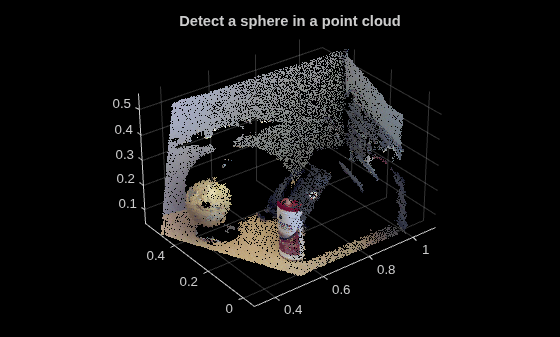
Set the maximum point-to-sphere distance for sphere fitting to 1cm.
maxDistance = 0.01;
Set the region of interest to constrain the search.
roi = [-inf,0.5;0.2,0.4;0.1,inf];
sampleIndices = findPointsInROI(ptCloud,roi);
Detect the globe in the point cloud and extract it.
[model,inlierIndices] = pcfitsphere(ptCloud,maxDistance,SampleIndices=sampleIndices);
globe = select(ptCloud,inlierIndices);
Plot the extracted globe.
figure
pcshow(globe)
title("Globe Point Cloud")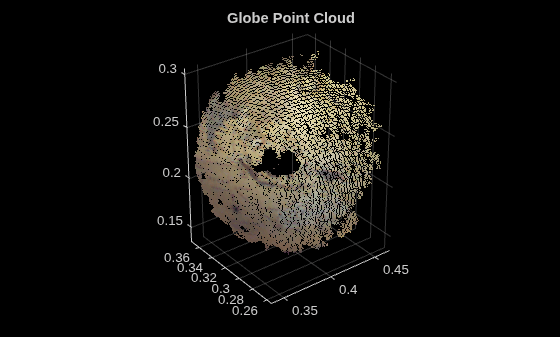
Version History
Introduced in R2015bSee Also
Objects
pointCloud|planeModel|cylinderModel|cuboidModel|rigidtform3d(Image Processing Toolbox)
Functions
pcfitcylinder|pcfitplane|pcfitsphere|pcfitcuboidalign|pcfitcuboid|pcshow|pcplayer|pcwrite|pcread|pcmerge|pctransform|pcdownsample|pcdenoise|pcregistericp
Topics
- 3-D Point Cloud Registration and Stitching (Computer Vision Toolbox)

