主要内容

addSurfaceMesh

R2026b

Display surface mesh in point cloud viewer

Since R2026b

    Description

    surface = addSurfaceMesh(pcview,mesh) displays the surface mesh specified by mesh in the point cloud viewer pcview. You can control the appearance of the mesh by using the properties of the surface output.

    example

    surface = addSurfaceMesh(pcview,triangulationObj) displays the surface mesh specified by the triangulation object triangulationObj.

    surface = addSurfaceMesh(___,Name=Value) specifies options using one or more name-value arguments in addition to any combination of arguments from previous syntaxes. For example, Color="yellow" sets the color of the mesh vertices to yellow.

    Examples

    collapse all

    Read the teapot PLY file as a point cloud, then generate a surface mesh from the point cloud using Poisson reconstruction.

    ptCloud = pcread("teapot.ply");
    mesh = pc2surfacemesh(ptCloud, "poisson");

    Visualize the point cloud in pcviewer, then add the surface mesh using addSurfaceMesh. Translate the mesh along the x-axis using the Transformation property to view the point cloud and mesh side by side.

    pcview = pcviewer(ptCloud);
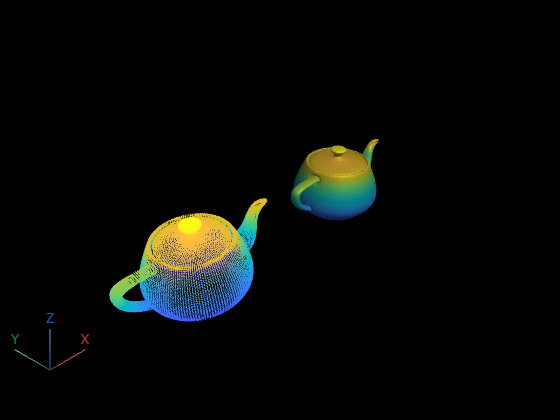
    surface = addSurfaceMesh(pcview, mesh);
    tform = rigidtform3d([0 0 0], [8 0 0]);
    surface.Transformation = tform;

    Input Arguments

    collapse all

    Point cloud viewer in which to display surface mesh, specified as a pcviewer object.

    Surface mesh, specified as a surfaceMesh object.

    Triangulation defining surface mesh, specified as a triangulation object.

    Name-Value Arguments

    collapse all

    Specify optional pairs of arguments as Name1=Value1,...,NameN=ValueN, where Name is the argument name and Value is the corresponding value. Name-value arguments must appear after other arguments, but the order of the pairs does not matter.

    Example: addSurfaceMesh(pcview,mesh,Color="yellow") sets the color of the mesh vertices to yellow.

    Vertex color, specified as an RGB triplet, a short color name, a long color name, or an M-by-3 matrix. When you do not specify this value, the function determines the vertex color using the ColorSource value and the colormap of pcview.

    Surface mesh opacity, specified as a numeric scalar in the range [0,1].

    Source of the color data, specified as "auto", "X", "Y", "Z", "FaceColor", or "VertexColor".

    • "auto" — Uses the FaceColor property of mesh, if available. Otherwise, uses VertexColor. If neither is available, or if the input is a triangulation object, uses vertex z-coordinates.

    • "X" — Use the x-coordinates of the vertices.

    • "Y" — Use the y-coordinates of the vertices.

    • "Z" — Use the z-coordinates of the vertices.

    • "FaceColor" — Use the FaceColor property of the mesh input object.

    • "VertexColor" — Use the VertexColor property of the mesh input object.

    Shape visibility, specified as "on" or "off", or as a numeric or logical 1 (true) or 0 (false). A value of "on" is equivalent to true, and "off" is equivalent to false. Thus, you can use the value of the property set by this argument as a logical value. The value is stored as an on/off logical value of type OnOffSwitchState.

    ValueDescription
    "on"Display edges only.
    "off"Display filled surface.

    Output Arguments

    collapse all

    Mesh surface, returned as a Surface object. The object represents the displayed mesh, with these properties:

    • Data — A surfaceMesh or triangulation object. (Read only)

    • Color — Vertex color, returned as an RGB triplet, a short color name, a long color name, or an M-by-3 matrix of RGB triplets.

    • ColorSource — Source of colormap data to use to color the surface mesh. Values can be "X", "Y", "Z", "FaceColor", "VertexColor", or "Custom".

    • Transformation — Transformation applied to the points in the 3-D scene, returned as a rigidtform3d (Image Processing Toolbox), affinetform3d (Image Processing Toolbox), simtform3d (Image Processing Toolbox), or transltform3d (Image Processing Toolbox) object.

    • Alpha — Transparency of the surface, specified as a numeric scalar in the range [0,1].

    • Wireframe — Whether to display the surface as a wireframe mesh. Values can be "on" or "off".

    • Visible — Whether to show the mesh object in the 3-D scene. Values can be "on" or "off".

    Version History

    Introduced in R2026b

    See Also

    Objects

    Functions