主要内容

segmentObjects

R2026b

Segment selected objects in point cloud using SNAP model

Since R2026b

    Description

    Add-On Required: This feature requires the Point Cloud Toolbox Model for SNAP Segmentation Network add-on.

    masks = segmentObjects(segmenter,ptCloud,pointPrompts) segments objects of interest in the input point cloud ptCloud using the pretrained SNAP model segmenter and the foreground point prompts pointPrompts. The function returns the object masks.

    example

    [masks,labels,scores] = segmentObjects(___) additionally returns predicted object labels and confidence scores for each segmented object.

    Examples

    collapse all

    Create a SNAP segmentation model configured for outdoor point cloud data.

    segmenter = snap("Outdoor");

    Read the input point cloud representing outdoor urban driving scene.

    ptCloud = pcread("PandasetLidarData.pcd");

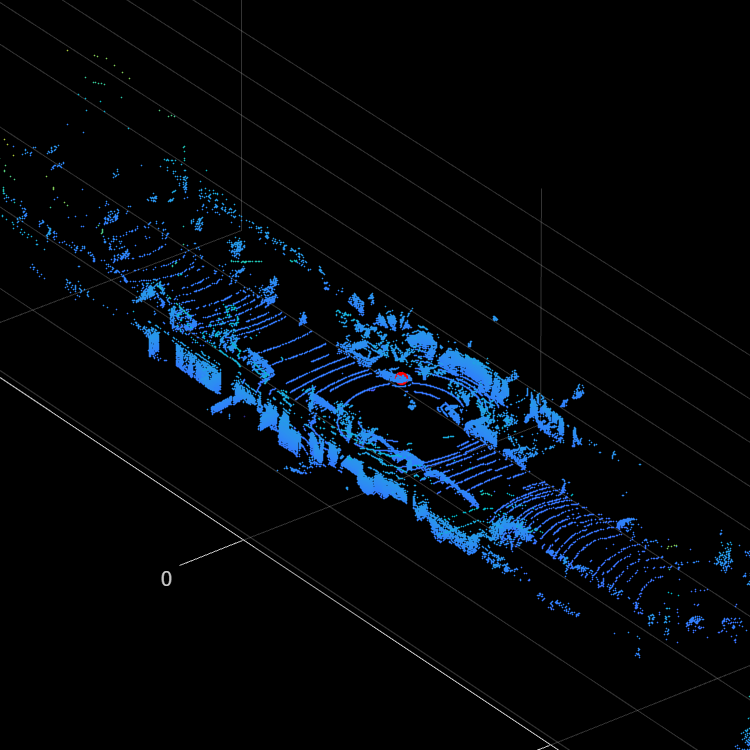
    Specify a point prompt that lies inside the object of interest. The prompt guides the model to segment the corresponding object.

    pointPrompt = [3 5 -0.5];

    Display the input point cloud and overlay the point prompt.

    figure(Position=[100 100 500 500])
    pcshow(ptCloud)
    hold on
    plot3(pointPrompt(1),pointPrompt(2),pointPrompt(3), ...
        ".r",MarkerSize=20)
    hold off
    zoom(5)
    Segment the object using the segmentObjects object function.

    [mask,label,score] = segmentObjects(segmenter,ptCloud,pointPrompt);

    Release GPU memory allocated to the SNAP model.

    releaseGPUMemory(segmenter)

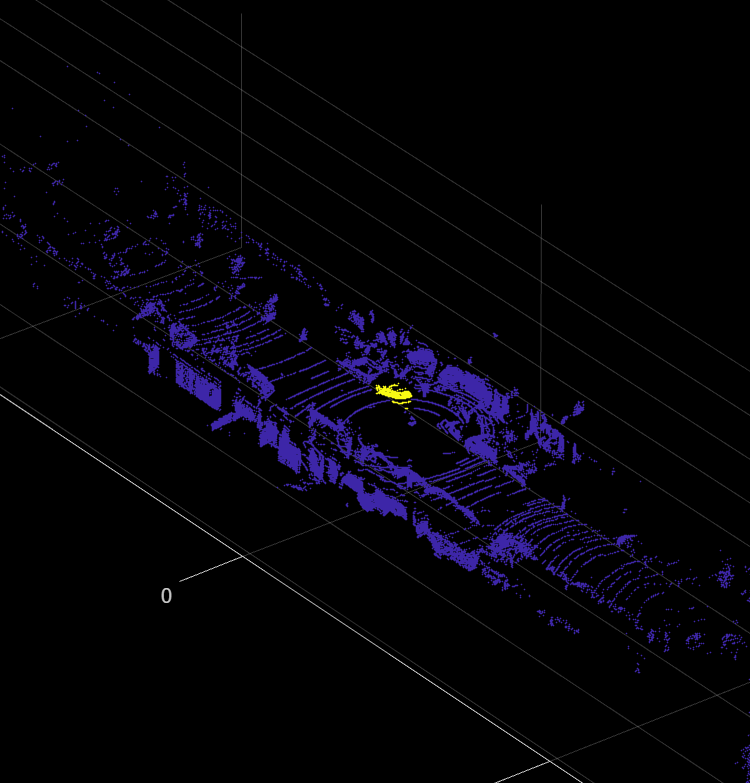
    Visualize the segmented object overlaid on the point cloud.

    figure(Position=[100 100 500 500])
    pcshow(ptCloud.Location,single(mask))
    zoom(5)
    Display the predicted label.

    disp(label)
         Car 
    

    Input Arguments

    collapse all

    SNAP segmentation model, specified as a snap object.

    Note

    To use this functionality, your system must have a CUDA® enabled NVIDIA® GPU. For information on the supported compute capabilities, see GPU Computing Requirements (Parallel Computing Toolbox).

    Input point cloud, specified as a pointCloud object. The point cloud can be unorganized or organized. The point cloud must use a coordinate system in which the positive Z-axis points upward. If your data uses a different coordinate system, use the pctransform function to reorient the point cloud.

    Foreground point prompts, specified as one of these options:

    • P-by-3 matrix for segmenting a single object. P is the number of points. Each row of the matrix specifies the xyz-coordinates of a point.

    • K-by-1 cell array for segmenting multiple objects. K is the number of objects. Each cell contains a P-by-3 matrix of point coordinates for one object.

    Tip

    Specify additional point prompts to refine the segmentation result.

    Output Arguments

    collapse all

    Object masks, returned a logical array. This table shows the size of masks based on the type of the input point cloud and whether the pointPrompts specifies a single or multiple objects.

    Type of point cloudSingle-object pointPromptsMulti-object pointPrompts (K)
    Unorganized point cloud with P pointsP-by-1P-by-K. Each column of the matrix corresponds to one object.
    Organized point cloud with M-by-N pointsM-by-NM-by-N-by-K. Each slice of the array along the third-dimension corresponds to one object.

    Object labels corresponding to the specified point prompts, returned as one of these options:

    • Categorical scalar for a single object. The value indicates the predicted class for the object.

    • N-by-1 categorical vector for multiple objects. N is the number of objects specified in pointPrompts. Each element corresponds to one object and indicates the predicted class for that object.

    The supported class names depend on the specified SNAP model. For example, indoor models use classes from ScanNet data set, outdoor models from the KITTI, nuScenes, and PandaSet data sets, and aerial models from the STPLS3D and DALES data sets.

    Segmentation confidence scores associated with the predicted masks for the specified prompts, returned as one of these options:

    • Numeric scalar for a single object. The value indicates the confidence score for the object.

    • N-by-1 numeric vector for multiple objects. N is the number of objects specified in pointPrompts. Each element corresponds to one object and indicates the confidence score for that object.

    Version History

    Introduced in R2026b