displayImage
R2026bDisplay an image on the Raspberry Pi hardware or on the LED Matrix of SenseHAT
Syntax
Description
For Raspberry Pi:
displayImage (
displays the specified image with a window title on the
Raspberry Pi
hardware. During simulation, this function displays the image on the
computer.mypi,img,Name,Value)
For SenseHAT:
displayImage (
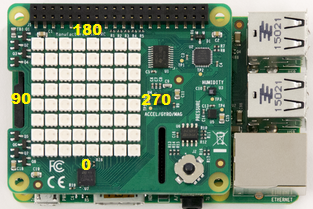
displays an image of 8 * 8 * 3 dimension on the LED Matrix of SenseHAT with the specified orientation. The
supported values for orientation are: 0, 90, 180, and 270 degrees.mysh,img,orientation)
The following image shows the orientations of the LED Matrix.
Note
To generate C/C++ code for this function, you must have an Embedded Coder® license.
Examples
Input Arguments
Name-Value Arguments
Extended Capabilities
Version History
Introduced in R2016b
See Also
raspi | sensehat | readHumidity | readPressure | readTemperature | readAngularVelocity | readAcceleration | readMagneticField | writePixel | displayMessage | clearLEDMatrix | readJoystick

