Enforce State-Dependent Action Constraints Using a Masking Network for a PPO Agent
R2026bThis example shows how to train a proximal policy optimization (PPO) agent with action masking in a discrete navigation problem. Action masking prevents the agent from selecting invalid actions (such as moving into walls or obstacles), improving sample efficiency and training stability.
In this example, you extends the navigation environment from Train DQN Agent Using Hindsight Experience Replay by adding an additional observation channel that indicates which actions are valid from the current state. You then train a PPO agent that uses this mask to avoid selecting invalid actions. For more information on PPO agents, see Proximal Policy Optimization (PPO) Agent.
Discrete Navigation Environment
The reinforcement learning environment for this example is a discrete 2-D navigation problem. The training goal is to make a robot reach the goal state while respecting obstacles.
The environment is a 20-by-20 grid containing a robot (blue), a goal (red), and obstacles (black).
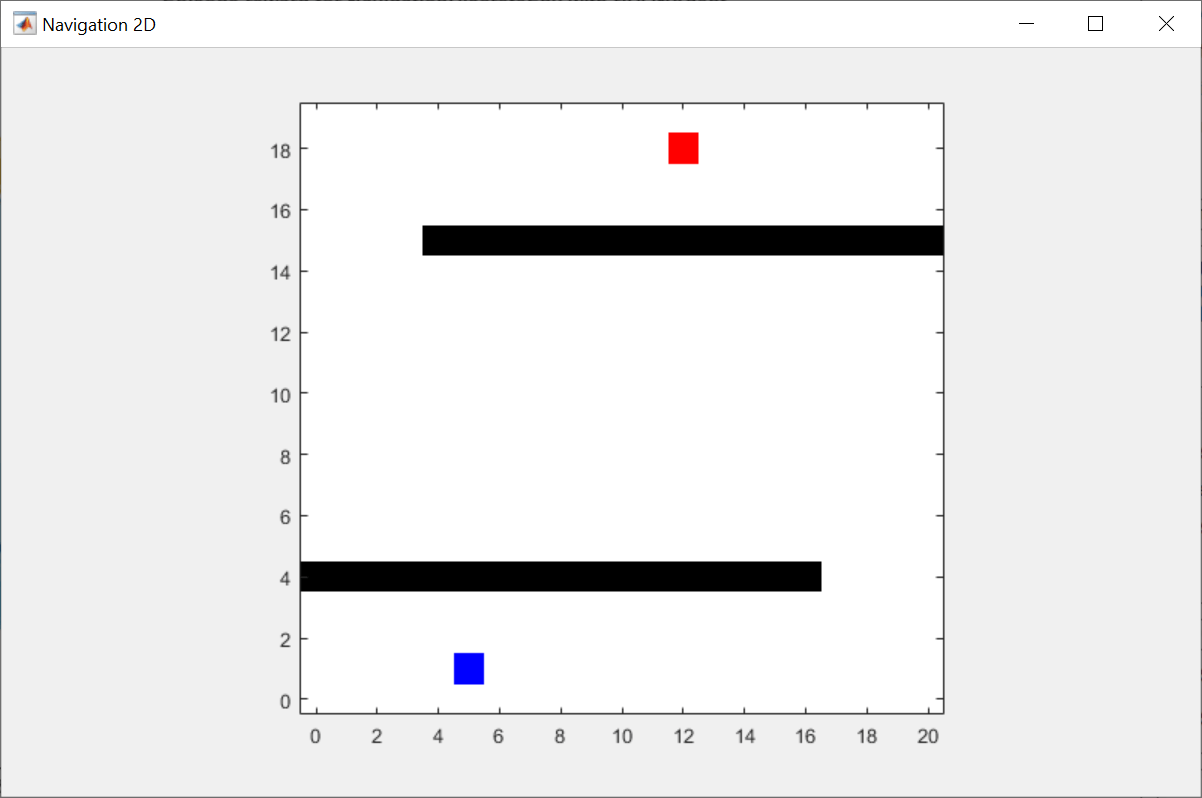
The environment returns two observations to the agent at each time step:
Position observation: a column vector that contains the robot and goal coordinates:
Action mask: a binary vector that indicates which actions are valid from the current state. Each element corresponds to one action (up, down, left, right), where 1 means that the action is allowed and 0 means that it is blocked. For example, if the robot is at the bottom edge of the grid, moving down is invalid, so the mask is .
The initial positions of the robot and the goal are sampled as follows:
~
~
~
~
where is a discrete uniform distribution between and .
The discrete actions for this environment are defined as follows:
If the action leads to the obstacle location or the map boundary, the robot does not move.
The reward signal is defined as follows:
where is the next observation, and
The terminal condition is defined as follows:
Action Masking
In many discrete action problems, not all actions are valid at every state. Action masking encodes these constraints directly into the policy network. The actor network receives the action mask as an additional observation channel and applies a large negative penalty to the raw action scores of invalid actions before the softmax operation. This penalty drives the probability of masked actions to near-zero.
This operation is represented by the following equation:
where are the raw action scores before the softmax operation, is a large penalty value () and is the action mask (1 = valid, 0 = invalid). When an action is valid (=1), its score is unchanged. When an action is invalid (=0), its score is reduced by , effectively removing it from consideration.
Specify Random Number Stream Seed and Algorithm for Reproducibility
The example code might involve computation of random numbers at several stages. Fixing the random number stream at the beginning of some sections in the example code preserves the random number sequence in the section every time you run it, which is a necessary condition to reproduce the results. For more information, see Results Reproducibility.
Specify the random number stream with seed 1 and random number algorithm Mersenne twister. For more information on controlling the seed used for random number generation, see rng.
previousRngState = rng(1,"twister");The output previousRngState is a structure that contains information about the previous state of the stream. You will restore the state at the end of the example.
Create Vectorized Environment Interface
To collect data faster, create a vectorized environment with 32 environment instances. For more information, see rlVectorEnv.
To run this example with action masking, set useActionMask to true. With this setting, the environment returns an additional observation channel that indicates which actions are valid from the current state. You then replace the default PPO actor network with with a custom masking network that receives this additional observation, before training the agent.
You can instead run the example without action masking by setting useActionMask to false. In that case, the environment returns only the position observation and the agent uses a standard actor.
numEnv = 32;
useActionMask = true;
venv = rlVectorEnv( ...
    @(~) NavigationDiscreteMaskEnv(useActionMask), ...
    "NumEnv",numEnv);
Get the observation and action specifications from the environment.
obsInfo = getObservationInfo(venv);
actInfo = getActionInfo(venv);
Create PPO Agent
Create a PPO agent with default networks, using the environment specifications. For more information on PPO agents, see rlPPOAgent.
initOptions = rlAgentInitializationOptions("NumHiddenUnit",128);
agent = rlPPOAgent(obsInfo,actInfo,initOptions);
Specify the PPO agent options, including training options for the actor and critic, using dot notation. Alternatively, you can use an rlPPOAgentOptions object.
agent.AgentOptions.MiniBatchSize                            = 512;
agent.AgentOptions.NumEpoch                                 = 4;
agent.AgentOptions.ActorOptimizerOptions.LearnRate          = 3e-4;
agent.AgentOptions.CriticOptimizerOptions.LearnRate         = 1e-3;
agent.AgentOptions.ActorOptimizerOptions.GradientThreshold  = 1;
agent.AgentOptions.CriticOptimizerOptions.GradientThreshold = 1;
agent.AgentOptions.NormalizedAdvantageMethod                = "current";
Replace Actor with Action-Masking Network
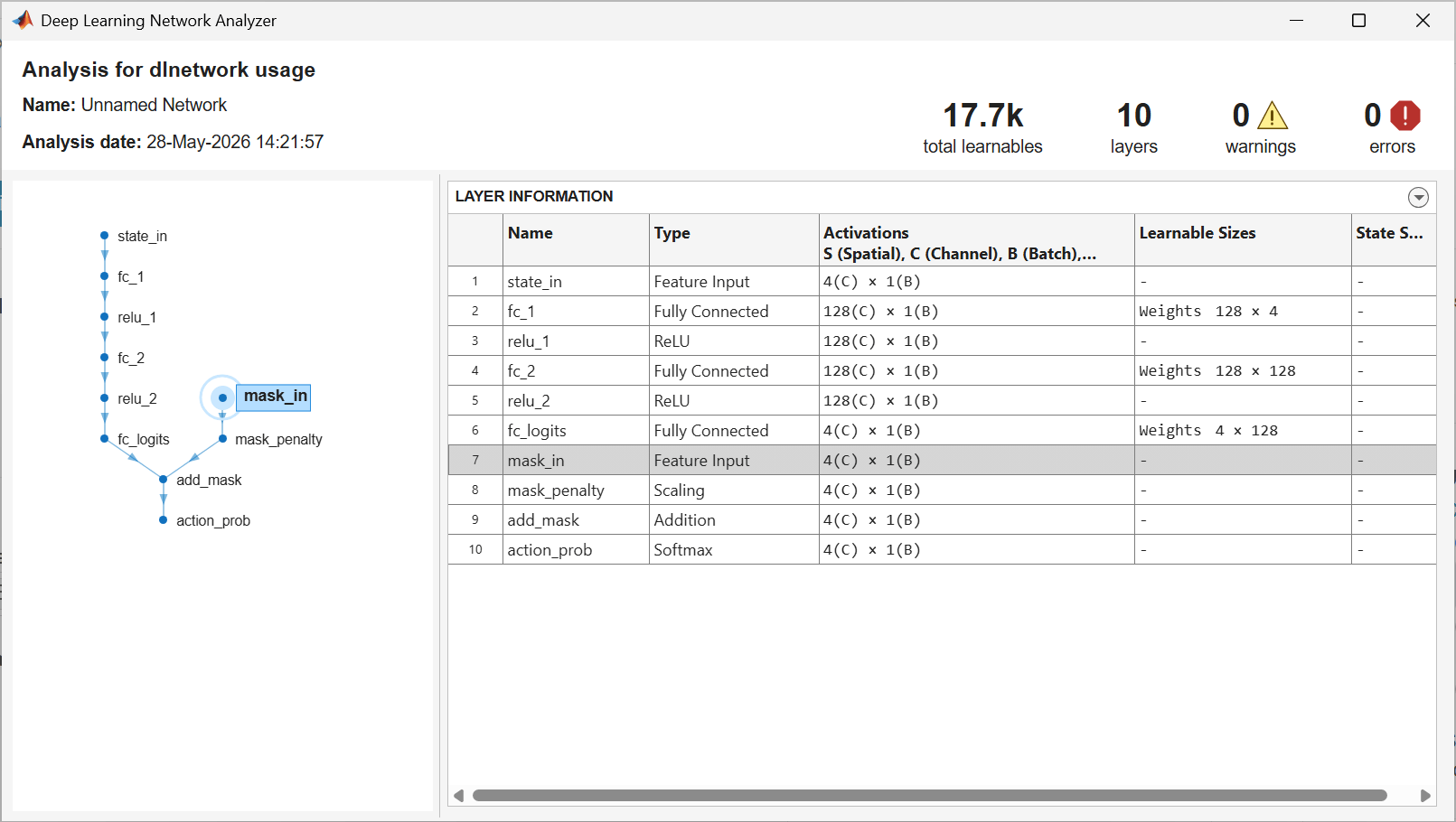
When action masking is enabled, replace the default actor network with a custom network that incorporates the action mask. The createActionMaskingActor local function, which is defined at the end of this example, builds a network with two input branches: one for the state observation and one for the action mask. Invalid actions receive a large negative penalty before the softmax layer, driving their selection probability to near-zero. Use analyzeNetwork to view the structure of the action-masking actor network. For more information, see analyzeNetwork.
if useActionMask
    numHiddenUnit = 128;
    actor = createActionMaskingActor(obsInfo,actInfo,numHiddenUnit);
    agent = setActor(agent,actor);
    analyzeNetwork(getModel(getActor(agent)));
end
Train Agent
To train the agent, first specify the training options. For this example, use the following options:
Run one training session containing 10000 episodes, with each episode lasting a maximum of 120 time steps.
Display the training progress in the Reinforcement Learning Training Monitor dialog box (set
Plotsto"training-progress") and disable the command line display (set theVerboseoption tofalse).Stop the training when the agent receives an evaluation statistic greater than 1.5. The evaluation statistic is the mean value of the evaluation episode rewards.
For more information on training options, see rlTrainingOptions.
trainOpts = rlTrainingOptions( ...
    MaxEpisodes=10000, ...
    MaxStepsPerEpisode=120, ...
    Verbose=false, ...
    Plots="training-progress", ...
    StopTrainingCriteria="EvaluationStatistic", ...
    StopTrainingValue=1.5);
Use an rlEvaluator object to periodically evaluate the agent during training and to stop training based on the evaluation statistic. For this example, use the following options:
Run 5 evaluation episodes at every 20*
numEnvtraining episodes. Multiplying bynumEnvensures that each environment instance has 20 full runs before running the evaluation, assuming there is no early stopping.To use the same initial conditions for each set of evaluation episodes, use random seeds from 101 to 105. For example, the first evaluation episode uses 101, and the fifth evaluation episode uses 105.
Use the mean of the evaluation episode rewards as the evaluation statistics. This is the default option.
evaluator = rlEvaluator( ...
    EvaluationFrequency=20*numEnv, ...
    NumEpisodes=5, ...
    RandomSeeds=101:105);
Train the agent using the train function. Training this agent is a computationally intensive process. To save time while running this example, load a pretrained agent by setting doTraining to false. To train the agent yourself, set doTraining to true.
doTraining = false;
if doTraining
    trainingStats = train(agent,venv,trainOpts,Evaluator=evaluator);
    save("trainedAgentPPOActionMask.mat","agent","trainingStats");
else
    load("trainedAgentPPOActionMask.mat","agent");
end
The following figure shows a snapshot of training progress with action masking.
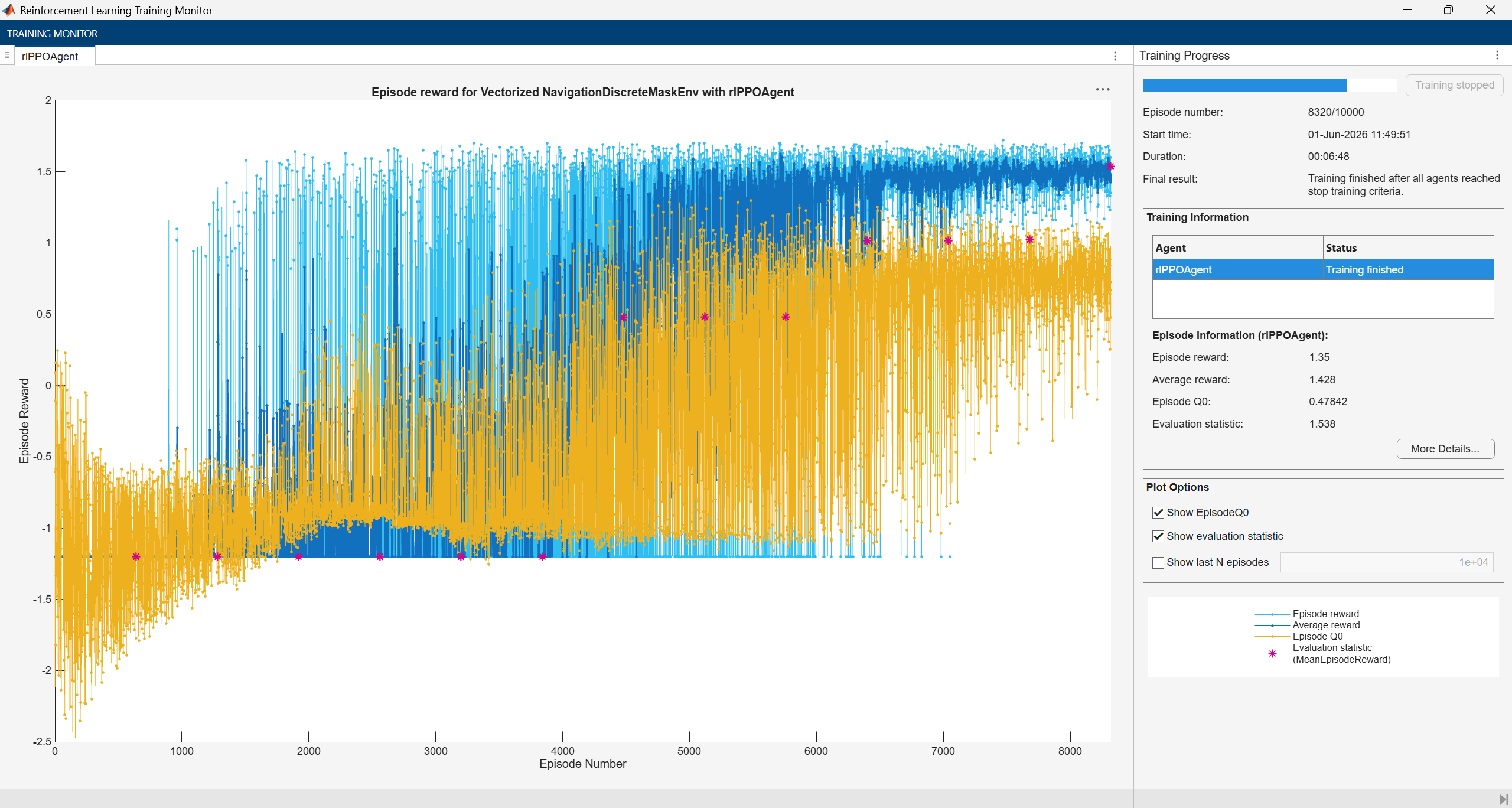
The agent learns a useful policy, meeting the stop criterion after about 8000 episodes.
For comparison, the following figure shows training progress without action masking.
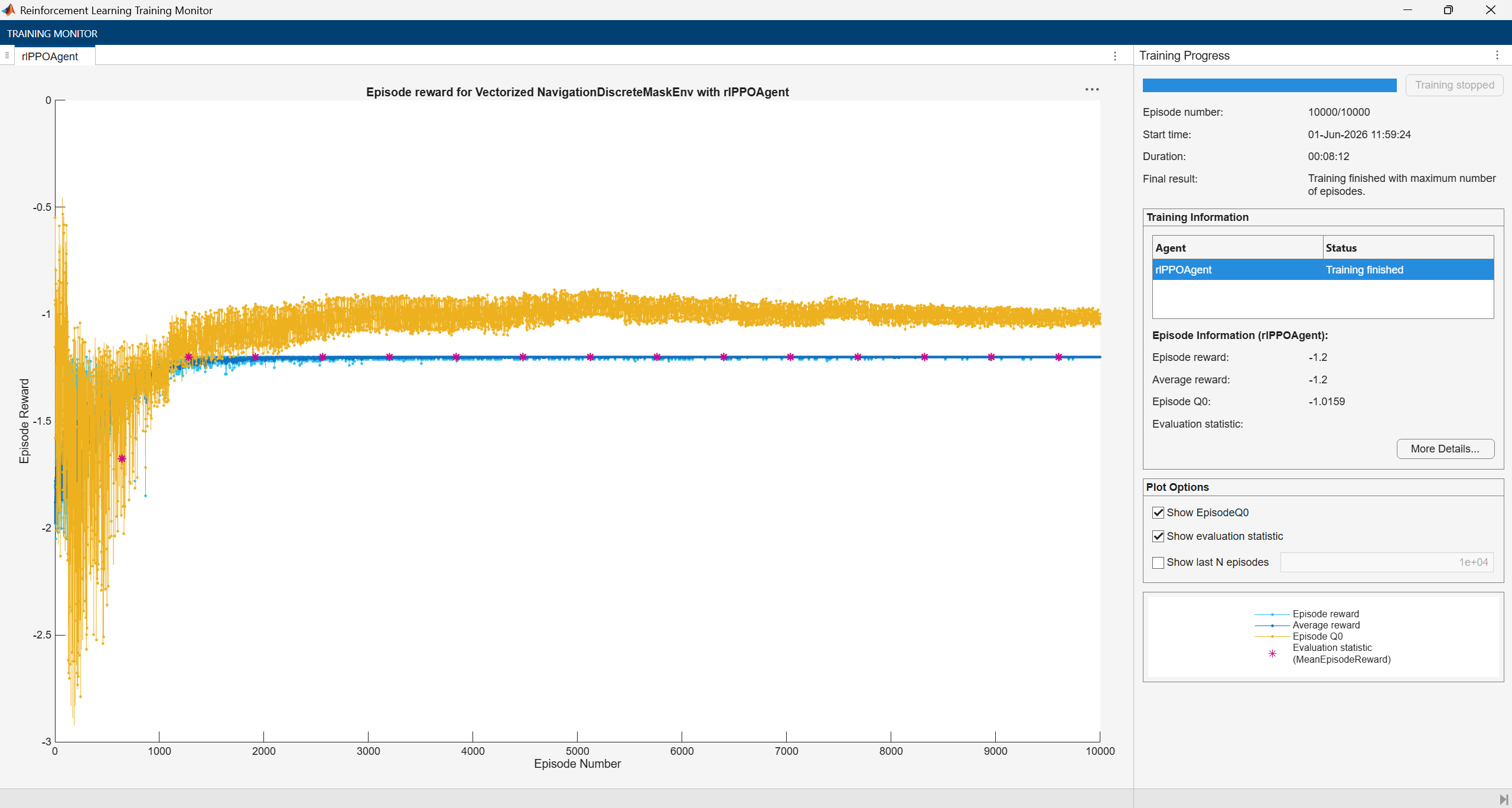
Without the mask, the agent fails to learn a useful policy even after 10,000 episodes.
Simulate Trained PPO Agent
Because the reset function randomizes the reference values, specify the random number generator seed to ensure simulation reproducibility.
rng(2)
To validate the performance of the trained agent, simulate it against the navigation environment. Use convertToScalarEnv to create a single environment instance from the vectorized environment, then call plot to visualize the robot navigating during simulation.
scalarEnv = convertToScalarEnv(venv);
plot(scalarEnv);
simOptions = rlSimulationOptions( ...
    MaxSteps=200, ...
    NumSimulations=10);
simOut = sim(scalarEnv,agent,simOptions);
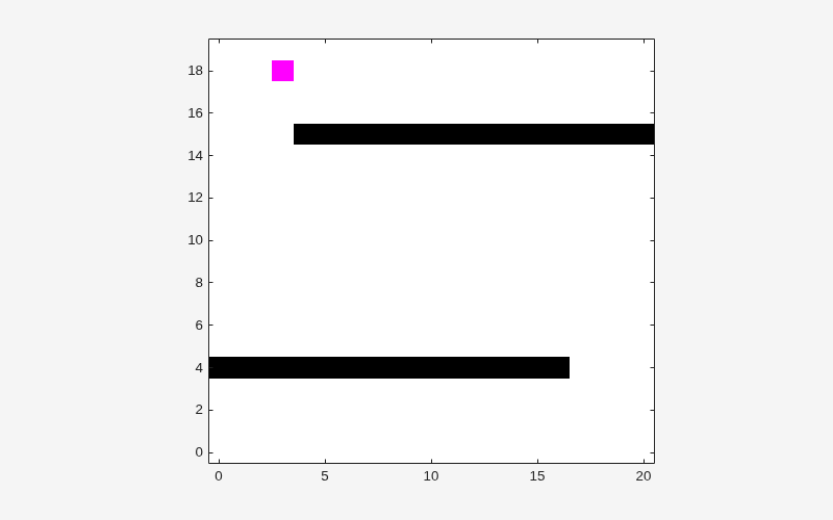
The trained agent reaches the goal. Compute the mean cumulative reward across simulations.
simCumReward = zeros(length(simOut),1);
for ii = 1:length(simOut)
    simCumReward(ii) = sum(simOut(ii).Reward);
end
fprintf("Mean cumulative reward: %.2f\n",mean(simCumReward));
Mean cumulative reward: 1.56
Restore the random number stream using the information stored in previousRngState.
rng(previousRngState);
Local Functions
The createActionMaskingActor function builds a discrete categorical actor with action masking. The network has two input branches:
State input: Passes through fully connected and ReLU layers to produce the action logit.
Mask input: Transforms the binary mask (1=valid, 0=invalid) into a large negative penalty for invalid actions using scaling layers.
The two branches are summed before a softmax layer, driving the probability of masked actions near zero.
function actor = createActionMaskingActor(obsInfo,actInfo,numHiddenUnit)
    penalty = 1e9;
    net = dlnetwork;

    % State observation branch
    tempNet = [
        featureInputLayer(obsInfo(1).Dimension(1),"Name","state_in")
        fullyConnectedLayer(numHiddenUnit,"Name","fc_1")
        reluLayer("Name","relu_1")
        fullyConnectedLayer(numHiddenUnit,"Name","fc_2")
        reluLayer("Name","relu_2")
        fullyConnectedLayer(getNumberOfElements(actInfo),"Name","fc_logits")];
    net = addLayers(net,tempNet);

    % Action mask branch
    tempNet = [
        featureInputLayer(obsInfo(2).Dimension(1),"Name","mask_in")
        scalingLayer("Scale",penalty,"Offset",-penalty,"Name","mask_penalty")];
    net = addLayers(net,tempNet);

    % Combine and output.
    tempNet = [
        additionLayer(2,"Name","add_mask")
        softmaxLayer("Name","action_prob")];
    net = addLayers(net,tempNet);

    net = connectLayers(net,"fc_logits","add_mask/in1");
    net = connectLayers(net,"mask_penalty","add_mask/in2");
    net = initialize(net);

    actor = rlDiscreteCategoricalActor(net,obsInfo,actInfo, ...
        ObservationInputNames=["state_in","mask_in"]);
end
See Also
Functions
Objects
Topics
- Train PPO Agent for Automatic Parking Valet
- Create DQN Agent Using Deep Network Designer and Train Using Image Observations
- Transfer Learning: Fine-Tune DQN Agent for Pendulum Swing-Up from Earth to Mars
- Create Actors, Critics, and Policy Objects
- Proximal Policy Optimization (PPO) Agent
- Train Reinforcement Learning Agents

