主要内容

ROS Toolbox System Requirements

R2026b

To generate custom messages for ROS or ROS 2, or deploy ROS or ROS 2 nodes from MATLAB® or Simulink® software, you must build the necessary ROS or ROS 2 packages. To build these packages, you must have Python® software, CMake software, and a C++ compiler for your platform. To connect to ROS and ROS 2 networks with the rosinit function, you must install and set up the required version of Python.

To generate and deploy ROS or ROS 2 nodes from MATLAB or Simulink, you must also have a MATLAB Coder™ or Simulink Coder license respectively. To generate and deploy CUDA® optimized ROS or ROS 2, you must have a GPU Coder™ license.

Note

The nodes in MATLAB and Simulink software can still communicate with ROS or ROS 2 nodes in ROS or ROS 2 distributions that are not included in Recommended ROS and ROS 2 Distributions, only if the message definitions are the same.

Recommended ROS and ROS 2 Distributions

Release-wise Support for Recommended ROS and ROS 2 Distributions

MATLAB ReleaseROS DistributionROS 2 Distribution
R2025a to R2026bNoetic NinjemysJazzy Jalisco
R2023b to R2024bNoetic NinjemysHumble Hawksbill
R2022a to R2023aNoetic NinjemysFoxy Fitzroy
R2020b to R2021bMelodic MoreniaDashing Diademata
R2019b to R2020aIndigo IglooBouncy Bolson
R2016 to R2019aIndigo IglooNot supported

Third-party Software

Note

Starting R2022b, manual installation of CMake is not required.

ROS and ROS 2 System Requirements

PlatformPlatform VersionsPythonC++ Compilers
Windows®

Windows 11 (recommended)

Windows 10

Python 3.10 (recommended) and 3.11Visual Studio 2019 (recommended) and 2022
Linux®

Ubuntu® 24.04 Noble Numbat (recommended)

Ubuntu 22.04 Jammy Jellyfish

Debian® 13 Trixie

Debian 12 Bookworm

Python 3.10 (recommended) and 3.11

To install Python on a Linux Ubuntu machine, use the command below with the required Python version for the specific Ubuntu release. For example, to install Python 3.10, use this command:

sudo apt update
sudo apt install software-properties-common
sudo add-apt-repository ppa:deadsnakes/ppa
sudo apt update
sudo apt install python3.10 python3.10-venv python3.10-dev

GNU Compiler Collection (GCC) versions 6.3 to 14 (forward compatible)

Note

gcc version must match the g++ version.

For example, to install gcc and g++ of a specific version such as gcc 14 and g++ 14, use these commands in your Linux terminal:

sudo apt install gcc-14
sudo apt install g++-14
These commands install the latest patch versions of gcc 14 and g++ 14 available in your Linux distribution's repositories.

macOS (Apple Silicon)

Tahoe (26)

Sequoia (15)

Python 3.10 (recommended) and 3.11

Xcode 10+

ROS and ROS 2 System Requirements

PlatformPlatform VersionsPythonC++ Compilers
Windows

Windows 11 (recommended)

Windows 10

Python 3.9 and 3.10

Visual Studio 2019 (recommended) and 2022
Linux

Ubuntu 24.04 Noble Numbat (recommended)

Ubuntu 22.04 Jammy Jellyfish

Debian 13 Trixie

Debian 12 Bookworm

Python 3.9 and 3.10

To install Python on a Linux Ubuntu machine, use the command below with the required Python version for the specific Ubuntu release. For example, to install Python 3.9, use this command:

sudo apt update
sudo apt install software-properties-common
sudo add-apt-repository ppa:deadsnakes/ppa
sudo apt update
sudo apt install python3.9 python3.9-venv python3.9-dev

GNU Compiler Collection (GCC) versions 6.3 to 14 (forward compatible)

Note

gcc version must match the g++ version.

For example, to install gcc and g++ of a specific version such as gcc 14 and g++ 14, use these commands in your Linux terminal:

sudo apt install gcc-14
sudo apt install g++-14
These commands install the latest patch versions of gcc 14 and g++ 14 available in your Linux distribution's repositories.

macOS

Tahoe (26)

Sequoia (15)

Sonoma (14)

Python 3.9 and 3.10

Xcode 10+

ROS and ROS 2 System Requirements

PlatformPlatform VersionsPythonC++ Compilers
Windows

Windows 11 (recommended)

Windows 10

Python 3.8, 3.9 and 3.10

Visual Studio 2019 (recommended) and 2022
Linux

Ubuntu 24.04 Noble Numbat (recommended)

Ubuntu 22.04 Jammy Jellyfish

Ubuntu 20.04 Focal Fossa

Debian 12 Bookworm

Debian 11 Bullseye

Python 3.8, 3.9 and 3.10

To install Python on a Linux Ubuntu machine, use the command below with the required Python version for the specific Ubuntu release. For example, to install Python 3.9, use this command:

sudo apt update
sudo apt install software-properties-common
sudo add-apt-repository ppa:deadsnakes/ppa
sudo apt update
sudo apt install python3.9 python3.9-venv python3.9-dev

GNU Compiler Collection (GCC) versions 6.3 to 12 (forward compatible)

Note

gcc version must match the g++ version.

For example, to install gcc and g++ of a specific version such as gcc 12 and g++ 12, use these commands in your Linux terminal:

sudo apt install gcc-12
sudo apt install g++-12
These commands install the latest patch versions of gcc 12 and g++ 12 available in your Linux distribution's repositories.

macOS

Ventura 13.3 (recommended)

Monterey 12.0.1

Big Sur 11

Catalina 10.15

Mojave 10.14

Python 3.8, 3.9 and 3.10

Xcode 10+

ROS and ROS 2 System Requirements

PlatformPlatform VersionsPythonC++ Compilers
Windows

Windows 11 (recommended)

Windows 10

Python 3.8, 3.9 and 3.10

Visual Studio 2019 (recommended) and 2022
Linux

Ubuntu 22.04 Jammy Jellyfish (recommended)

Ubuntu 20.04 Focal Fossa

Debian 12 Bookworm

Debian 11 Bullseye

Python 3.8, 3.9 and 3.10

To install Python on a Linux Ubuntu machine, use the command below with the required Python version for the specific Ubuntu release. For example, to install Python 3.9, use this command:

sudo apt update
sudo apt install software-properties-common
sudo add-apt-repository ppa:deadsnakes/ppa
sudo apt update
sudo apt install python3.9 python3.9-venv python3.9-dev

GNU Compiler Collection (GCC) versions 6.3 to 12 (forward compatible)

Note

gcc version must match the g++ version.

For example, to install gcc and g++ of a specific version such as gcc 12 and g++ 12, use these commands in your Linux terminal:

sudo apt install gcc-12
sudo apt install g++-12
These commands install the latest patch versions of gcc 12 and g++ 12 available in your Linux distribution's repositories.

macOS

Ventura 13.3 (recommended)

Monterey 12.0.1

Big Sur 11

Catalina 10.15

Mojave 10.14

Python 3.8, 3.9 and 3.10

Xcode 10+

ROS and ROS 2 System Requirements

PlatformPlatform VersionsPythonC++ Compilers
Windows

Windows 11 (recommended)

Windows 10

Python 3.8, 3.9 and 3.10

Visual Studio 2019 (recommended) and 2022
Linux

Ubuntu 20.04 Focal Fossa (recommended)

Debian 11 Bullseye

Python 3.8, 3.9 and 3.10

To install Python on a Linux Ubuntu machine, use the command below with the required Python version for the specific Ubuntu release. For example, to install Python 3.9, use this command:

sudo apt update
sudo apt install software-properties-common
sudo add-apt-repository ppa:deadsnakes/ppa
sudo apt update
sudo apt install python3.9 python3.9-venv python3.9-dev

GNU Compiler Collection (GCC) versions 6.3 to 10 (forward compatible)

Note

gcc version must match the g++ version.

For example, to install gcc and g++ of a specific version such as gcc 10 and g++ 10, use these commands in your Linux terminal:

sudo apt install gcc-10
sudo apt install g++-10
These commands install the latest patch versions of gcc 10 and g++ 10 available in your Linux distribution's repositories.

macOS

Mojave 10.14

Catalina 10.15

Big Sur 11

Monterey 12.0.1

Ventura 13.3 (recommended)

Python 3.8, 3.9 and 3.10

Xcode 10+

ROS and ROS 2 System Requirements

PlatformPlatform VersionsPython VersionC++ CompilersCMake
Windows

Windows 11 (recommended)

Windows 10

Python 3.8 and 3.9

Visual Studio 2019 (recommended) and 2022

For R2023a, manual installation of CMake is not required.

Linux

Ubuntu 20.04 Focal Fossa (recommended)

Debian 11 Bullseye

Python 3.8 and 3.9

To install Python on a Linux Ubuntu machine, use the command below with the required Python version for the specific Ubuntu release. For example, to install Python 3.9, use this command:

sudo apt update
sudo apt install software-properties-common
sudo add-apt-repository ppa:deadsnakes/ppa
sudo apt update
sudo apt install python3.9 python3.9-venv python3.9-dev

GNU Compiler Collection (GCC) 6.3+
macOS

Mojave 10.14

Catalina 10.15

Big Sur 11

Monterey 12.0.1 (recommended)

Python 3.8 and 3.9

Xcode 10+

ROS and ROS 2 System Requirements

Windows

Windows 11 (recommended)

Windows 10

Python 3.9

Visual Studio 2019 (recommended) and 2022

For R2022b, manual installation of CMake is not required.

Linux

Ubuntu 20.04 Focal Fossa (recommended)

Debian 11 Bullseye

Python 3.9

To install Python on a Linux Ubuntu machine, use the command below with the required Python version for the specific Ubuntu release. For example, to install Python 3.9, use this command:

sudo apt update
sudo apt install software-properties-common
sudo add-apt-repository ppa:deadsnakes/ppa
sudo apt update
sudo apt install python3.9 python3.9-venv python3.9-dev

GNU Compiler Collection (GCC) 6.3+
macOS

Mojave 10.14

Catalina 10.15

Big Sur 11

Monterey 12.0.1 (recommended)

Python 3.9

Xcode 10+

ROS and ROS 2 System Requirements

PlatformPlatform VersionsPython VersionC++ CompilersCMake
WindowsWindows 10 (recommended)

Python 3.9

Visual Studio 2017 and 2019 (recommended)

For R2022a, download and install CMake 3.16.3+.

Linux

Ubuntu 20.04 Focal Fossa (recommended)

Debian 11 Bullseye

Python 3.9

To install Python on a Linux Ubuntu machine, use the command below with the required Python version for the specific Ubuntu release. For example, to install Python 3.9, use this command:

sudo apt update
sudo apt install software-properties-common
sudo add-apt-repository ppa:deadsnakes/ppa
sudo apt update
sudo apt install python3.9 python3.9-venv python3.9-dev

GNU Compiler Collection (GCC) 6.3+
macOS

Mojave 10.14

Catalina 10.15

Big Sur 11

Monterey 12.0.1 (recommended)

Python 3.9

Xcode 10+

ROS 2 System Requirements

PlatformPlatform VersionsPython VersionC++ CompilersCMake
WindowsWindows 10

Python 3.7

Visual Studio 2017CMake 3.15.5+
Linux

Ubuntu 18.04 Bionic Beaver (recommended)

Python 3.7

To install Python on a Linux Ubuntu machine, use the command below with the required Python version for the specific Ubuntu release. For example, to install Python 3.7, use this command:

sudo apt update
sudo apt install software-properties-common
sudo add-apt-repository ppa:deadsnakes/ppa
sudo apt update
sudo apt install python3.7 python3.7-venv python3.7-dev

GNU Compiler Collection (GCC) 6.3+
macOSSierra 10.12.x

Python 3.7

Xcode 10+

ROS System Requirements

PlatformPlatform VersionsPython VersionC++ CompilersCMake
WindowsWindows 10

Python 2.7

Visual Studio 2017CMake 3.15.5+
Linux

Ubuntu 18.04 Bionic Beaver (recommended)

Python 2.7

To install Python on a Linux Ubuntu machine, use the command below with the required Python version for the specific Ubuntu release. For example, to install Python 2.7, use this command:

sudo apt update
sudo apt install software-properties-common
sudo add-apt-repository ppa:deadsnakes/ppa
sudo apt update
sudo apt install python2.7 python2.7-venv python2.7-dev

GNU Compiler Collection (GCC) 6.3+
macOSMac OS X

Python 2.7

Xcode 10+

Configure Python Environment

Release-wise Information to Configure Python Environment

MATLAB ReleaseConfigure Python Environment
R2022b and onwards

After you install and set up the required version of Python, follow these steps to configure it for use with ROS Toolbox for MATLAB release R2022b and onwards.

  1. On the Home tab in the Environment section of the MATLAB toolstrip, click Preferences.

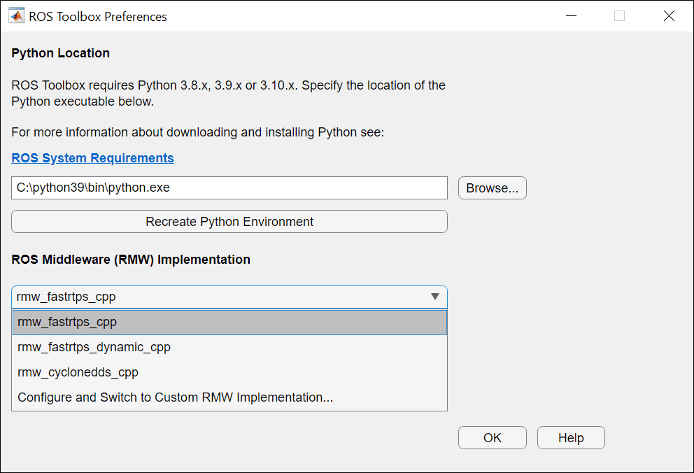
  2. Select ROS Toolbox, click the Open ROS Toolbox Preferences button, and specify the path to the Python executable that you installed in the previous step.

  3. Click Recreate Python Environment.

    Default view of ROS Toolbox Preferences dialog box. Browse to navigate to the parent directory of python executable. Click Recreate Python Environment.

Prior to R2022b

After you install and set up the required version of Python, follow these steps to configure it for use with ROS Toolbox for MATLAB releases prior to R2022b.

  1. To check your Python version, use the pyenv function. For example,

    pyenv
    ans = 
      PythonEnvironment with properties:
    
              Version: "3.9"
           Executable: "C:\Python39\python.exe"
              Library: "C:\Python39\python39.dll"
                 Home: "C:\Python39"
               Status: NotLoaded
        ExecutionMode: InProcess
  2. If your Python interpreter is set to a different version, restart MATLAB and set the version with pyenv.

    pyenv(Version="3.9")

Tips

ROS communication does not have built-in security, which means it can be exposed to risks like unauthorized access, eavesdropping, or data spoofing by undesired users. Additionally, nodes that join later may still access data that was transmitted earlier. To mitigate these risks, restrict ROS communication to trusted wired or wireless networks and implement robust network security practices, such as using the strongest authentication methods available. Additionally, download and use the secure version of your vendor’s communication framework, if available, and configure it to align with the latest security best practices.

Docker and Virtual Machine Installation and Setup

Install and set up the Virtual Machine image included with the ROS Toolbox, based on Ubuntu Linux and preconfigured to support the ROS examples in the ROS Toolbox. Use the Docker image included with the ROS Toolbox, which is also based on Ubuntu Linux and configured to support the ROS and ROS 2 examples in the ROS Toolbox.

See Also

Topics