slreportgen.report.CFunction Class
Namespace: slreportgen.report
Superclasses: slreportgen.report.Reporter
Description
Use an object of the slreportgen.report.CFunction class to report on a
C Function
block.
By default, a CFunction object reports:
A table that includes the Description parameter and any custom mask parameters
A table that lists the contents of the Symbols parameter
Sections for the C code defined by the Output Code, Start Code, and Terminate Code parameters
Use the object properties to exclude or modify the reported information.
Note
To use a CFunction reporter in a report, you must create the report using
the slreportgen.report.Report class.
The slreportgen.report.CFunction class is a handle class.
Creation
Description
creates
a rptr = slreportgen.report.CFunctionCFunction object with default property values. You must specify the
C Function block to report by setting the Object
property. Use other properties to specify report options.
specifies the C Function block to report and sets the rptr = slreportgen.report.CFunction(cFunctionBlock)Object
property to cFunctionBlock.
sets properties using name-value arguments. For example, rptr = slreportgen.report.CFunction(PropertyName=Value)rptr =
slreportgen.report.CFunction(Object="slrgex_cfunction/C Function") sets the
Object
property to "slrgex_cfunction/C Function". You can specify multiple
name-value arguments.
Properties
Simulink C Function block to report, specified as one of these values:
A character vector or string scalar that contains the path of a C Function block
A handle to a C Function block
An
slreportgen.finder.BlockResultobject that represents the block
Note
If you use a finder to find C Function blocks and add the results
directly to a report, the blocks are reported using
slreportgen.report.CFunction reporters, instead of
slreportgen.report.SimulinkObjectProperties reporters.
Whether to include a table of block parameters, specified as a logical 1
(true) or 0 (false). When you
specify:
1(true) — The reporter generates a table that includes the Description parameter and any custom mask parameters, by default. The Output Code, Start Code, Terminate Code, and Symbols parameters are not included in this table because they are reported in separate sections. Use theObjectPropertiesReporterproperty of this reporter to specify the parameters that the table includes or to customize the table format. If the parameters are empty, the reporter does not generate a table.0(false) — Omit a table of block parameters.
Attributes:
GetAccess | public |
SetAccess | public |
Data Types: logical
Whether to include a table of the symbols used by the C Function
block, specified as a logical 1
(true) or 0 (false). When you
specify:
1(true) — Include a table of the symbols used by the C Function block.0(false) — Omit a table of the symbols used by the C Function block.
Attributes:
GetAccess | public |
SetAccess | public |
Data Types: logical
Whether to include the C code used to compute the outputs of the C
Function block, specified as a logical 1
(true) or 0 (false). When you
specify:
1(true) — Include the C code used to compute the outputs of the C Function block.0(false) — Omit the C code used to compute the outputs of the C Function block.
Attributes:
GetAccess | public |
SetAccess | public |
Data Types: logical
Whether to include the C code used to compute the state of the C
Function block at the start of the simulation, specified as a logical 1
(true) or 0 (false). When you
specify:
1(true) — Include the C code used to compute the state of the C Function block at the start of the simulation.0(false) — Omit the C code used to compute the state of the C Function block at the start of the simulation.
Attributes:
GetAccess | public |
SetAccess | public |
Data Types: logical
Whether to include the C code that the C Function block executes when it terminates,
specified as a logical 1
(true) or 0 (false). When you
specify:
1(true) — Include the C code that the C Function block executes when it terminates.0(false) — Omit the C code that the C Function block executes when it terminates.
Attributes:
GetAccess | public |
SetAccess | public |
Data Types: logical
Whether to include initialization C code that executes whenever the C
Function block is enabled, specified as a logical 1
(true) or 0 (false). When you
specify:
1(true) — Include initialization C code that executes whenever the C Function block is enabled. If the C Function block does not define condition initialization code, nothing is added to the report.0(false) — Omit initialization C code that executes whenever the C Function block is enabled.
Attributes:
GetAccess | public |
SetAccess | public |
Data Types: logical
Formatter for the C Function block properties table, specified as an
slreportgen.report.SimulinkObjectProperties object. The default value of this
property is an empty slreportgen.report.SimulinkObjectProperties object. You can customize the
appearance of the block properties table by modifying the properties of the default
object or by replacing it with another SimulinkObjectProperties object.
You can specify the properties to display in this table by using the
Properties property of the
SimulinkObjectProperties object. If Properties is
empty, the reporter automatically determines which properties to display based on the C
Function block parameters.
Attributes:
GetAccess | public |
SetAccess | public |
Formatter for the table of symbols used by the C Function block, specified as an
mlreportgen.report.BaseTable object. The default value of this property is an
empty BaseTable object with the StyleName property
set to "CFunctionSymbolsTable". You can customize the appearance of
the table of symbols by modifying the properties of the default object or by replacing
it with another BaseTable object. Any content added to the title property
of the BaseTable object appears before the default generated table title
in the report.
Attributes:
GetAccess | public |
SetAccess | public |
Paragraph formatter for the titles of the output, start, and terminate code sections
of the report, specified as an mlreportgen.dom.Paragraph object. The
default value of this property is an empty Paragraph object with the
StyleName property set to "CFunctionCodeTitle".
You can customize the appearance of the code section titles by modifying the properties
of the default object or by replacing it with another Paragraph
object. Any content added to the Paragraph object in this property
appears before the code titles in the report.
Attributes:
GetAccess | public |
SetAccess | public |
Formatter for the C code in the output, start and terminate code sections of the
report, specified as an mlreportgen.dom.Preformatted object. The default value of this property is an
empty Preformatted object with StyleName set to
"CFunctionCode". You can customize the appearance of the C code by
modifying the properties of the default object or by replacing it with another
Preformatted object. Any content added to the
Preformatted object in this property appears before the formatted code
in the report.
Attributes:
GetAccess | public |
SetAccess | public |
Since R2024a
Type of C code to include, specified as "both",
"simulation", or "code generation". This
property applies only if a C Function block is configured to use different C code in
generated code than it uses for simulation. Otherwise this property is ignored.
"both"(default) — Include C code used during simulation and C code used in generated code."simulation"— Include only C code used during simulation."code generation"— Include only C code used in generated code.
Attributes:
GetAccess | public |
SetAccess | public |
Data Types: char | string
Source of the template for this reporter, specified in one of these ways:
Character vector or string scalar that specifies the path of the file that contains the template for this reporter
Reporter or report whose template this reporter uses or whose template library contains the template for this reporter
Document Object Model (DOM) document or document part whose template this reporter uses or whose template library contains the template for this reporter
The specified template must be the same type as the report to which you
append this reporter. For example, for a Microsoft® Word report, TemplateSrc must be a Word reporter template.
If the TemplateSrc property is empty, this reporter uses the
default reporter template for the output type of the report.
Attributes:
GetAccess | public |
SetAccess | public |
NonCopyable | true |
Dependent | true |
Name of the template for this reporter, specified as a character vector or string scalar.
The template for this reporter must be in the template library of the template specified by
the TemplateSrc property of this reporter.
Attributes:
GetAccess | public |
SetAccess | public |
Data Types: char | string
Hyperlink target for this reporter, specified as a character vector or string scalar
that specifies the link target ID, or an mlreportgen.dom.LinkTarget object. A character vector or string scalar
value converts to a LinkTarget object. The link target immediately
precedes the content of this reporter in the output report.
Attributes:
GetAccess | public |
SetAccess | public |
Methods
| Method | Purpose |
|---|---|
slreportgen.report.CFunction.createTemplate |
Create reporter template
Input Arguments
Return Values
For more information, see the method
for the |
slreportgen.report.CFunction.customizeReporter |
Create reporter from
Input Arguments
Return Values
For more information, see the method
for the |
slreportgen.report.CFunction.getClassFolder |
Get location of folder that contains
Return Values
For more information, see the method
for the |
copy |
Create copy of reporter object and make deep copies of property values
Input Arguments
Return Values
For more information, see the method
for the |
getImpl |
Get implementation of reporter
Note You cannot add content to the reporter after calling this method. Input Arguments
Return Values
For more information, see the method
for the |
Examples
This example generates a report that includes information about a C Function block used in a model.
Import the Report API packages so that you do not have to use long, fully qualified class names.
import mlreportgen.report.* import slreportgen.report.*
Create a report.
rpt = slreportgen.report.Report("output","pdf");
Load a model that has a C Function block.
model_name = "slrgex_cfunction"; cFcnObj = "slrgex_cfunction/C Function"; load_system(model_name);
Create a chapter reporter.
chapter = Chapter(cFcnObj);
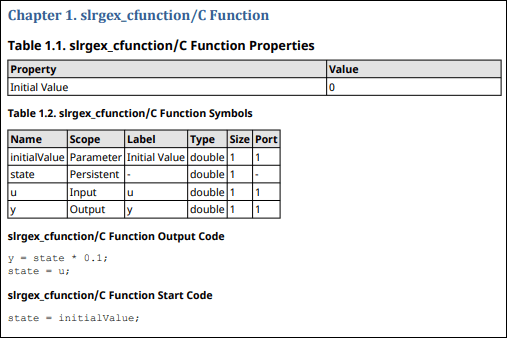
Create a C Function block reporter. By default, the reporter includes the Output Code, Start Code, Terminate Code, and Symbols parameters, as well as any other block parameters in the report. The Terminate Code parameter of the C Function block in this example is empty.
rptr = CFunction(cFcnObj);
Add the C Function reporter to the chapter and chapter to the report.
append(chapter,rptr); append(rpt,chapter);
Close and view the report.
close(rpt); close_system(model_name); rptview(rpt);
Here is the C Function block information in the report:
Version History
Introduced in R2021bIf your C Function block is configured to use different C code in
generated code than it uses for simulation, you can now choose which C code to report. You
can include generated code only, simulation code only, or both generated and simulation code
by setting the slreportgen.report.CFunction
CodeTypePolicy.
MATLAB Command
You clicked a link that corresponds to this MATLAB command:
Run the command by entering it in the MATLAB Command Window. Web browsers do not support MATLAB commands.
Select a Web Site
Choose a web site to get translated content where available and see local events and offers. Based on your location, we recommend that you select: .
You can also select a web site from the following list
How to Get Best Site Performance
Select the China site (in Chinese or English) for best site performance. Other MathWorks country sites are not optimized for visits from your location.
Americas
- América Latina (Español)
- Canada (English)
- United States (English)
Europe
- Belgium (English)
- Denmark (English)
- Deutschland (Deutsch)
- España (Español)
- Finland (English)
- France (Français)
- Ireland (English)
- Italia (Italiano)
- Luxembourg (English)
- Netherlands (English)
- Norway (English)
- Österreich (Deutsch)
- Portugal (English)
- Sweden (English)
- Switzerland
- United Kingdom (English)