Build Battery Model from Custom Cell Component
R2026bThis example shows how to create and build a Simscape™ model of a battery parallel assembly from a custom cell component. To build a battery system, you can either use the cell blocks in the Simscape Battery™ library or use a custom cell component. This approach allows you to use a custom cell component tailored to your requirements to build a battery system.
Create Custom Cell Component
To create a custom component of a battery cell, you must define a component model class inside an SSC file. This example provides a custom cell component named Thermal Equivalent Circuit Battery, which models a thermal equivalent-circuit battery with a capacity of 27 A*hr.
open("+BatteryComponents/Battery.ssc");The Battery.ssc file defines the thermal model of the custom cell component by using a ThermalModel enumeration class. The available options for this enumeration are "ConstantTemperature" and "VariableTemperature".
For more information on how to create a custom component, see Creating Custom Components.
A Simscape Battery custom cell component must meet all of these requirements:
The custom block must provide exactly two electrical conserving ports named n and p. To include the required nodes, in the declaration line of the
Batterycomponent, inherit thefoundation.electrical.branchcomponent.
component Battery < foundation.electrical.branch
All variables must be scalar.
The custom block cannot contain a variable or intermediate variable named power_dissipated.
For a complete list of the requirements of a Simscape Battery custom cell component, see the CellModelBlockPath property of the CellModelBlock object.
To provide an interface for the thermal modeling, you must specify a thermal node. The thermal node of the custom cell component in this example is named H, but there is no required naming for the node.
    nodes(ExternalAccess=none)
        H = foundation.thermal.thermal;  % H
    end
To use the block in the Battery Pack Model Builder, you must generate a custom block library of the cell component. To generate the library, first save the component SSC file inside a +BatteryComponents folder, then use the ssc_build function to create a Simscape block.
sscbuild("BatteryComponents");
This command generates a Simulink® model file called BatteryComponents_lib in the same folder that contains your +BatteryComponents namespace. View the library.
open_system("BatteryComponents_lib");Create ParallelAssembly Object from Custom Component
To create a battery object from your custom cell component, first specify the custom cell component inside the CellModelBlockPath property of a CellModelBlock object by using the batteryCellModelBlock function.
cellModelOptions = batteryCellModelBlock;
cellModelOptions.CellModelBlockPath = "BatteryComponents_lib/Thermal Equivalent Circuit Battery";
To simulate the thermal effects of the battery cell, expose the thermal node H in the custom cell component. In the BlockParameters property of the cellModelOptions object, set the ThermalModel parameter to "VariableTemperature".
cellModelOptions.BlockParameters.ThermalModel = "VariableTemperature";
disp(cellModelOptions.BlockExposesThermalNodes);
1
Use the cellModelOptions object to create a battery Cell object. To create a Cell object, use the batteryCell function and specify the geometry of the cell and the cell model options.
customCell = batteryCell(batteryCylindricalGeometry,cellModelOptions);
To create a parallel assembly, use the batteryParallelAssembly function. Specify the battery cell you created as the first argument, specify the number of parallel-connected cells as the second argument, and set the AmbientThermalPath name-value argument as "CellBasedThermalResistance".
parallelAssembly = batteryParallelAssembly(customCell,3,AmbientThermalPath="CellBasedThermalResistance");Build Simscape Model of ParallelAssembly Object
After you create your ParallelAssembly object, you must convert it into a Simscape model to use it in block diagrams.
To create a library that contains the Simscape Battery model of the ParallelAssembly object, use the buildBattery function.
buildBattery(parallelAssembly,Verbose="off");This function creates the Batteries_lib SLX library file in your working directory. To access the Simscape model of your ParallelAssembly object, open the Batteries_lib SLX file, double-click the sublibrary, and drag the Simscape block into your model.
open_system("Batteries_lib");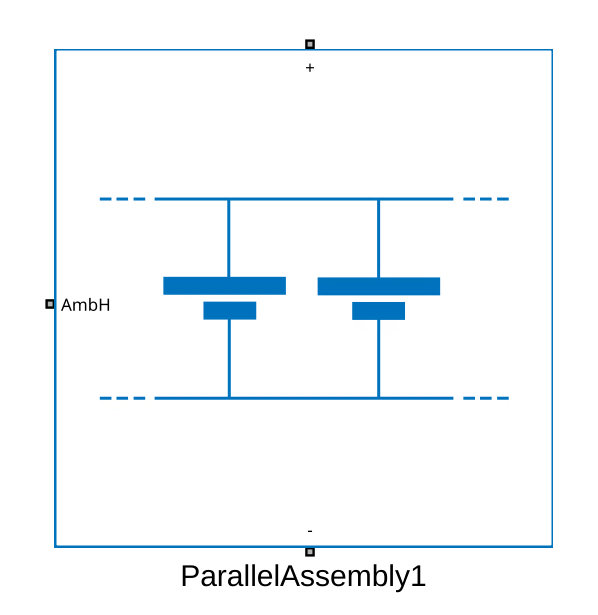
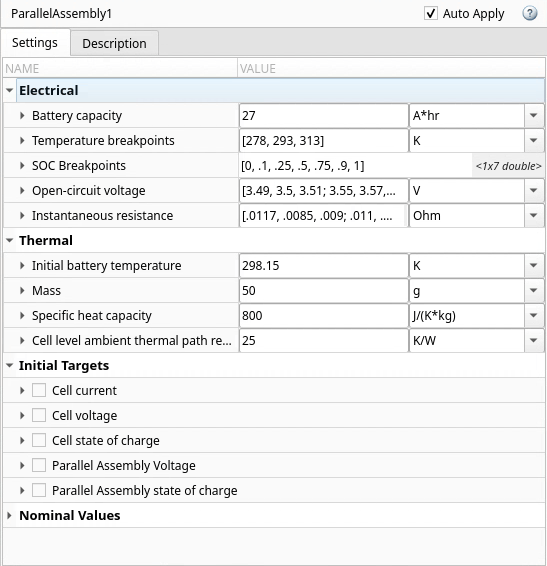
The block that you generated for the parallel assembly uses the custom cell component as the cell model. The block also exposes the parameters and variables of the custom cell component.
See Also
Cell | ParallelAssembly | CellModelBlock | ParallelAssembly
(Generated Block)

