refrigerantChargeProperties
R2026bCalculate two-phase fluid states based on charge density and temperature
Since R2026a
Description
[
calculates the two-phase fluid states for the fluid properties source,
pressure,specificEnthalpy,specificInternalEnergy,normalizedInternalEnergy,exitflag] = refrigerantChargeProperties(propertySource,chargeDensity,temperature)propertySource, from the charge density,
chargeDensity, and the temperature of the refrigerant charge,
temperature. If you want to initialize a model based on refrigerant
charge density, use this function to calculate the fluid states.
The refrigerantChargeProperties function solves a system of two
equations for pressure, p, and normalized specific internal energy, ,
where:
vTLU is the fluid specific volume property table.
TTLU is the fluid temperature property table.
ρcharge is the value of the
chargeDensityargument, which is the total refrigerant mass in the system divided by the total system volume.Tcharge is the value of the
temperatureargument.
Examples
This example shows how to calculate initial conditions, apply those conditions to a model, and compare the model results with the specified conditions.
Specify the model and block names. This model contains a Two-Phase Fluid Properties (2P) and a Constant Volume Chamber (2P) block.
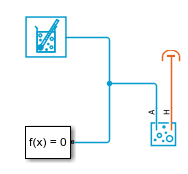
model = "RefrigerantChargeProperties";
load_system(model);
block = model + "/Constant Volume Chamber (2P)";
propBlock = model + "/Two-Phase Fluid Properties (2P)";
Specify the mass and the temperature of the refrigerant charge. Determine the total volume in the system and calculate the charge density. In this model, the only block with volume is the Constant Volume Chamber (2P) block.
m = 0.0020; % [kg]
T_charge = 320; % [K]
V = str2double(get_param(block,"volume")); % [m^3]
rho_charge = m/V; % [kg/m^3]
Use the refrigerantChargeProperties function to calculate the initial conditions.
[pressure, specificEnthalpy, specificInternalEnergy, normalizedInternalEnergy, validity] ...
    = refrigerantChargeProperties(propBlock, rho_charge, T_charge);
Specify the initial conditions in the Constant Volume Chamber (2P) block to match the calculated values. Set the values for the initial pressure, p_init, and the initial specific internal energy, u_init, to pressure and specificInternalEnergy, respectively.
set_param(block, "p_init", num2str(pressure));
set_param(block, "u_init", num2str(specificInternalEnergy));
Simulate the model and retrieve the simulation temperature and specific volume output.
[~, ~, ~] = sim(model);

v_I = simlog_RefrigerantChargeProperties.Constant_Volume_Chamber_2P.v_I.series.values("m^3/kg");
T_I = simlog_RefrigerantChargeProperties.Constant_Volume_Chamber_2P.T_I.series.values("K");
Calculate the simulation charge density from the specific volume and confirm that the model results match the refrigerant mass and temperature that you specified.
rho_I = 1./v_I;
m_I = rho_I .* V;
disp("Specified refrigerant mass = "+num2str(m)+" kg, "+"Model refrigerant mass = "+num2str(m_I(1))+" kg")
Specified refrigerant mass = 0.002 kg, Model refrigerant mass = 0.002 kg
disp("Specified refrigerant temperature = "+num2str(T_charge)+" K, Model refrigerant temperature  = "+ ...
    num2str(T_I(1))+" K at saturation pressure = "+num2str(pressure)+" MPa")
Specified refrigerant temperature = 320 K, Model refrigerant temperature = 320.0002 K at saturation pressure = 0.01056 MPa
Input Arguments
Output Arguments
Version History
Introduced in R2026a
See Also
twoPhaseFluidTables | Two-Phase Fluid Properties (2P) | Two-Phase Fluid Predefined Properties
(2P) (Simscape Fluids)

