Simscape Initialization Analyzer
R2026bDescription
Use the Simscape Initialization Analyzer app to analyze and debug initialization warnings and errors for a Solver Configuration block in a Simscape model.
To analyze a Simscape model that fails to initialize, is slow to initialize, or performs slowly during simulation, use the Simscape Initialization Analyzer app to analyze the final states. Use the app to:
Display targets and priorities.
Plot states with respect to their target.
Highlight poorly initialized states and states with large magnitudes.
Generate suggestions to improve initialization.
You can use the Solve event drop-down menu to select a solver reinitialization event to analyze.
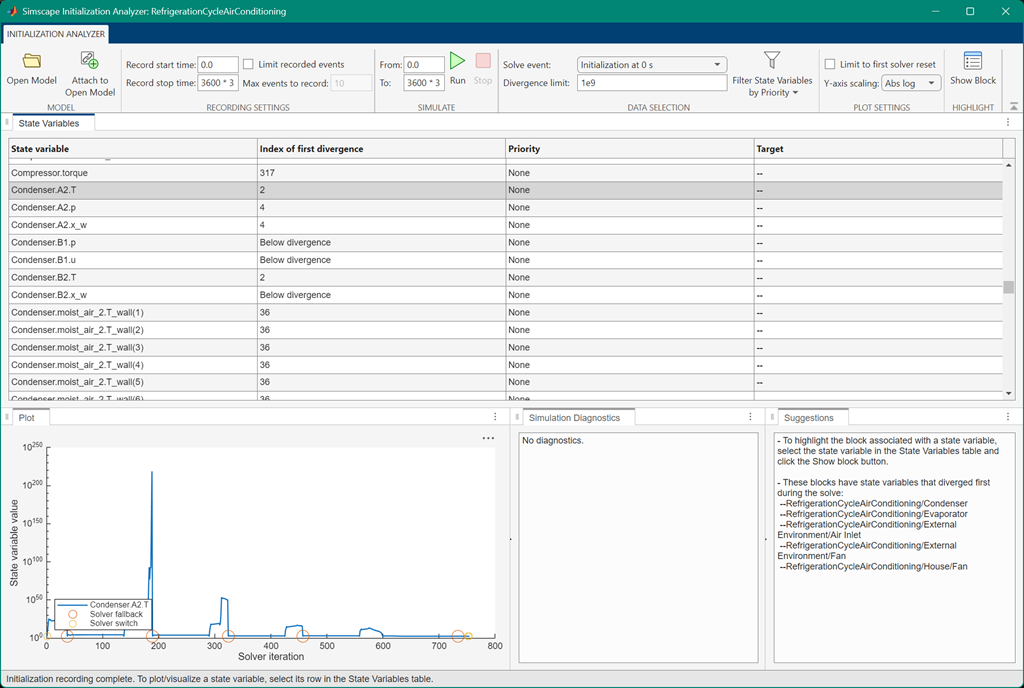
The columns in the State Variables pane display information related to the solver initialization:
State variable — The solver state variable
Computational unit — The unit that the solver uses to compute the given state variable
Index of first divergence — The solver iteration when the solver value magnitude exceeds the divergence limit
Priority — The state priority during initialization
Target — The target value of the state during initialization
When you select a state, the Plot pane displays the state
value with respect to the solver iteration. Continuous states with inf or
NaN values can slow or prevent transient initialization.
Open the Simscape Initialization Analyzer App
To open the app, click the Initialization Analyzer button on the Simulink toolstrip.

Examples
This example shows how to analyze a Simscape™ model with poor initialization performance.
Create a new model called initializationTest and save it in a
directory on your MATLAB® path. Add these blocks to the canvas:
Solver Configuration block
Simscape Component block
PS-Simulink Converter block
Scope block
Create an SSC file called splitFunction.ssc and save it in the
same directory as the model. Add this code to the
file:
component splitFcn
    variables
        x = 0;
    end
    outputs
        y = 0;
    end

    equations
        x == y;
        cos(time*{1, '1/s'}) == userFunction(x);
    end

end
Create an SSC file called userFunction.ssc and save it to the
same directory as the model. Add this code to the
file:
function out = userFunction(x)
definitions
out = if x < 0
    sqrt(-x);
else
    -1e-12 * x;
end
end
end
Open the block dialog box for the Simscape Component
block, and select the splitFunction.ssc component file.
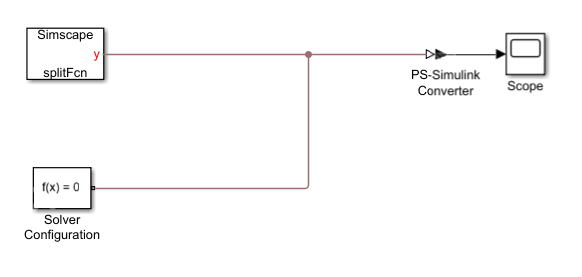
Connect the blocks in the model.
Run the model. The Diagnostic Viewer pane shows an initialization error:
An error occurred during simulation and the simulation was stopped
Caused by:
['initializationTest/Solver Configuration']: Transient initialization at time 1.548870641501275, solving for consistent states and modes, failed to converge.
Nonlinear solver: failed to converge, residual norm too large.
These components have equations that did not converge:

'initializationTest/Simscape Component'
Equation location is:
 'splitFunction' (line 11)
Equation location is:
'userFunction'(no line number info)
Open the initializationTest model in the Simscape
Initialization Analyzer
app.
simscapeInitializationAnalyzer("initializationTest")Run the model in the app and select the Simscape_Component_y0
state variable. The app displays a plot of the state variable with respect to the solver
iteration and indicates which blocks have state variables that diverged during the
solve.
Parameters
Programmatic Use
Limitations
The app does not support:
Local solvers.
Rapid accelerator mode.
Libraries or subsystems.
When you use the app on a library or subsystem or with a local solver or rapid accelerator mode enabled, the app generates an error.

