Wheel and Axle (AB-PB)
R2026bWheel and Axle (AB-PB) block

To add a block to a model, double-click the canvas and start typing the block name. Then, select the block from the list.
Libraries:
Simscape /
Foundation Library /
Mechanisms
Description
The Wheel and Axle (AB-PB) block represents an ideal wheel and axle mechanism. The wheel and the axle have the same axis, with the axis rigidly connected to the frame, therefore this mechanism is an ideal converter between rotational and translational motion. You can use this block to model a rack-pinion, steering wheel, hoisting device, windlass, and similar mechanisms.
The angle-based rotational ports Br and Fr are rigidly connected to each other and represent the central axle. The position-based translational port Rt also represents the axle. Use the Positive rotation parameter to change whether positive wheel rotation corresponds to positive or negative axle translation.
The block uses these equations
where:
t is torque of the rotational network acting on the axle. Positive torque drives the wheel in the positive rotational direction.
f is force of the wheel periphery contact point acting on the axle. A positive force drives the axle in the positive translational direction.
ω is angular velocity of axle.
v is translational velocity of axle.
R is wheel radius.
ε is positive rotation sign:
If Positive rotation parameter value is
Drives
                wheel in positive translational direction
, ε = 1.If Positive rotation parameter value is
Drives
                wheel in negative translational direction
, ε = –1.
Variables
To set the priority and initial target values for the block variables prior to simulation, use the Initial Targets section in the block dialog box or Property Inspector. For more information, see Set Priority and Initial Target for Block Variables.
Nominal values provide a way to specify the expected magnitude of a variable in a model. Using system scaling based on nominal values increases the simulation robustness. Nominal values can come from different sources, one of which is the Nominal Values section in the block dialog box or Property Inspector. For more information, see Modify Nominal Values for a Block Variable.
Examples
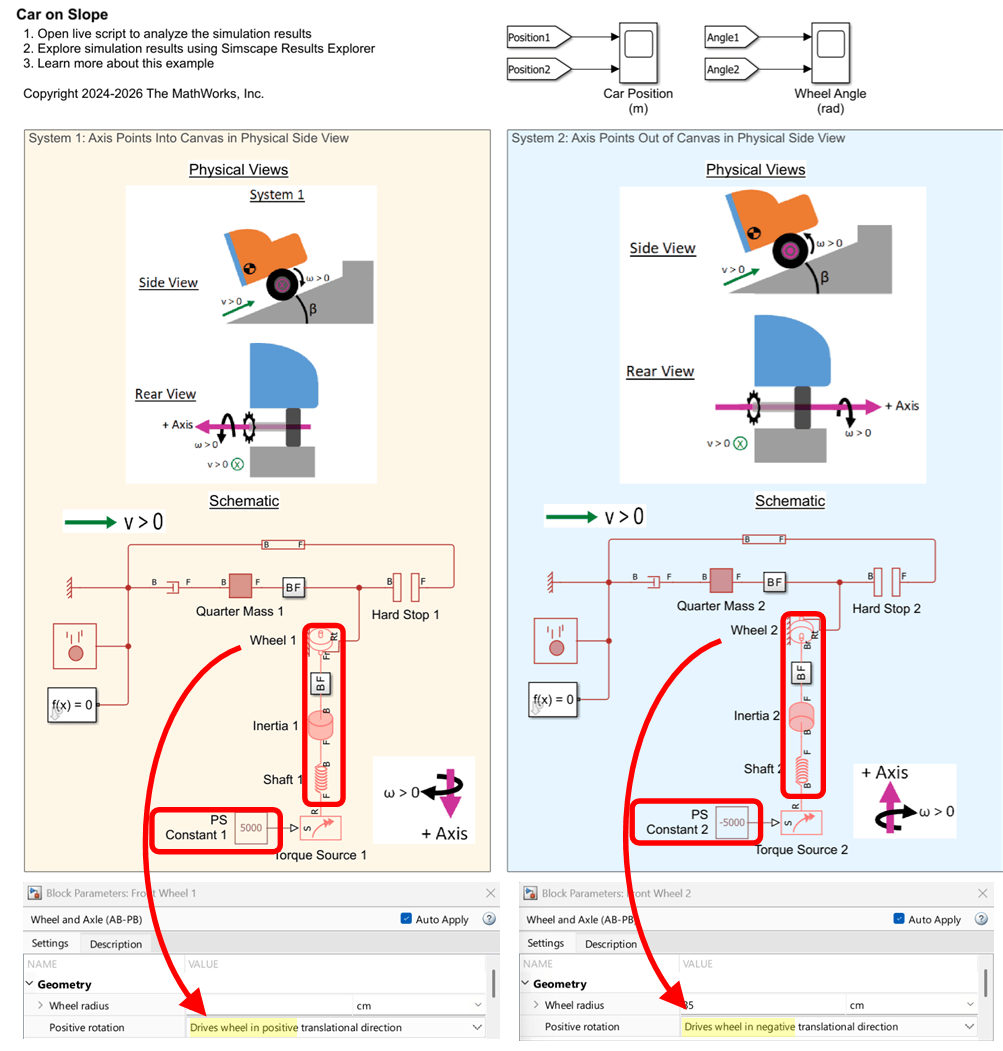
Interfacing Angle-Based Rotational and Position-Based Translational Networks
Demonstrates how you can define positive directions for translation and rotation in your physical view and adjust the Simscape™ network to achieve the desired behavior. It highlights the flexibility of Simscape in mapping physical directions to schematic representations.
Ports
Conserving
Parameters
Extended Capabilities
Version History
Introduced in R2026a

