Use Mask Parameters for Per-Instance Variant Control in Variant Blocks
R2026bYou can define a mask parameter as a variant control variable so that each instance of the masked subsystem can activate a different variant choice from its mask dialog box. The mask parameter value is scoped to the masked subsystem instance, so different instances of the same subsystem can independently control which variant choice is active.
Use mask parameters for variant control variables if you:
Need each instance of a masked subsystem to activate a different variant choice without duplicating the subsystem
Need to configure variant choices through the mask dialog box at the instance level
Build self-contained, reusable components where the active variant choice is configured from the mask dialog box without accessing internal model details
For information on variant activation times and variant control variable types that the mask workspace supports, see Verify Variable Type Compatibility with Workspace and Variant Activation Time.
For constraints that apply when defining variant control variables in different workspaces, see Workspace Constraints for Variant Control Variables.
Control Active Variant Choice of a Variant Subsystem Block Using Mask Parameters
Open the slexVariantSubsystemCtrlFromMaskandModelWks model.
model = "slexVariantSubsystemCtrlFromMaskandModelWks";
open_system(model)
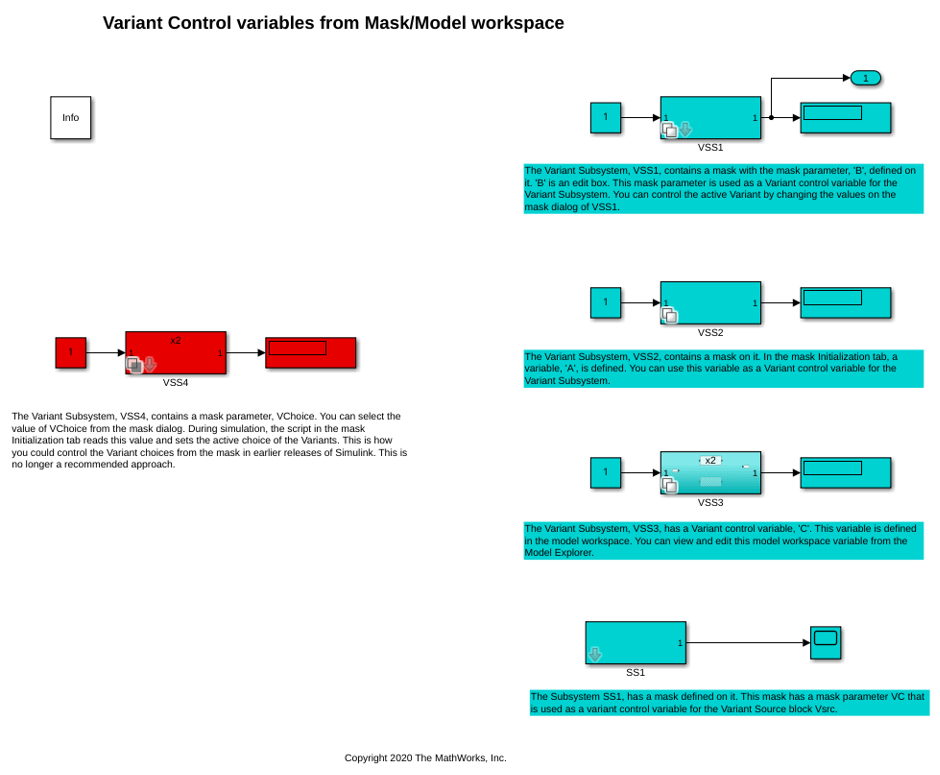
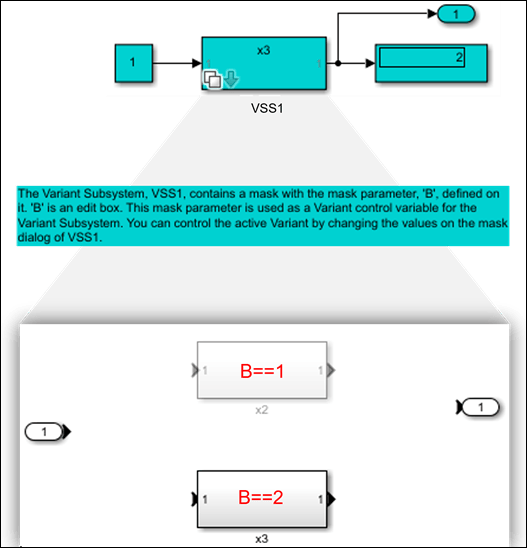
The model contains a masked Variant Subsystem block VSS1.
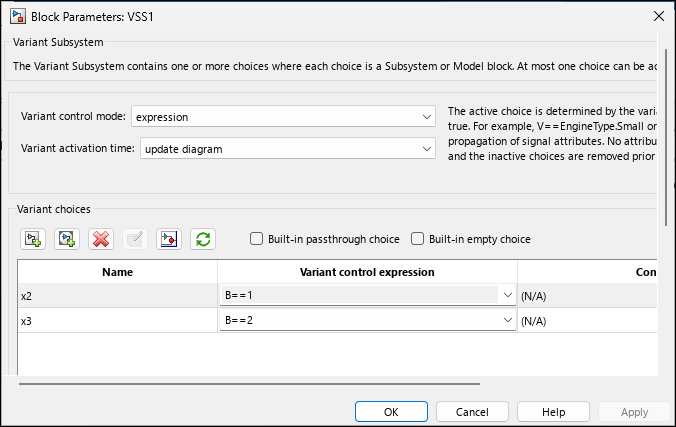
Open the Block Parameters dialog box of the VSS1 block. The block has two variant choices x2 and x3 with variant control expressions B == 1 and B == 2. The Variant activation time parameter is set to update diagram.
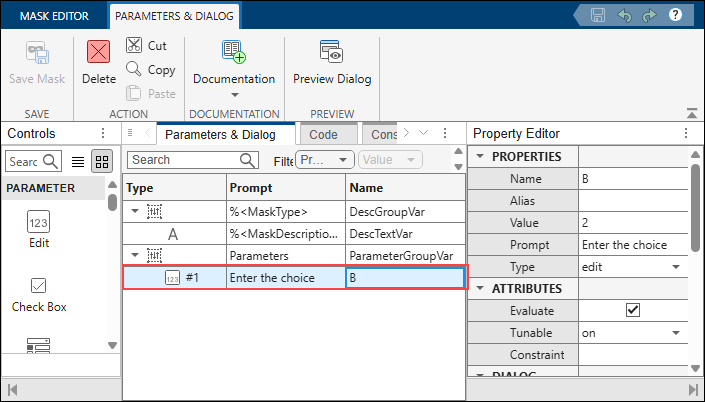
The variable B is a mask parameter. To view the variable definition, right-click the VSS1 subsystem and select Edit Mask. On the Parameters & Dialog tab, the Prompt is specified as Enter the choice and Name is specified as B.
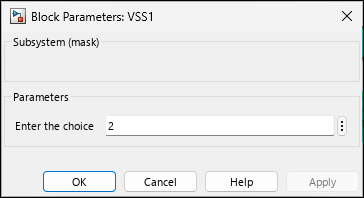
Double-click the VSS1 subsystem to open the mask dialog box. The default value of Enter the choice is 2.
Simulate the Model
Simulate the model. During simulation, Simulink® evaluates the variant control expressions using the value from the mask dialog box. The variant condition B == 2 evaluates to true. The x3 subsystem becomes active, and the x2 subsystem becomes inactive.
sim(model);
Change the Value to Switch the Active Variant Choice
To modify the active variant choice, change the value of Enter the choice to 1 in the mask dialog box. Then, simulate the model again. The variant condition B == 1 evaluates to true. The x2 subsystem becomes active, and the x3 subsystem becomes inactive.
set_param(model + "/VSS1","B","1")
sim(model);
Each instance of a masked subsystem has its own mask dialog box with independently configurable parameter values. If you place multiple instances of VSS1, each instance can have a different value for B.
Control Active Variant Choice of Inline Variant Blocks Using Mask Parameters
The slexVariantSubsystemCtrlFromMaskandModelWks model contains a masked Subsystem block SS1. The SS1 subsystem has an underlying Variant Source block Vsrc.
Open the Block Parameters dialog box of the Vsrc block inside SS1. The first input port is associated with variant control expression VC == 1 and the second input port is associated with VC == 2. The Variant activation time parameter is set to update diagram.
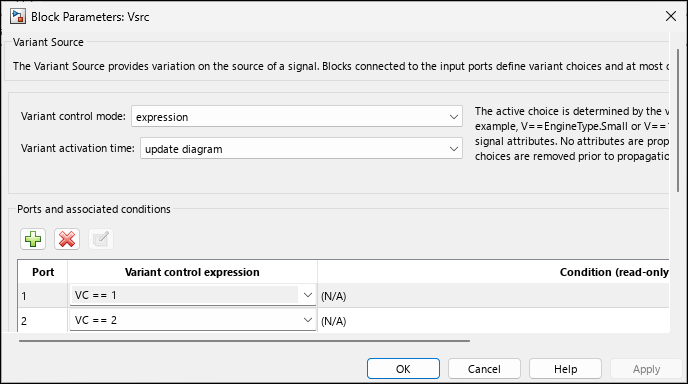
The variable VC is a mask parameter. To view the variable definition, right-click the SS1 subsystem and select Edit Mask. On the Parameters & Dialog tab, Prompt is specified as Choose the signal, Name is specified as VC, and Type is set to popup.
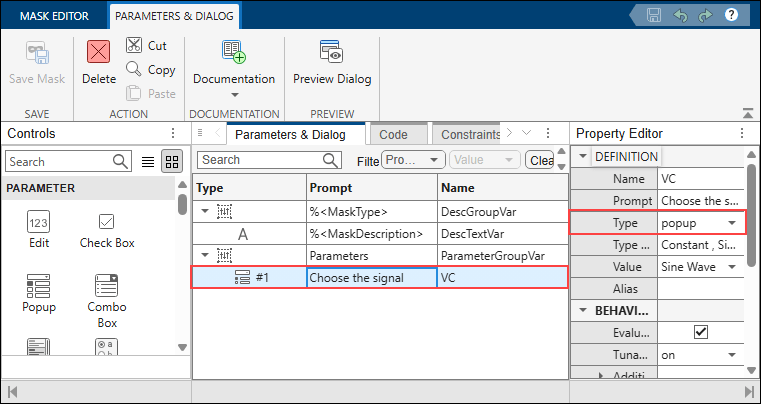
For popup mask parameters, Simulink assigns a 1-based index to each option in the order listed. The variant control expression evaluates against this index, not the option string. For example, if the popup options are Constant and Sine Wave, selecting Constant sets the variable to 1 and selecting Sine Wave sets it to 2.
Double-click the SS1 subsystem to open the mask dialog box. The default value of Choose the signal is Sine Wave.
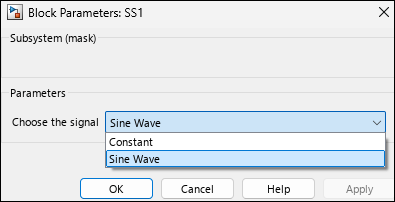
During simulation, Simulink maps the index of the selected value to the variable VC. The index of Sine Wave is 2, so the variant condition VC == 2 evaluates to true. The second input port of the Vsrc block becomes active and the first input port becomes inactive.
sim(model);
To modify the active variant choice, select Constant in the mask dialog box. Then, simulate the model again. The index of Constant is 1, so the variant condition VC == 1 evaluates to true. The first input port of the Vsrc block becomes active and the second input port becomes inactive.
set_param(model + "/SS1","VC","Constant")
sim(model);
Note: The mask parameter value takes precedence over variables with the same name in the model workspace, data dictionary, or base workspace. Verify that you do not have unintended variables with the same name in multiple workspaces.

