Use Model Arguments with Fast Restart to Switch Variant Choices Per Instance Without Recompiling for Variant Blocks
R2026bYou can define a variant control variable in the model workspace and configure it as a model argument so that the parent model can set a different value for each instance of the referenced model. You specify the value for each instance independently. During simulation, the referenced model receives the instance-specific values, enabling each instance to activate a different variant choice. For more information on model arguments, see Specify a Different Value for Each Instance of a Reusable Model.
When you set the variant activation time to startup, Simulink® compiles the model with all variant choices and resolves the active variant choice at the start of each simulation run. You can then use fast restart to switch the active variant choice and resimulate without recompiling the model. For more information on fast restart, see How Fast Restart Improves Iterative Simulations.
Use model arguments for variant control variables when you:
Need each instance of a referenced model to activate a different variant choice without duplicating the model
Need the parent model to configure variant choices independently for each Model block instance
Want to switch the active variant choice per instance without recompiling by using fast restart
For information on variant activation times and variable types that the model workspace supports, see Verify Variable Type Compatibility with Workspace and Variant Activation Time.
For constraints that apply when defining variant control variables in different workspaces, see Workspace Constraints for Variant Control Variables.
Note: You can use model arguments only with startup and runtime variant activation times. If you need update diagram or update diagram analyze all choices variant activation times, define the variable in the model workspace without selecting the Argument option so that all instances share the same variant choice. For more information, see Use Model Workspace to Define Variant Control Variables Scoped to the Model for Variant Blocks.
Explore the Model
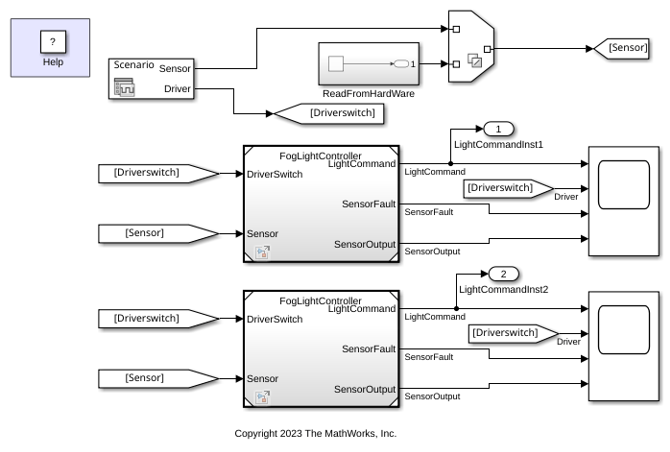
Open the parent model slexVariantsWithModelArguments.
parentModel = "slexVariantsWithModelArguments";
open_system(parentModel)
Open the referenced model FogLightController.
refModel = "FogLightController";
open_system(refModel)
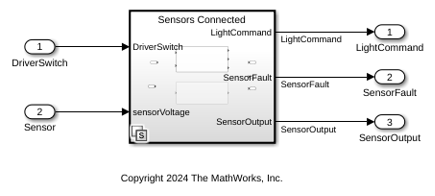
The slexVariantsWithModelArguments model is a parent model that contains two Model blocks, Model and Model1, both referencing the FogLightController model. The FogLightController model contains a Variant Subsystem block with two variant choices, Sensors Connected and Driver Switch.
Define the Variant Control Variable as a Model Argument
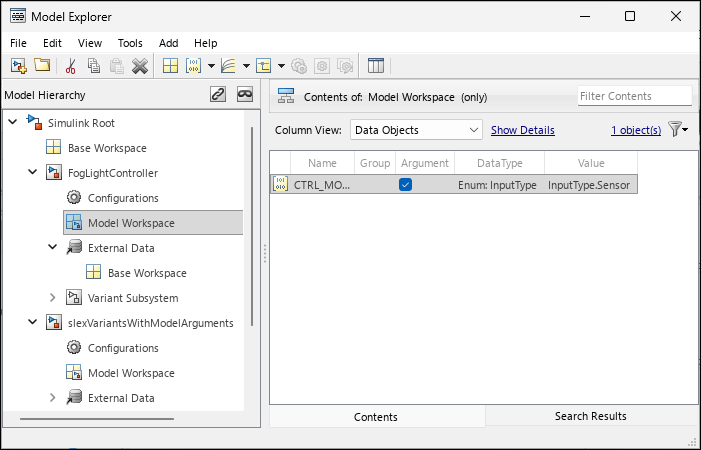
In the model workspace of FogLightController, a Simulink.ParameterCTRL_MODE is defined with an enumerated type InputType, which provides descriptive names for the variant control values.
To view the variable, in the Simulink Toolstrip, on the Modeling tab, click Model Explorer. In the Model Hierarchy pane, click FogLightController > Model Workspace.
It has the Argument option selected in Model Explorer, which allows the parent model to set a different value for the CTRL_MODE variable in each instance of the referenced model.
The variable CTRL_MODE is a Simulink.Parameter object with value InputType.Sensor.
The InputType enumeration class defines the variant control values:
type InputType.m
classdef InputType < Simulink.IntEnumType
  enumeration
    Sensor (1)
    Driver (2)
  end
methods (Static)
  function retVal = addClassNameToEnumNames()
      % ADDCLASSNAMETOENUMNAMES Specifies whether to add the class name
      % as a prefix to enumeration member names in generated code.
      % Return true or false.
      % If you do not define this method, no prefix is added.
      retVal = true;
  end
end
end
Specify Variant Control Expressions in the Variant Block
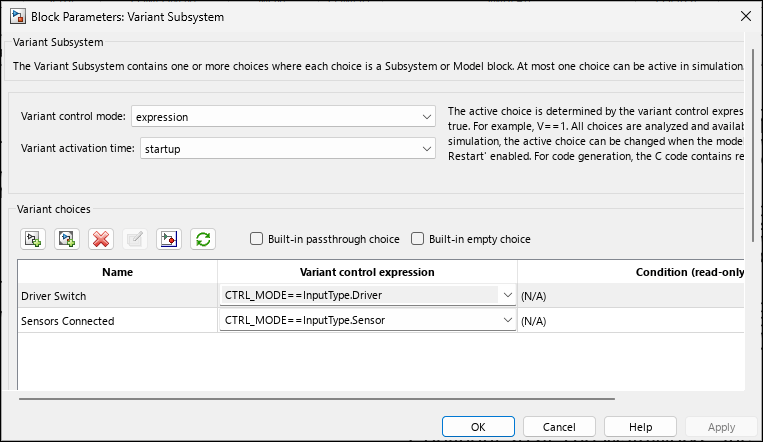
Open the Block Parameters dialog box of the Variant Subsystem block in FogLightController.
The block has two variant choices
Sensors ConnectedandDriver Switch.
The variant control expressions are
CTRL_MODE == InputType.SensorandCTRL_MODE == InputType.Driver. The Variant activation time parameter is set tostartup.
Set Instance-Specific Model Argument Values in the Parent Model
In the parent model slexVariantsWithModelArguments, set a different value for CTRL_MODE on each Model block instance. To set the value, open the Block Parameters dialog box for a Model block, and on the Instance parameters tab, specify the value for CTRL_MODE.
Set CTRL_MODE to InputType.Sensor on the Model block and InputType.Driver on the Model1 block.
ModelBlockPath = parentModel+ "/Model";
Model1BlockPath = parentModel+ "/Model1";
set_param(ModelBlockPath,"ParameterArgumentValues",struct("CTRL_MODE",'InputType.Sensor'))
set_param(Model1BlockPath,"ParameterArgumentValues",struct("CTRL_MODE",'InputType.Driver'))
Simulate the Parent Model
Simulate the parent model slexVariantsWithModelArguments. During simulation, the Model instance activates the Sensors Connected variant choice and the Model1 instance activates the Driver Switch variant choice. You can also use fast restart to switch the active variant choice and resimulate without recompiling the model. To enable fast restart, in the Simulink Toolstrip, on the Simulation tab, click Fast Restart.
set_param(parentModel,"FastRestart","on")
sim(parentModel);
Use the Scope blocks to verify that each instance produces different results based on its argument value.
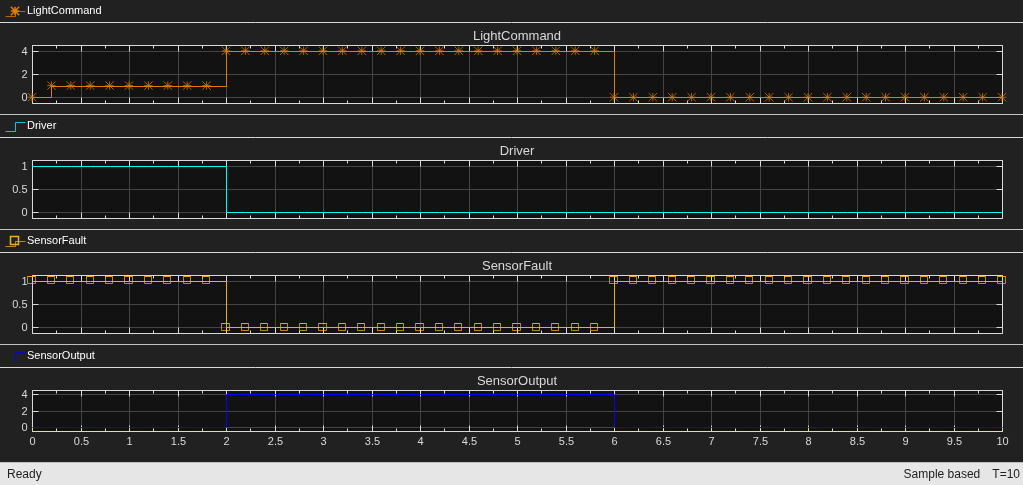
The Scope block shows the Model instance output where LightCommand varies between 0 and 4 based on sensor data, confirming that the Sensors Connected variant choice is active.
open_system(parentModel + "/Scope")
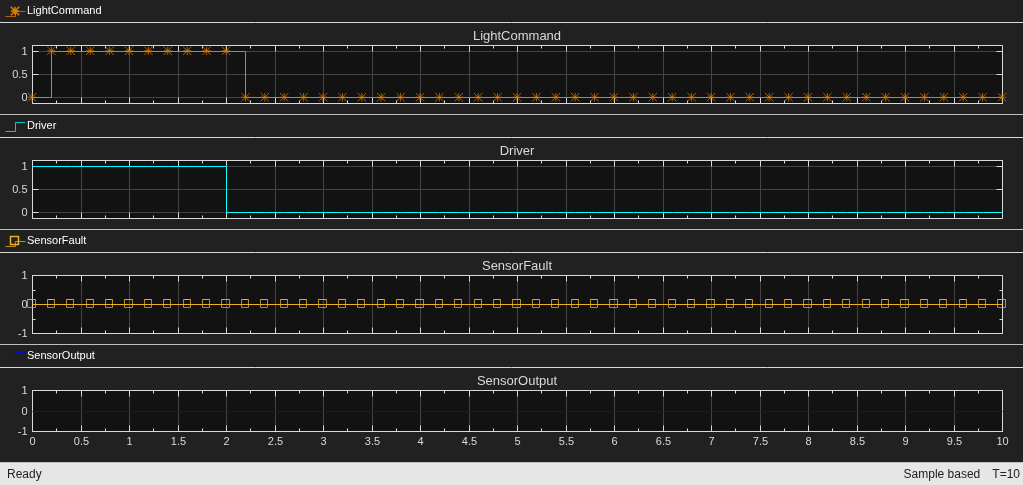
The Scope1 block shows the Model1 instance output where LightCommand switches between 0 and 1 based on driver input, confirming that the Driver Switch variant choice is active.
open_system(parentModel + "/Scope1")
Change the Value to Switch the Active Variant Choice
To modify the active variant choice of an instance, change the value of CTRL_MODE and simulate the model again.
For example, to switch the Model1 instance from Driver to Sensor, change the CTRL_MODE value to InputType.Sensor. During simulation, both instances activate the Sensors Connected choice. Because CTRL_MODE is configured as a model argument, this change applies only to the specified instance. Other instances retain their own values.
set_param(Model1BlockPath,"ParameterArgumentValues",struct("CTRL_MODE",'InputType.Sensor'))
sim(parentModel);
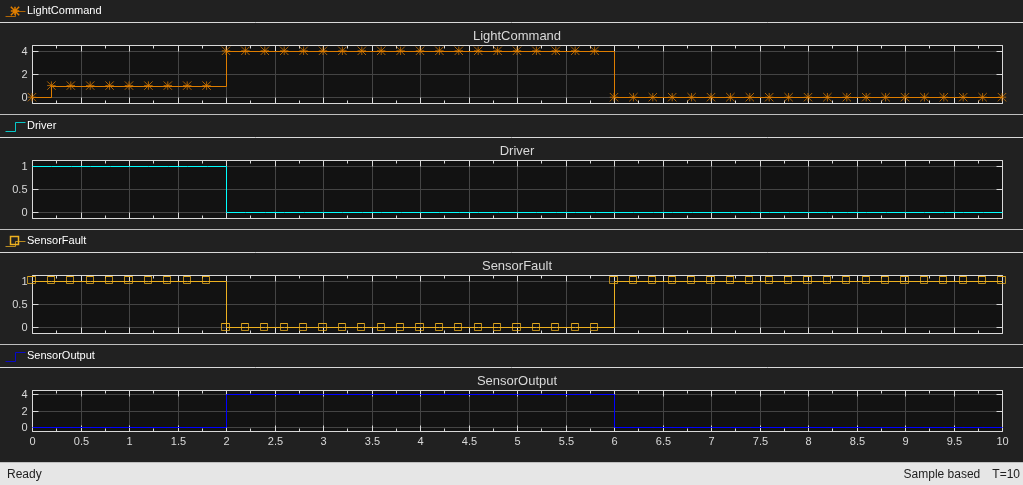
The Scope block shows the Model instance output where LightCommand varies between 0 and 4 based on sensor data, confirming that the Sensors Connected variant choice remains active.
open_system(parentModel + "/Scope")
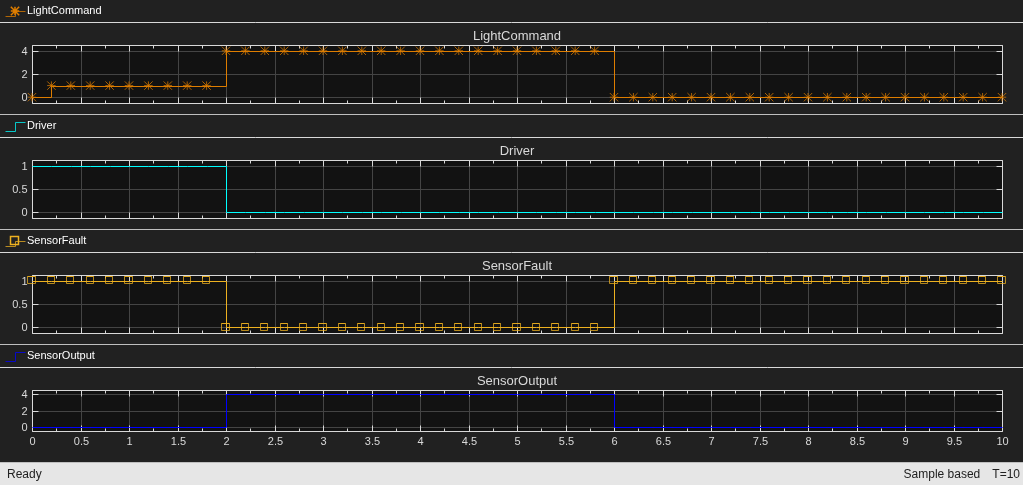
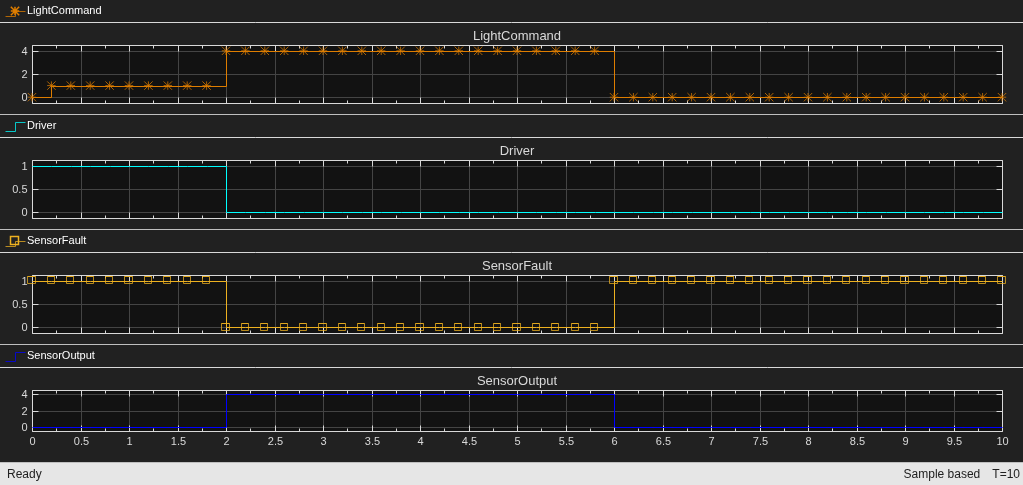
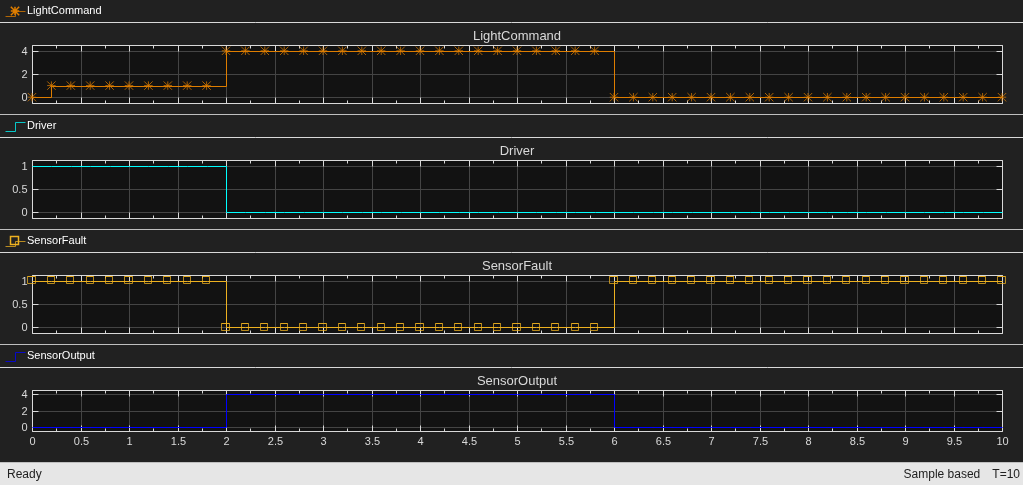
The Scope1 block shows the Model1 instance output where LightCommand now also varies between 0 and 4 based on sensor data, confirming that the Sensors Connected variant choice is now active for this instance as well.
open_system(parentModel + "/Scope1")
Note:
The highlighting of the active and inactive variant choices in the block diagram reflects the value in the model workspace, not instance-specific argument values. During simulation, Simulink correctly uses instance-specific values. To confirm per-instance behavior, compare scope outputs rather than block diagram highlighting.
If a variable with the same name exists in a closer scope, such as the mask workspace, Simulink uses the mask workspace value. Verify that you do not have unintended variables with the same name in multiple workspaces.
Scoped Data Dictionary for Subsystem References
If you use subsystem references instead of model references, you can use a scoped data dictionary to provide equivalent per-instance behavior. Attach a data dictionary to a specific subsystem reference. Simulink resolves variant control variables from that dictionary in the subsystem scope. Each subsystem reference can point to a different dictionary, enabling instance-specific values without model arguments. For more information, see Partition Data for Model Reference Hierarchy Using Data Dictionaries.
See Also
Use Model Workspace to Define Variant Control Variables Scoped to the Model for Variant Blocks
Topics
- Choose and Configure a Workspace for Variant Control Variables of Variant Blocks
- Generate Code for Instance-Specific Variant Blocks Using Model Arguments in Model Reference Hierarchy (Simulink Coder)
- Variant Control Modes in Variant Blocks
- Activate Variant During Different Stages of Simulation and Code Generation Workflow

