主要内容

addThresholdRule

R2026b

Add threshold rule to configuration

Since R2026b

    Description

    rule = addThresholdRule(config,Name=Value) adds a threshold rule to the configuration config and returns the new metric.threshold.ThresholdRule object. Use threshold rules to define compliance criteria for metrics displayed in the Model Testing, SIL Code Testing, and PIL Code Testing dashboards. If the shipping thresholds do not match your project criteria, add custom threshold rules to specify how metric results are classified as shown in Adjust Dashboard Thresholds to Match Your Testing Criteria.
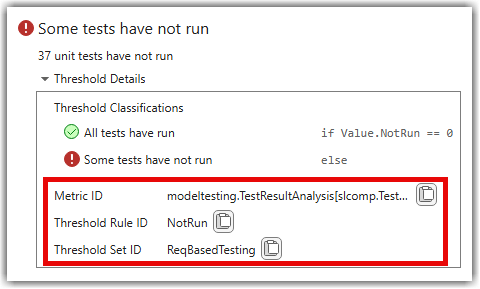
    Threshold rules for the "Not Run" widget

    example

    Examples

    collapse all

    Add a new threshold rule to a custom threshold set and define its compliance classifications.

    Copy a shipping threshold set to create a custom configuration.

    config = metric.config.Configuration.copyThresholdSet( ...
        SourceThresholdSetId="ReqBasedTesting", ...
        TargetThresholdSetId="MyTestingThresholds");

    Add a new threshold rule for the test status distribution metric. The new rule has no classifications, so you must add them to define the compliance criteria.

    newRule = addThresholdRule(config, ...
        ThresholdSetId="MyTestingThresholds", ...
        MetricId="modeltesting.TestResultAnalysis[slcomp.TestStatusDistribution]", ...
        ThresholdRuleId="MyNewRuleForTestsNotRun")
    newRule =
    
      ThresholdRule with properties:
    
                     Id: "MyNewRuleForTestsNotRun"
         ThresholdSetId: "MyTestingThresholds"
               MetricId: "modeltesting.TestResultAnalysis[slcomp.TestStatusDistribution]"
            Description: [1x1 metric.threshold.Description]
        Classifications: [0x0 metric.threshold.Classification]

    Add classifications to define the compliance criteria. The dashboard evaluates classifications in order. The classification with an empty Statement acts as the default case and must be last.

    addClassification(newRule, ...
        Category="Compliant", ...
        Statement="Value.NotRun < 5", ...
        Summary="Less than 5 tests not run");
    
    addClassification(newRule, ...
        Category="Uncategorized", ...
        Statement="", ...
        Summary="More than 5 tests not run");

    Save and register the configuration so the custom threshold set appears in the dashboard.

    proj = currentProject;
    p = proj.RootFolder;
    config.FileName = fullfile(p,"MyConfig.json");
    saveAndRegister(config,ResourcesLocation=p)

    Input Arguments

    collapse all

    Configuration, specified as a metric.config.Configuration object.

    Name-Value Arguments

    collapse all

    Specify optional pairs of arguments as Name1=Value1,...,NameN=ValueN, where Name is the argument name and Value is the corresponding value. Name-value arguments must appear after other arguments, but the order of the pairs does not matter.

    Example: addThresholdRule(config,ThresholdSetId="MyTestingThresholds",MetricId="modeltesting.TestResultAnalysis[slcomp.TestStatusDistribution]",ThresholdRuleId="MyNewRule")

    Identifier of the threshold set to which the rule belongs, specified as a string scalar. The threshold set specified by ThresholdSetId must already exist in the configuration.

    Data Types: string

    Identifier of the metric associated with the threshold rule, specified as a string scalar.

    Data Types: string

    Unique identifier for the threshold rule, specified as a string scalar. The combination of ThresholdSetId, MetricId, and ThresholdRuleId must be unique in the configuration.

    Data Types: string

    Output Arguments

    collapse all

    Threshold rule, returned as a metric.threshold.ThresholdRule object.

    Version History

    Introduced in R2026b