主要内容

metric.threshold.ThresholdRule

R2026b

Threshold rule that classifies metric result into compliance category

Since R2026b

    Description

    A metric.threshold.ThresholdRule object represents a rule that associates a metric with a set of classifications. The classifications define whether a metric result is compliant, noncompliant, a warning, or uncategorized. Threshold rules belong to a threshold set and specify the compliance criteria that the Model Testing, SIL Code Testing, and PIL Code Testing dashboards use to classify metric results. To make custom thresholds appear in the Model Testing, SIL Code Testing, and PIL Code Testing dashboards, copy a shipping threshold set and modify the threshold rules, then save and register the configuration. For more information, see Adjust Dashboard Thresholds to Match Your Testing Criteria.
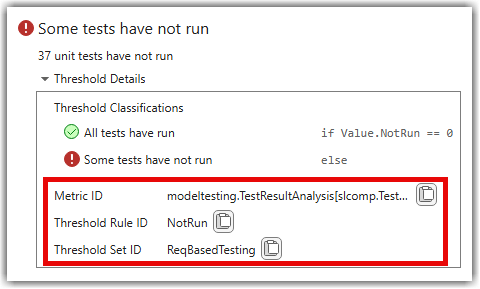
    Threshold rules for the "Not Run" widget

    Creation

    You do not create metric.threshold.ThresholdRule objects directly. Instead, you can get threshold rule objects by using one of these approaches:

    Properties

    expand all

    Unique identifier of the threshold rule, specified as a string.

    To find the threshold rule identifier, in the dashboard, point to a compliance overlay for a widget, then expand the Threshold Details in the tooltip. Note the identifier next to Threshold Rule ID.

    Example: "NotRun"

    Identifier of the threshold set that contains this rule, specified as a string.

    To find the threshold set identifier, in the dashboard, point to a compliance overlay for a widget, then expand the Threshold Details in the tooltip. Note the identifier next to Threshold Set ID.

    Example: "ReqBasedTesting"

    Identifier of the metric that this rule classifies, specified as a string. The metric ID corresponds to a metric available in the Model Testing, SIL Code Testing, and PIL Code Testing dashboards.

    To find the threshold set identifier, in the dashboard, point to a compliance overlay for a widget, then expand the Threshold Details in the tooltip. Note the identifier next to Metric ID.

    Example: "modeltesting.TestResultAnalysis[slcomp.TestStatusDistribution]"

    Description of the threshold rule, specified as a metric.threshold.Description object with these properties:

    • Text — Parameterized description string that uses {0}, {1}, and so on as placeholders for metric result values.

    • Arguments — String array of expressions that fill the placeholders in order. Each expression must be a valid MATLAB expression such as "Value.NotRun" or "Value.Condition".

    Set these properties directly on the Description object. For example, rule.Description.Text = "{0} tests not run" and rule.Description.Arguments = "Value.NotRun".

    Classifications that define the compliance criteria for this rule, specified as an array of metric.threshold.Classification objects. Each classification specifies a Category (such as Compliant, NonCompliant, Warning, or Uncategorized), a Statement that defines the condition, and a Summary that describes the outcome.

    The dashboard evaluates classifications in order. Each classification with a nonempty Statement acts like an if or else-if condition. The first classification whose statement evaluates to true determines the compliance category for the metric result. The classification with an empty Statement acts as the default else case and must be the last classification in the array.

    For more information, see metric.threshold.Classification.

    Object Functions

    expand all

    addClassificationAdd classification to threshold rule
    removeClassificationRemove classification from threshold rule

    Examples

    collapse all

    Copy a shipping threshold set, inspect a threshold rule, and modify its classifications to change the compliance criteria.

    Copy the "ReqBasedTesting" shipping threshold set.

    config = metric.config.Configuration.copyThresholdSet( ...
        SourceThresholdSetId="ReqBasedTesting", ...
        TargetThresholdSetId="MyTestingThresholds");

    Get the threshold rule for the Not Run widget and inspect its classifications.

    rule = getThresholdRule(config, ...
        ThresholdSetId="MyTestingThresholds", ...
        MetricId="modeltesting.TestResultAnalysis[slcomp.TestStatusDistribution]", ...
        ThresholdRuleId="NotRun");
    rule.Classifications(1)
    rule.Classifications(2)
    ans =
    
      Classification with properties:
    
         Category: Compliant
        Statement: "Value.NotRun == 0"
          Summary: "All tests have run"
    
    
    ans =
    
      Classification with properties:
    
         Category: NonCompliant
        Statement: ""
          Summary: "Some tests have not run"

    Change the non-compliant classification to a warning. Modify the Category property directly on the classification object.

    rule.Classifications(2).Category = "Warning";
    rule.Classifications(2).Summary = "Some tests have not run (warning)";

    Save and register the configuration to apply the change.

    proj = currentProject;
    p = proj.RootFolder;
    config.FileName = fullfile(p,"MyConfig.json");
    saveAndRegister(config,ResourcesLocation=p)
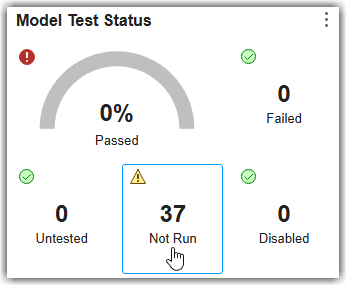
    "Not Run" widget showing a warning overlay when there are tests that have not run yet

    Version History

    Introduced in R2026b