Coverage Pane
Use the Coverage pane of the configuration parameters dialog box to configure coverage settings for your model. For more information about coverage, see Use Simulink Coverage to Analyze Your Model.
Coverage Configuration Parameters
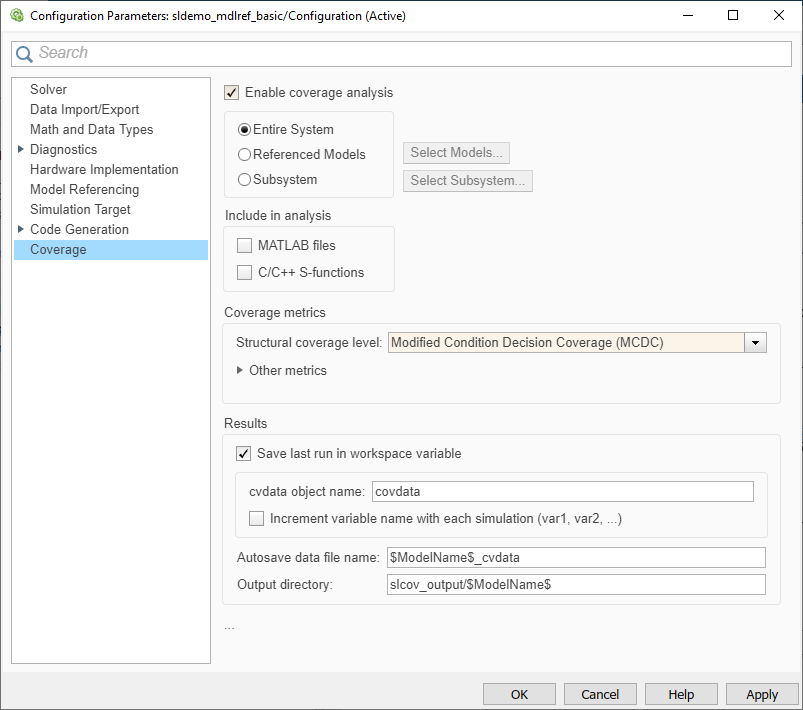
On the Coverage pane in the Configuration Parameters dialog box, set the options for the coverage calculated during simulation.
| Parameter | Description |
|---|---|
Enable coverage analysis on the model. | |
Specify whether to collect coverage for the entire system or for a specific referenced model, Observer model, or subsystem. | |
Specify the referenced model for which to analyze coverage. | |
Specify the path to the subsystem for which to analyze coverage. | |
Enable coverage analysis for MATLAB® functions in external MATLAB files. | |
Enable coverage analysis for C/C++ code in S-Function blocks in the model. | |
Specify the types of coverage data to analyze. For more information, see Structural Coverage Metrics. | |
Specify whether to collect coverage for lookup table blocks. | |
Specify whether to collect signal range coverage. | |
Specify whether to collect signal size coverage. | |
Specify whether to collect coverage for objects and constraints specified by Simulink® Design Verifier™ blocks. | |
Specify whether to collect saturation on integer overflow coverage. | |
Specify whether to collect relational boundary coverage. | |
Specify the value of absolute tolerance for relational boundary coverage. Applies to signals with a floating-point data type. | |
Specify the value of relative tolerance for relational boundary coverage. Applies to signals with a floating-point data type. | |
Specify whether to save the coverage analysis data from simulations to a variable in the base MATLAB workspace. | |
Specify the name of the | |
Specify whether to create a new variable to store coverage results for each consecutive simulation. | |
Specify the name of the CVT file to which to save coverage data. | |
Specify the folder where Simulink Coverage™ saves coverage data files. |
Coverage Advanced Parameters
These parameters are in the Advanced parameters section:
| Parameter | Description |
|---|---|
Specify whether to record coverage only for a specified time interval. | |
Specify the simulation time at which to begin coverage analysis. | |
Specify the simulation time at which to stop coverage analysis. | |
Specify whether to analyze coverage for every supported block in the model. | |
Specify whether coverage takes into account the order of operands in blocks that perform a logical operation. | |
Specify the definition of modified condition decision coverage (MCDC) to use during coverage analysis. | |
Specify whether to display a warning when Simulink Coverage detects that the model contains blocks that are not supported for model coverage analysis. | |
Specify the filter file to attach to the coverage data. | |
Specify which coverage metrics to analyze. | |
Specify whether to perform model coverage analysis during simulation. | |
Specify whether to perform coverage analysis for referenced models during simulation. | |
Specify whether to analyze coverage for the top-level model in addition to referenced models. | |
Specify the formatting of the HTML coverage report. | |
Specify additional | |
Specify whether to exclude inactive choices of Simulink variants with startup activation time and inactive variant configurations in Stateflow® charts from coverage data results. | |
Specify whether to update the coverage report when you pause the simulation. | |
Specify whether to save coverage data results to a file. | |
Specify whether to collect model coverage results from consecutive simulations. | |
Specify whether to include model coverage results from consecutive simulations in a single HTML coverage report. | |
Specify whether to save coverage data from consecutive
simulations in a single | |
Specify the name of the |

