您好,世界!示例外部代码集成用于 Simulink Real-Time
R2026b此示例展示了如何使用 S-Function Builder 模块实现外部代码集成。该示例向系统日志添加一条问候信息。
打开模型
使用复制命令按钮复制打开示例的 MATLAB 命令。使用该命令打开示例文件,然后使用 open_system 命令打开 slrt_ex_helloworld_sfunbuilder 模型。
model = 'slrt_ex_helloworld_sfunbuilder';
open_system(model);
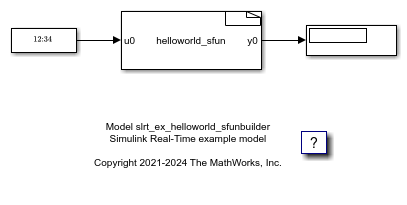
打开 S-Function 模块
双击 helloworld-sfun S-Function 模块。S-Functioin 构建器打开并显示 S-Function 代码。
/* Includes_BEGIN */
#ifdef SIMULINK_REAL_TIME
#include "slrt_log.hpp"
#endif
/* Includes_END */
/* Externs_BEGIN */
/* extern double func(double a); */
/* Externs_END */
void helloworld_sfun_Start_wrapper(SimStruct *S)
{
/* Start_BEGIN */
/* Start_END */
}
void helloworld_sfun_Outputs_wrapper(const real_T *u0,
                                     real_T *y0,
                                     SimStruct *S)
{
/* Output_BEGIN */
// Create custom message
static char hellomsg[100];
sprintf(hellomsg,"Hello World! t=%f \n",*u0);
// Use macros for platform dependent code
#ifdef SIMULINK_REAL_TIME
slrealtime::log_info(hellomsg);
#else
ssPrintf(hellomsg);
#endif
// Generic platform independent code
*y0 = *u0;
/* Output_END */
}
void helloworld_sfun_Terminate_wrapper(SimStruct *S)
{
/* Terminate_BEGIN */
/*
 * Custom Terminate code goes here.
 */
/* Terminate_END */
}
构建模型并运行实时应用程序
在构建模型之前,您可以在桌面上运行该模型,并在 Simulink Real-Time 系统日志查看器中查看输出消息。
当您准备构建模型时,在 Simulink 编辑器的实时选项卡中,连接目标计算机并点击在目标上运行。或者,在 MATLAB 命令行窗口中输入:
tg = slrealtime;
connect(tg);
modelSTF = getSTFName(tg);
set_param(model,"SystemTargetFile",modelSTF);
evalc('slbuild(model)');
load(tg,model);
start(tg);
pause(20);
stop(tg);
在状态日志中查看消息
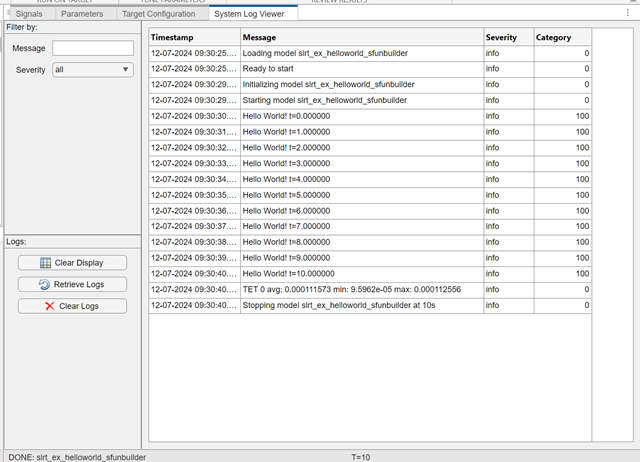
打开目标计算机状态日志并查看 Hello World! 消息。在 Simulink 编辑器的实时选项卡中,选择准备 > SLRT 资源管理器。然后,选择系统日志查看器选项卡。或者,在 MATLAB 命令行窗口中输入:
slrtLogViewer;
该查看器显示系统日志中的 Hello World! 消息。
关闭模型
bdclose(model);

