hdlHardwareSetup
R2026bSyntax
Description
hdlHardwareSetup opens the Hardware Setup tool. Use this app to set
up hardware boards supported by HDL Coder. The Hardware Setup tool guides you through the
process of registering, configuring, and connecting to your hardware board.
You can use the Hardware Setup tool to configure your hardware, download third-party tools, establish an connection with host computer, and write the firmware image.
Examples
Use the Hardware Setup tool to configure your target AMD®, Intel® and Microchip hardware board for the hardware-software co-design workflow.
hdlHardwareSetup
You can choose the HDL workflows and board‑specific settings of your target hardware. You can configure the hardware board for HDL workflows such as IP core generation, deep learning, FPGA verification and debug, or SoC modeling and generation. The hardware setup steps vary based on the selected hardware board.
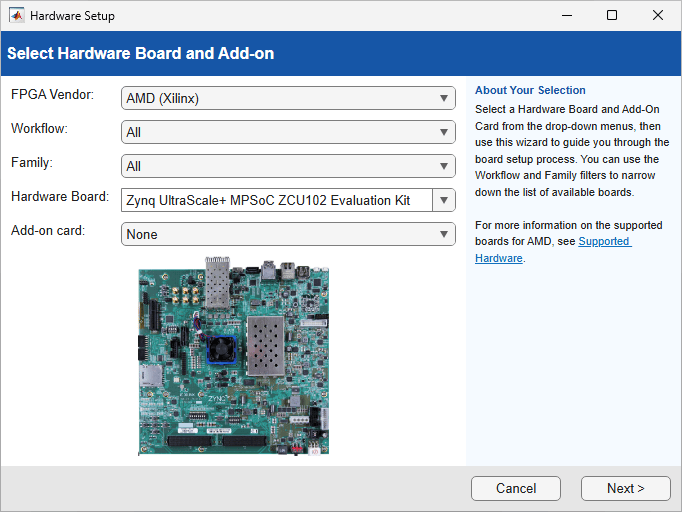
In the Select a Hardware Board step of the Hardware
Setup tool, you can specify your FPGA vendor as AMD,
Intel or Microchip, and then
select the desired workflow and hardware boards from the list.
FPGA Vendor: Select the FPGA manufacturer for the target device.
Workflow: Specify the HDL workflow you want to use.
Family: Specify the FPGA device family.
Hardware Board: Choose the target hardware board from the list or custom hardware board.
Add‑On Card: Choose an add‑on card supported with the selected hardware board.
Version History
Introduced in R2025a
See Also
Topics
- Set Up AMD FPGA and SoC Devices
- Set Up Intel Hardware Boards (HDL Coder)
- Set Up Microchip FPGA and SoC Devices (HDL Coder)

