Extract MOSFET Data from Data Sheet Using Graph Data Extractor
This example is step one in a series of examples that take you through parameterizing a MOSFET (Ideal, Switching) block and creating a part collection. You can digitize the graphical data from a manufacturer data sheet using the Graph Data Extractor app. You can then import this data into the block to parameterize it. This example shows what data you need to extract from the data sheet and provides an example data set for you to process and import into the block in the next step. For more information about extracting data using the Graph Data Extractor app, including step-by-step examples, see Graph Data Extractor.
Simscape™ Electrical™ functions and tools can help you parameterize blocks to match manufacturer specifications. The best parameterization method depends on the specific block and the data you have available. Built-in parts are the best option if you want to use a part that the block supports. The Wolfspeed® 650 V SiC Power MOSFET, C3M0015065D [1], is a built-in part for the MOSFET (Ideal, Switching) block. You can use data extracted from readily available manufacturer data sheets to model a wide variety of device types that are not built-in parts for your block. For demonstration purposes, this example provides data that you can use to recreate the Wolfspeed 650 V SiC Power MOSFET, C3M0015065D as a custom part.
To parameterize the MOSFET (Ideal, Switching) block, you need I-V data for both the MOSFET and the body diode. You also need data that defines the switching loss curves. By extracting these characteristics at relevant operating conditions, you can convert graphical information into numerical data sets. You can then process these data sets to make them compatible with the block and import the parameter values.
To open the Graph Data Extractor app, at the MATLAB® Command Window, run this command.
graphDataExtractor
You can start a new session by clicking the New Session button. Then, to digitize a plot you can import the image that you want to digitize and follow the on-screen instructions.
Extract MOSFET I-V Curve From Data Sheet
Most MOSFET data sheets provide I-V characteristics across various gate-source voltages and junction temperatures. However, the MOSFET (Ideal, Switching) block assumes operation under a fixed gate-source voltage. To parameterize the block, the only I-V curves that you need to digitize are the I-V curves corresponding to the operating gate voltage of the circuit, at a minimum of two junction temperatures.
This screenshot shows a Graph Data Extractor session in which the app digitizes an I-V curve from the MOSFET data sheet. This example provides data sets that were extracted from the data sheet using the app. To learn how to extract the data yourself, see Extract Points from a Datasheet Plot into a Data Table.
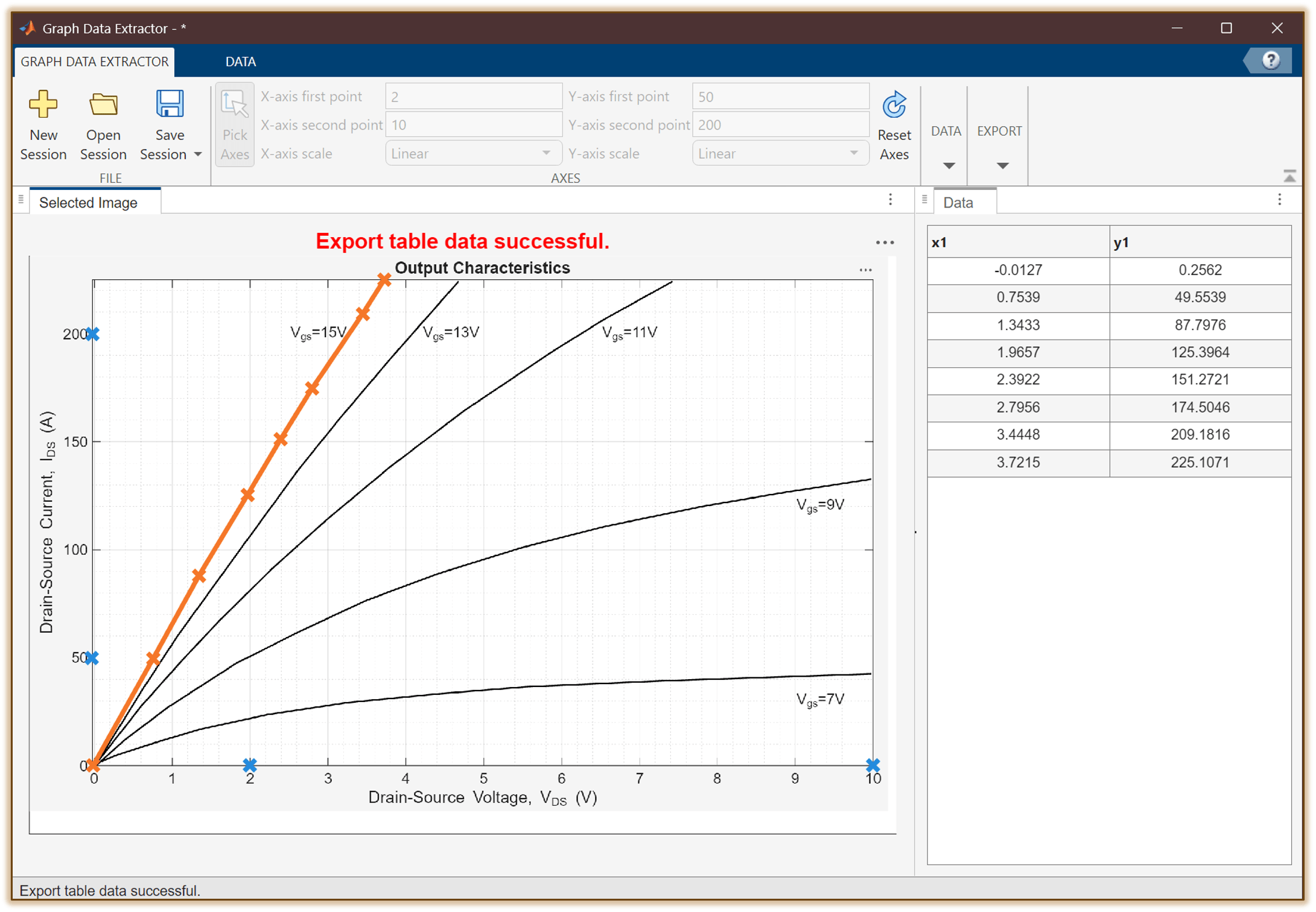
To parameterize the MOSFET (Ideal, Switching) block you need I-V data for the MOSFET at a minimum of two junction temperatures. Load the pre-extracted MOSFET I-V data for the first junction temperature, 25°C, and specify the temperature.
IV_Vgs15_Tj25 = load("IV_Vgs15_Tj25.mat");
IVat25degC = IV_Vgs15_Tj25.tableData;
temp1IV = simscape.Value(25,"degC"); % Temperature (degC)
Load the MOSFET I-V data for the second junction temperature, 175°C, and specify the temperature.
IV_Vgs15_Tj175 = load("IV_Vgs15_Tj175.mat");
IVat175degC = IV_Vgs15_Tj175.tableData;
temp2IV = simscape.Value(175,"degC"); % Temperature (degC)
Extract Diode Characteristics from Data Sheet
To parameterize the MOSFET (Ideal, Switching) block you need I-V data for the body diode at a minimum of two junction temperatures. You can use the Graph Data Extractor app to digitize the diode I-V curves from the data sheet. Load the diode I-V data for the 25°C junction temperature and specify the temperature.
DiodeIV_atT25_Vgs_4 = load("DiodeIV_atT25_Vgs-4.mat");
diodeIVat25degC = DiodeIV_atT25_Vgs_4.tableData;
temp1DiodeIV = simscape.Value(25,"degC"); % Temperature (degC)
Load the diode I-V data for the 175°C junction temperature and specify the temperature.
DiodeIV_atT175_Vgs_4 = load("DiodeIV_atT175_Vgs-4.mat");
diodeIVat175degC = DiodeIV_atT175_Vgs_4.tableData;
temp2DiodeIV = simscape.Value(175,"degC"); % Temperature (degC)
Extract Switching Losses from Data Sheet
To parameterize the MOSFET (Ideal, Switching) block you need tabular data for the turn-on energy loss, , and turn-off energy loss, , as functions of the drain-source current. You only need data for these relationships at a single drain-source voltage and junction temperature. You can digitize multiple traces from a single plot using the Graph Data Extractor app. For more information, see Extract Multiple Lines from Datasheet and Plot Them on a Grid.
Load the switching loss data. The data includes turn-on and turn-off energy losses with respect to drain-source current in a single table. The first two columns of the table correspond to data and the last two columns correspond to data. Specify the junction temperature and voltage.
Loss_Eon_Eoff_vs_Id_Vdd400 = load("Loss_Eon_Eoff_vs_Id_Vdd400.mat"); lossAt400V = Loss_Eon_Eoff_vs_Id_Vdd400.tableData; tempLoss = simscape.Value(25,"degC"); % Temperature (degC) vLoss = simscape.Value(
400,"V"); % Voltage (V)
In this case, the two extracted curves contain different numbers of data points. As a result, Graph Data Extractor pads the shorter data set with NaN values to match the length of the longer one. Additionally, the x-axis vectors for each trace differ, which makes the data incompatible with the block. To make the data compatible with the block, you can use the Graph Data Extractor app to interpolate the data for a common x-axis. This is the approach you use in the Extract Multiple Lines from Datasheet and Plot Them on a Grid example. The next step in this series of examples shows you an alternative approach for fixing these issues and transforming the data into a compatible format for block parameterization by using a utility function.
Clear the intermediate values that you do not need in the next step.
clear IV_Vgs15_Tj25 IV_Vgs15_Tj175 DiodeIV_atT25_Vgs_4 DiodeIV_atT175_Vgs_4 Loss_Eon_Eoff_vs_Id_Vdd400;
Reference
[1] : “C3M0015065D, 650 V, 15 mΩ, Discrete SiC MOSFET | Wolfspeed.” Accessed November 20, 2025. https://www.wolfspeed.com/products/power/sic-mosfets/650v-silicon-carbide-mosfets/c3m0015065d/.

