主要内容

Generate Derived Data Sheets

You can use built-in MATLAB® scripts to generate derived data sheets for specific blocks. Derived data sheets contain summary tables and characteristic plots based on the block parameter values in your model. These tables and plots are similar to those that device manufacturers provide in their data sheets. Use derived data sheets to:

  • Explore the impact of your parameter choices on device characteristics.

  • Confirm that the block behaves as you expect, if you parameterized the block to match the manufacturer specifications of a specific part.

  • Help you choose a part from a manufacturer, if you tuned the block parameter values so that your Simscape™ model satisfies your system-level design requirements.

  • Communicate your design to other members of your organization.

To generate a derived data sheet:

  1. Open the MATLAB script by clicking the Open live script button next to the Derived data sheet parameter in the Utilities section of the block dialog box.

  2. In the script that opens, provide values for any additional variables that the data sheet requires.

    For example, the derived data sheet for the PMSM block contains this code block under the Enter Parameter Values heading. You can specify a new value for the peak line current in amps by replacing the numerical value, 30, in the Peak of line current (A) text box.

    Code block from the PMSM block derived data sheet with text boxes for you to specify additional variables. These variables are the peak line current in amps, the peak maximum allowable line current in amps, the maximum stator line-to-line peak voltage in volts, the rated speed in rpm, and the maximum rotor speed in rpm.

  3. Click the Generate Data Sheet button in the script.

Depending on the block, MATLAB either:

  • Calculates the characteristics by substituting your block parameter values into the defining equations.

  • Simulates a harness with a copy of your block in Simulink® over a range of conditions, then imports the results to MATLAB.

The script then generates a specification table and plots the results. For example, the derived data sheet for the PMSM block with default parameter values contains this table under the Generate Specification Tables heading.

    Parameter                  Value      Unit
    Continuous Stall Torque    2.31       Nm  
    Peak Torque                7.10       Nm  
    Rated Speed                1800.00    rpm 
    Peak of Stall Current      10.56      A   
    Peak of Maximum Current    31.68      A   
    Rated Power                0.44       kW  

The derived data sheet for the PMSM block also contains:

  • A plot that shows torque and current versus rotor speed at both peak torque and maximum AC voltage
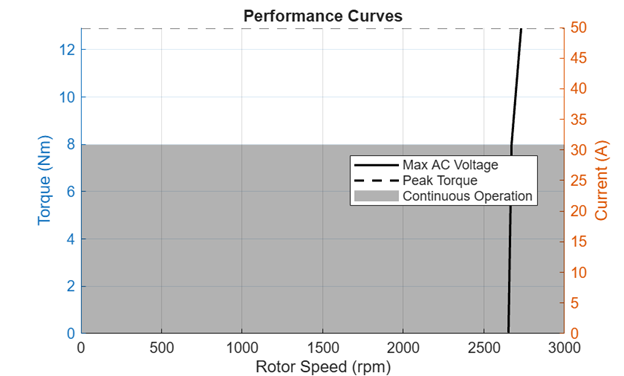
    Plot showing torque and current versus rotor speed at peak torque and the maximum AC voltage.

  • Subplots of torque, efficiency, shaft power, and stator current versus rotor speed at 50% and 100% of the rated stator current
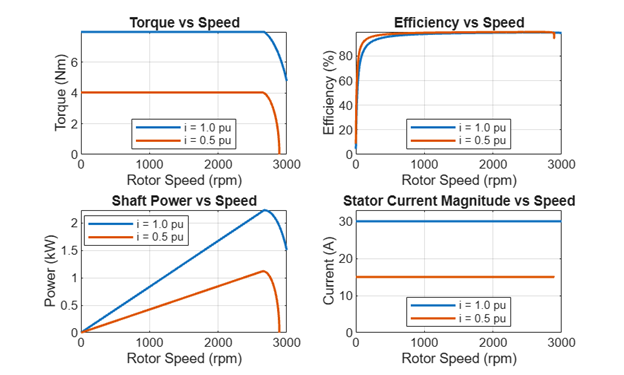
    Subplots of torque, efficiency, shaft power, and stator current versus rotor speed at 50% and 100% of the rated stator current.

You can compare these plots and summary tables to manufacturer data sheets, either to check that you have parameterized the block correctly or to help you select a manufactured part.

MATLAB stores the data displayed in the summary table and plots, as a structure in the workspace. The structure for the PMSM block is named pmsmDataSheet. You can use this structure to postprocess the data.

To compare plots and summary tables for devices with different characteristics:

  1. Save the results by renaming the structure so that MATLAB does not replace it with new results when you regenerate the data sheet.

  2. Change the input variables in the top section of the MATLAB script or the parameter values in the block mask.

  3. Click the Generate Data Sheet button or run the MATLAB script again.

The block you generate the data sheet for must be the currently selected block in your Simulink model. If you make changes to your model, click the block before regenerating the data sheet.

Blocks That Support Derived Data Sheets

This table shows the blocks that support derived data sheets in the Simscape Electrical™ sublibraries.

If you want to generate summary tables and characteristics plots of block-level characteristics, but your block does not support derived data sheets, you can use Display or Plot buttons, respectively, in the Utilities section of the block parameters. For more information, see Visualize Block Parameterization by Plotting Characteristic Curves.

If your block does not support Utilities, or if the buttons do not generate the plots and summary information you need, you can build your own harness. To learn how to build harnesses and plot block-level characteristics, see the featured examples in the Visualize, Validate, and Tune Parameter Values category.

BlockAdditional Input VariablesDerivationSpecification TablePlotsAdditional Information
BLDC
  • Rated voltage

  • Rated speed

Harness
  • Rated voltage

  • Rated speed

  • Rated torque

  • Rated current

  • Maximum power

  • Stall torque

  • Stall current

  • Back-EMF constant

  • Number of pole pairs

  • Speed, current, mechanical power, and efficiency versus torque

 
Induction Machine Squirrel CageNoneHarness
  • Rated apparent power

  • Number of poles

  • Frequency

  • Line-to-line RMS voltage

  • Rated torque

  • Line RMS current

  • Rated speed

  • Slip

  • Rated output power

  • Rated reactive power

  • Rated power factor

  • Torque and line-to-line RMS current versus normalized speed at the rated voltage and frequency

  • Torque versus speed at different stator voltages for a constant ratio of voltage to frequency

You can plot characteristics for wye, delta, or both winding configurations by selecting a value for the WindingConfiguration dropdown list in the script.
Magnetic CoreNoneHarness
  • Relative permeability

  • Remanence

  • Coercivity

  • Saturation flux density, B

  • Field intensity, H, at flux saturation

  • Hysteresis power loss

  • Eddy current power loss

  • Flux density versus magnetic field intensity (B-H curve):

    • Without eddy current effects

    • With inner loops, at a fixed frequency

    • With eddy current losses, at different frequencies

  • Hysteresis and eddy current losses:

    • Versus flux density at a fixed frequency

    • Versus frequency at a fixed flux density

  • To include eddy current power loss in the specification table or to plot eddy current losses, select Model eddy current in the block dialog box.

  • The Magnetic Core block estimates the Jiles-Atherton parameters based on the assumption that the core is saturated iron. You can obtain these estimates by generating a derived data sheet. Then, adjust the values to fit your data. For more information, see the Model Ferrite Core Using Magnetic Core Block example.

MOSFET (Ideal, Switching)NoneDefining equations
  • On-state drain-to-source resistance

  • Threshold voltage

  • Off-state conductance

To include these additional variables in the specification table, in the block dialog box, set the Modeling option parameter to Show thermal port and the On-state behavior and switching losses parameter to Tabulated:

  • Maximum on-state drain-source voltage

  • Maximum drain-source current

  • Junction temperature

  • Drain-source voltage versus drain-source current at different temperatures

  • Switch-on loss, switch-off loss, and total switching loss versus drain-source current at different temperatures

  • On-state forward voltage versus current of the body diode at different temperatures

  • Surface plots of switching losses with respect to the drain-source voltage and drain-source current at different temperatures

  • Surface plot of switching losses with respect to on-state current and junction temperature at maximum off-state voltage

  • On-state resistance versus drain-source current at different temperatures

  • Off-state drain-source voltage versus off-state drain-source current

  • Off-state forward voltage versus current of the body diode

  • To plot characteristics at different temperatures or to plot switching losses, set the Modeling option parameter to Show thermal port.

  • To plot MOSFET characteristics at different temperatures, set the On-state behavior and switching losses parameter to Tabulated.

    • The temperatures for plots of the on-state characteristics correspond to the elements of the Temperature vector, Tj parameter.

    • The temperatures for plots and surface plots of the switching loss characteristics correspond to the elements of the Temperature vector for switching losses, Tj parameter. If the number of temperature values is greater than five, MATLAB generates plots only at the maximum and minimum temperatures and three equidistant points between them.

  • To generate the surface plot of switching losses with respect to on-state current and junction temperature at maximum off-state voltage, specify a value for the Temperature vector for switching losses, Tj parameter with a length greater than 5.

  • To plot diode characteristics, set the Integral protection diode parameter to Diode with no dynamics.

  • To plot diode characteristics at different temperatures, set the Diode model parameter to Tabulated I-V curve. The temperatures correspond to the elements of the Junction temperatures, Tj parameter.

PMSM
  • Peak line current

  • Peak maximum line current

  • Maximum stator line-to-line peak voltage

  • Rated rotor speed

  • Maximum rotor speed

Defining equations
  • Continuous stall torque

  • Peak torque

  • Rated speed

  • Peak stall current

  • Peak maximum allowable current

  • Rated power

  • Torque and current versus rotor speed at peak torque and the maximum AC voltage

  • Torque, efficiency, shaft power, and stator current versus speed at 50% and 100% of the rated stator current

  • If you set the Winding type parameter to Open-end, the calculations assume that one end connects to the ground.

Solar CellNoneHarness
  • Open-circuit voltage

  • Short-circuit current

  • Voltage at maximum power

  • Current at maximum power

  • Maximum power

  • Output voltage versus current and power:

    • At a fixed temperature and various irradiance values

    • At a fixed irradiance value and various temperatures

  • You can use these characteristic curves to evaluate the maximum power point tracking (MPPT) output, because the curves help to identify the peak power at various irradiance levels and cell temperatures.

  • Before R2026a: To open the MATLAB script: double-click the block to open the Block Parameters window, open the Description tab, and click the Generate Datasheet hyperlink.

See Also

Simscape Blocks

Topics