cast
R2026b将数值转换为不同数值数据类型
描述
y = cast(x,dataTypeName)x 转换为由 dataTypeName 指定的数据类型。
在使用 MATLAB 作为动作语言的图中,将 dataTypeName 指定为 "single"、"double"、"int8"、"uint8"、"int16"、"uint16"、"int32"、"uint32"、"int64"、"uint64" 或 "logical"。
在使用 C 语言作为动作语言的图中,指定 dataTypeName、single、double、int8、uint8、int16、uint16、int32、uint32、int64、uint64 或 boolean。
在使用 MATLAB 作为动作语言的图中,y = cast(x,"like",y)x 转换为与数值 y 相同的数据类型。
示例
将双精度类型的 x 强制转换为整数类型,并将值赋给 y。
在使用 MATLAB 作为动作语言的图中,输入:
x = -4.56789;
y = cast(x,"int8");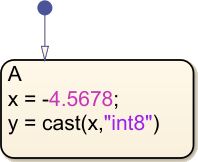
y 的值是 -5。
在使用 C 语言作为动作语言的图中,请输入:
x = -4.56789;
y = cast(x,int8);
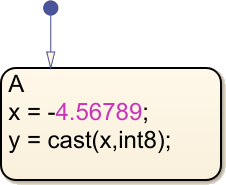
y 的值是 -4。
将双精度类型的 x 强制转换为整数 z 的数据类型,并将该值赋给 y。
在使用 MATLAB 作为动作语言的图中,输入:
x = -4.56879;
z = int8(5);
y = cast(x,"like",z);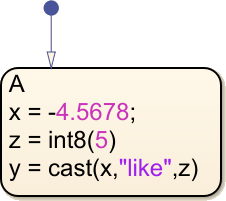
y 的值是 -5。
在使用 C 语言作为动作语言的图中,请输入:
x = -4.56789;
z = int8(5);
y = cast(x,type(z));
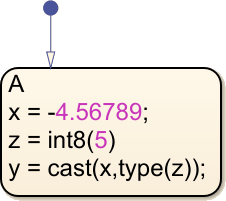
y 的值是 -4。
在使用 C 语言作为动作语言的图中,将双精度类型的 x 强制转换为定点数据类型,并将值赋给 fp。
x = -4.56879;
fp = cast(x,fixdt(1,5,1));
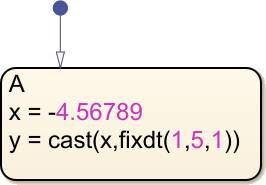
y 的值是 -4.5。
版本历史记录
在 R2006a 之前推出

