Debounce Signals in a State Transition Table
This example shows how to debounce a noisy signal by using state transition tables.
Open Model
Open the sf_debouncer_STT model.
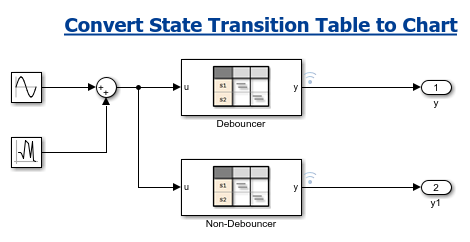
This model combines the signals from the Sine block and the Random Number Generator block to generate a continuous noisy signal. When a noisy signal is close to the threshold between two discrete values, it can cause rapid and erratic changes between the two values. To prevent the operating mode from rapidly switching, the model uses debouncing.
Debounce Noisy Signal
The State Transition Table block Debouncer debounces the input signal. You can compare this signal to the State Transition Table block Non-Debouncer, which does not debounce the input signal but has identical inputs, outputs, and states.
Double-click the Debouncer block to see the state transition table.
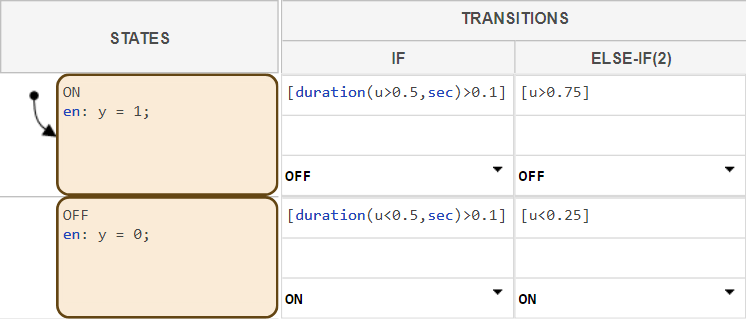
The table starts in the On state. Based on the input, the table transitions to On when:
The input is greater than
0.5for 0.1 seconds or longer.The input is
0.75for any length of time.
The table transitions to Off when:
The input is less than
0.5for 0.1 seconds or longer.The input is
0.5for any length of time.
The table outputs 1 when On is active and 0 when Off is active.
To debounce the input signal, the table uses the duration operator. This operator returns the length of simulation time for which a Boolean expression is true. In this model, the duration operator prevents the table from transitioning from On to Off or Off to On unless u meets the specified condition for longer than 0.1 seconds.
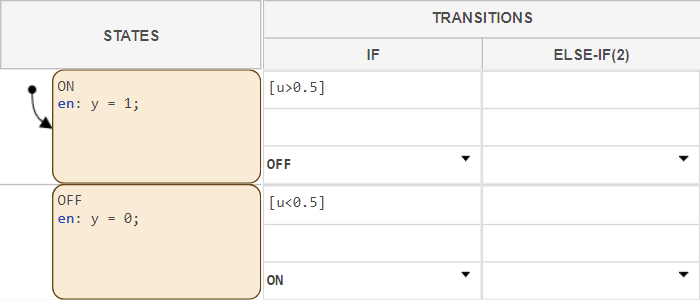
By comparison, the state transition table Non-Debouncer transitions betweens states as soon as data u crosses a threshold.
Simulate the Model
To observe the difference in outputs between the debounced and non-debounced signals, simulate the model. In the Simulation tab, click Run.
When the simulation completes, open the Simulation Data Inspector. In the Simulation tab, click Data Inspector.
To compare the output of the two tables, under Inspect, select Debouncer and Non-Debouncer.

The debounced signal only transitions to On when u is greater than 0.5 for 0.1 seconds and to Off when u is less than 0.5 for 0.1 seconds. The non-debounced signal changes rapidly between On and Off when u is near 0.5.

