distplot
R2026bSyntax
Description
distplot( plots the Survivor Function of the mdl)AcceleratedLifeModel object mdl at the stressor level in
mdl.BaselineStressorLevel. If
mdl.BaselineStressorLevel is empty, distplot
uses the last unique stressor level in mdl.StressorLevels.
distplot(
plots the survivor function at the stressor level specified by
mdl,stressorLevel)stressorLevel.
distplot(___, specifies
options using one or more name-value arguments in addition to any of the input argument
combinations in the previous syntaxes. For example, specify Name=Value)Type="cdf" to
plot the cumulative distribution function (cdf).
distplot( uses the plot
axes specified by the ax,___)Axes object ax. The option
ax can precede any of the input argument combinations in the previous
syntaxes.
h = distplot(___)h) to the lines in the distribution plot.
Examples
Load the partFailure data set, which contains simulated observations of failure times for an assembly line part at specific humidity and temperature levels.
load partFailure.matFit an accelerated life model to the data in the partFailure table using the fitacclife function. Use the FailureTime table variable as the failure times, and the other table variables as the stressors.
mdl = fitacclife(partFailure,"FailureTime");Plot Survivor Function
Return the survivor function values of the model, evaluated at 50 equally spaced time values between 0.8 and 10. By default, the software calculates the survivor function at the lowest unique stressor level in mdl.StressorLevels. In this example, the lowest unique stressor level corresponds to a humidity value of 50% and a temperature of 5 degrees Celsius.
points = linspace(0.8,10,50)';
x = distfcn(mdl,EvaluationTimes=points)
x = 50×1

    0.8000
    0.9878
    1.1755
    1.3633
    1.5510
    1.7388
    1.9265
    2.1143
    2.3020
    2.4898
    2.6776
    2.8653
    3.0531
    3.2408
    3.4286
      ⋮
Plot the survivor function at the evaluation points.
distplot(mdl,EvaluationTimes=points)
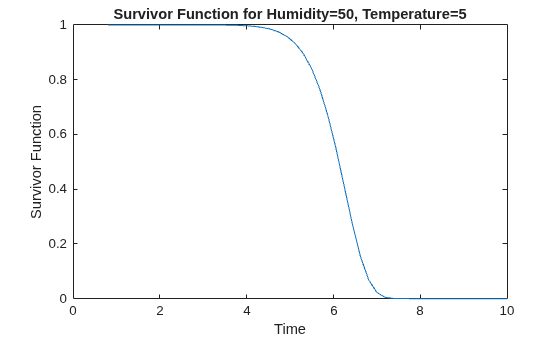
The plot shows that, at this stressor level, the assembly line part has a survival probability close to 100% for time values smaller than 4. The survival probability drops to approximately zero for time values greater than 7.5.
Plot Probability Density Function
Plot the probability density function (pdf).
distplot(mdl,Type="pdf",EvaluationTimes=points)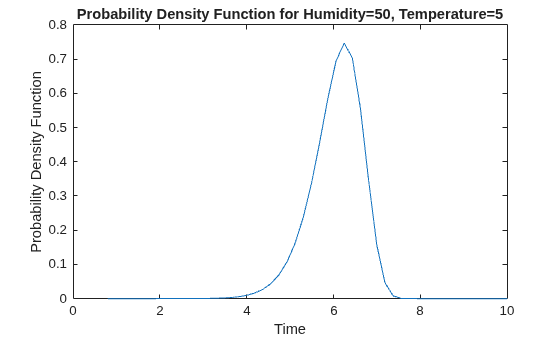
The plot shows that the most likely failure time at this stressor level is approximately 6.2.
Plot Cumulative Distribution Function
Plot the cumulative distribution function (cdf) at a stressor level that corresponds to 90% humidity and a temperature of 20 degrees.
distplot(mdl,[90 20],Type="cdf",EvaluationTimes=points)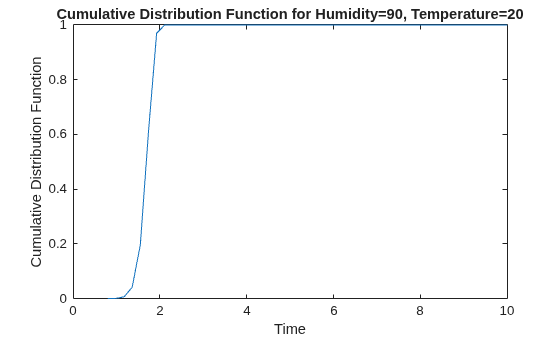
The plot shows that, at this stressor level, approximately half of all assembly line parts have failure times smaller than 1.7.
Plot Inverse Cumulative Distribution Function
Calculate the inverse cumulative distribution function (icdf) at 90% humidity and 35 degrees, and 90% humidity and 20 degrees. Evaluate the icdf at 10 equally spaced probability values between 0.1 and 0.9.
pts = linspace(0.05,0.9,10);
icdfval = [icdf(mdl,pts); icdf(mdl,pts,[90,20])]
icdfval = 2×10

    4.9953    5.4502    5.6944    5.8737    6.0227    6.1562    6.2834    6.4119    6.5525    6.7298
    1.3842    1.5102    1.5779    1.6275    1.6688    1.7058    1.7411    1.7767    1.8156    1.8648
Create a plot of the icdf values for the two stressor levels.
plot(pts,icdfval,"-o")
xlabel("Probability")
ylabel("ICDF Value")
legend(["Humidity = 90, Temperature = 35", ...
    "Humidity = 90, Temperature = 20"],Location="east")
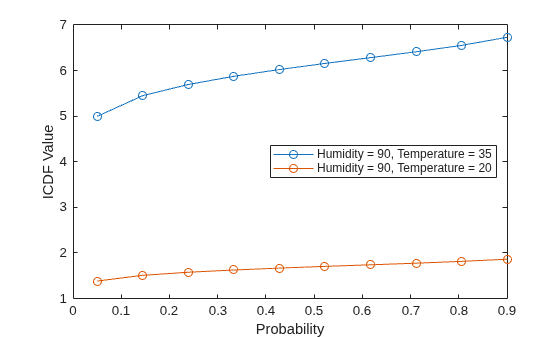
The icdf values are consistently lower at the lower temperature stressor level.
Input Arguments
Name-Value Arguments
Output Arguments
More About
Version History
Introduced in R2026a
See Also
fitacclife | AcceleratedLifeModel | accelfactor | coefci | distfcn | icdf | meanfailplot | meanfailtime | probplot

