incrementalNormalizer
R2026bSyntax
Description
Normalizer = incrementalNormalizer("zscore")ZScoreNormalizer
model object for simple-weighted normalization of streaming data.
You can also create a default ZScoreNormalizer model object using
Normalizer = incrementalNormalizer.
Normalizer = incrementalNormalizer("exponentiallyweighted")ExponentiallyWeightedNormalizer model object for exponentially weighted
normalization of streaming data.
Normalizer = incrementalNormalizer("classweighted",ClassNames,Prior)ClassWeightedNormalizer model object for class-weighted normalization of
streaming data, with the class names ClassNames and class priors
Prior. You can use a ClassWeightedNormalizer object
to normalize input data for supervised classification models.
Normalizer = incrementalNormalizer(___,Name=Value)Normalizer =
incrementalNormalizer). For example,
Normalizer=incrementalNormalizer("exponentiallyweighted",ForgettingFactor=0.9)
creates an ExponentiallyWeightedNormalizer object that gives more weight to
newer observations than older ones.
Examples
Create a default model for incremental normalization and display its properties.
Normalizer = incrementalNormalizer;
details(Normalizer)
  incremental.preprocessing.ZScoreNormalizer with properties:

               SumOfWeights: [1×0 double]
                  ScaleData: 1
                     Center: [1×0 double]
                      Scale: [1×0 double]
             PredictorNames: []
                     IsWarm: 1
    NumTrainingObservations: 0
              NumPredictors: 0
               WarmupPeriod: 0
             TrainingPeriod: Inf
            UpdateFrequency: 1
      CategoricalPredictors: []

  Methods, Superclasses
Normalizer is a ZScoreNormalizer model object. All its properties are read-only. The properties of Normalizer affect how the incremental fit function processes chunks of data as follows:
fitreturns normalized data (IsWarm=true).The
ScaleDatavalue istrue, meaning that the normalized data is centered (mean = 0) and scaled (standard deviation = 1).The
UpdateFrequencyvalue is1, meaning thatfitupdates theCenter(mean) andScale(standard deviation) values ofNormalizereach time it processes an observation.The
TrainingPeriodvalue isInf, meaning that theCenterandScalevalues ofNormalizerare never fixed.Because
NumPredictors=0,fitsets theNumPredictorsvalue equal to the number of predictors in the input data.
Generate Simulated Data
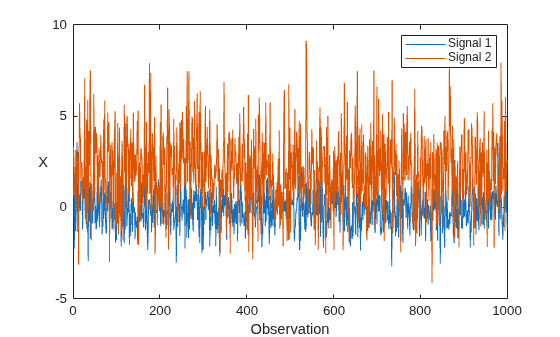
Generate a data set X that contains 1000 observations of two simulated Gaussian noise signals. The first signal has zero mean and a standard deviation of 1, and the second signal has a mean of 2 and a standard deviation of 2.
rng(0,"twister"); % For reproducibility
n = 1000;
X = [randn(n,1),2*randn(n,1)+2];
Plot the data set.
plot(X)
xlabel("Observation")
ylabel("X",Rotation=0)
legend(["Signal 1","Signal 2"])
Perform Incremental Learning
Fit the incremental model Normalizer to the data by using the fit function. To simulate a data stream, fit the model in chunks of 50 observations at a time. At each iteration:
Process 50 observations.
Call the incremental
fitfunction to overwrite the previous incremental normalizer modelNormalizerwith a new one fitted to the incoming observations.Store
center, the fittedCentervalues ofNormalizer, to see how the values evolve during incremental learning.Store
scale, the fittedScalevalues ofNormalizer, to see how the values evolve during incremental learning.Store
XNormalized, the normalized data chunk, to see how it evolves during incremental learning.
numObsPerChunk = 50;
nchunk = floor(n/numObsPerChunk);
center = zeros(nchunk,2);
scale = zeros(nchunk,2);
XNormalized = [];
% Incremental normalization
for j = 1:nchunk
    ibegin = min(n,numObsPerChunk*(j-1) + 1);
    iend = min(n,numObsPerChunk*j);
    idx = ibegin:iend;
    [Normalizer,normalized] = fit(Normalizer,X(idx,:));
    center(j,:) = Normalizer.Center;
    scale(j,:) = Normalizer.Scale;
    XNormalized = [XNormalized;normalized];
end
Display the properties of the incremental normalizer model after the final iteration.
details(Normalizer)
  incremental.preprocessing.ZScoreNormalizer with properties:

               SumOfWeights: [1000 1000]
                  ScaleData: 1
                     Center: [-0.0326 2.0738]
                      Scale: [0.9985 1.9962]
             PredictorNames: ["x1"    "x2"]
                     IsWarm: 1
    NumTrainingObservations: 1000
              NumPredictors: 2
               WarmupPeriod: 0
             TrainingPeriod: Inf
            UpdateFrequency: 1
      CategoricalPredictors: []

  Methods, Superclasses
The model is trained on all the data in the stream. The Center and Scale values are approximately equal to the true means and standard deviations of the input signals.
Analyze Model During Incremental Learning
At the end of each iteration, the fit function updates the Center and Scale values of the model object using the observations in the data chunk. The function then returns a transformed version of the data chunk that is normalized using the updated values of Center and Scale.
To see how the Center and Scale values evolve during training, plot them on separate tiles.
figure
tiledlayout(2,1);
nexttile
plot(center,"o-")
xlabel("Iteration")
ylabel("Center")
nexttile
plot(scale,"o-")
xlabel("Iteration")
ylabel("Scale")
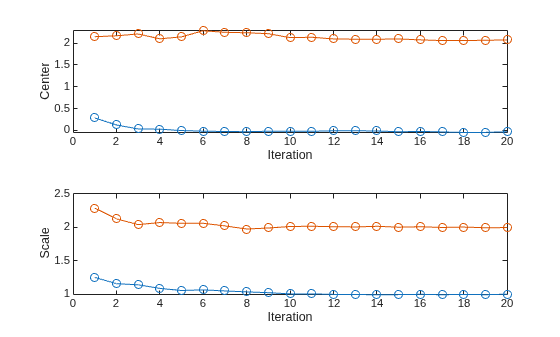
The Center and Scale values approach the true means and standard deviations of the input signals after approximately 10 iterations.
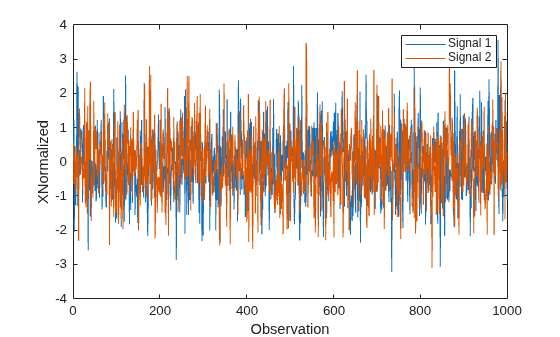
Plot the normalized signal data, and then display the means and standard deviations.
figure
plot(XNormalized)
xlabel("Observation")
ylabel("XNormalized")
legend(["Signal 1","Signal 2"])
display(mean(XNormalized))
-0.0323 -0.0318
display(std(XNormalized))
0.9576 0.9786
The normalized signals have means close to zero and standard deviations close to 1.
Compute the z-scores for the entire data set using the zscore function. Plot the absolute percentage difference between the normalized signal values and the z-scores.
zscores = zscore(X);
figure
plot(100*abs(XNormalized-zscores)/zscores)
xlabel("Observation")
ylabel("Absolute Percentage Difference")
legend(["Signal 1","Signal 2"])
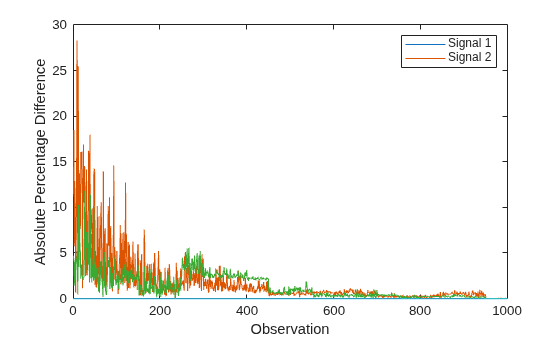
The plot indicates that after the normalizer processes approximately 600 observations, the z-scores and the normalized signal values differ by less than one percent.
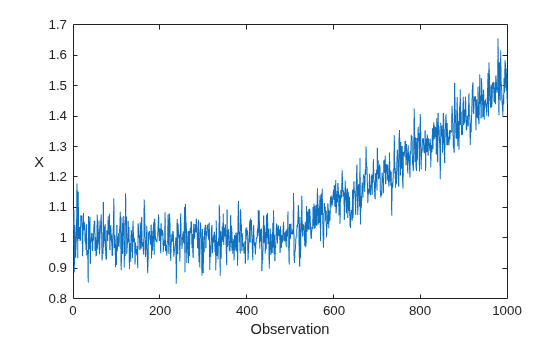
Generate a data set X that contains 1000 observations of a simulated Gaussian noise signal with a standard deviation of 0.05. The signal has an initial mean of 1, which increases linearly after the 500th observation.
rng(0,"twister"); % For reproducibility
n = 1000;
m = 500;
initialMu = 1;
sigma = 0.05;
driftRate = 1/1000;
X = initialMu + sigma*randn(m,1);
t = (1:n-m)';
X = [X; initialMu + t*driftRate + sigma*randn(n-m,1)];
Plot the data set.
plot(X)
xlabel("Observation")
ylabel("X",Rotation=0)
Create Incremental Normalization Model
Create an exponentially weighted incremental normalization model with an initial Center (mean) value of 1 and a Scale (standard deviation) value of 0.05, based on 10 prior observations. Display the properties of the model object.
Normalizer = incrementalNormalizer("exponentiallyweighted", ...
    Center=1,Scale=0.05,NumObservations=10);
details(Normalizer)
  incremental.preprocessing.ExponentiallyWeightedNormalizer with properties:

               SumOfWeights: 10
           ForgettingFactor: 0.0500
                  ScaleData: 1
                     Center: 1
                      Scale: 0.0500
             PredictorNames: "x1"
                     IsWarm: 1
    NumTrainingObservations: 0
              NumPredictors: 1
               WarmupPeriod: 0
             TrainingPeriod: Inf
            UpdateFrequency: 1
      CategoricalPredictors: []

  Methods, Superclasses
Normalizer is an ExponentiallyWeightedNormalizer model object. All its properties are read-only. The properties of Normalizer affect how the software processes chunks of data as follows:
The incremental
fitfunction returns normalized data (IsWarm=true).The
ScaleDatavalue istrue, meaning that the normalized data is centered (mean =0) and scaled (standard deviation =1).fitupdates theCenterandScalevalues of the model each time it processes an observation (UpdateFrequency=1).The value of
ForgettingFactor(0.05) is greater than zero, meaning thatfitassigns higher weight to newer observations.The
TrainingPeriodvalue isInf, meaning that theCenterandScalevalues of the model are never fixed.
Perform Incremental Fitting
To simulate a data stream, process the data in chunks of 50 observations at a time. At each iteration:
Process 50 observations.
If the mean of the data chunk is within one standard deviation of the signal's initial mean, transform the data chunk using the current model. Otherwise, overwrite the previous incremental model with a new one fitted to the incoming observations, and then transform the data chunk using the updated values of
CenterandScale.Store
center, the fittedCentervalue ofNormalizer, to see it evolves during incremental learning.Store
scale, the fittedScalevalue ofNormalizer, to see how it evolves during incremental learning.Store
XNormalized, the normalized data chunk, to see how it evolves during incremental learning.
numObsPerChunk = 50;
nchunk = floor(n/numObsPerChunk);
center = zeros(nchunk,1);
scale = zeros(nchunk,1);
XNormalized = [];
% Incremental normalization
for j = 1:nchunk
    ibegin = min(n,numObsPerChunk*(j-1) + 1);
    iend = min(n,numObsPerChunk*j);
    idx = ibegin:iend;
    chunkMu = mean(X(idx));
    if abs(chunkMu - initialMu) < sigma
        normalized = transform(Normalizer,X(idx));
    else
        [Normalizer,normalized] = fit(Normalizer,X(idx));
    end
    center(j) = Normalizer.Center;
    scale(j) = Normalizer.Scale;
    XNormalized = [XNormalized;normalized];
end
Analyze Incremental Model During Training
To see how the Center and Scale values evolve during training, plot them on separate tiles.
figure
tiledlayout(2,1);
nexttile
plot(center,"o-")
xlabel("Iteration")
ylabel("Center")
nexttile
plot(scale,"o-")
xlabel("Iteration")
ylabel("Scale")
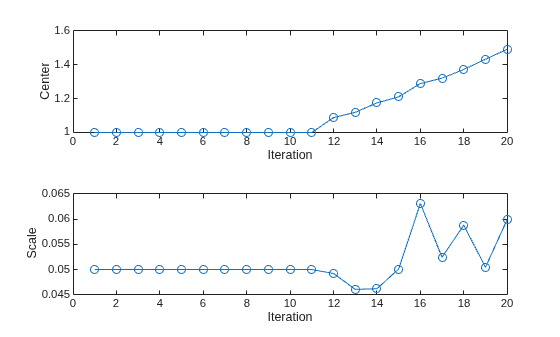
The Center and Scale values closely track the signal's mean and standard deviation values during the first 11 iterations. After the signal's mean starts to drift, the Center value continues to track the signal's mean, and the Scale value fluctuates slightly around the signal's standard deviation value.
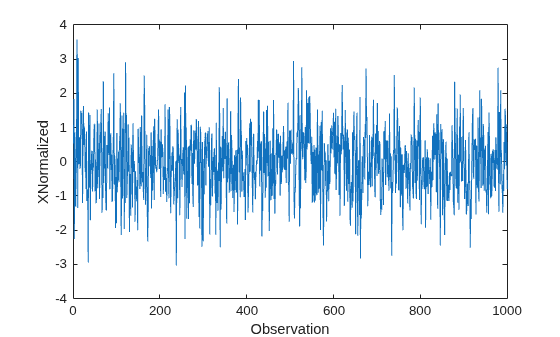
Plot the normalized signal data, and then display its mean and standard deviation.
figure
plot(XNormalized)
xlabel("Observation")
ylabel("XNormalized")
display(mean(XNormalized))
-0.0180
display(std(XNormalized))
0.9880
The normalized signal has a mean close to zero and a standard deviation close to 1.
Load the human activity data set. The data set contains 24,075 observations of five physical human activities: sitting, standing, walking, running, and dancing. Each observation has 60 features extracted from acceleration data measured by smartphone accelerometer sensors.
rng(0,"twister") % For reproducibility
load humanactivity
n = numel(actid);
classes = unique(actid);
Display a bar chart of the feature means.
bar(mean(feat))
xlabel("Feature")
ylabel("Mean Value")
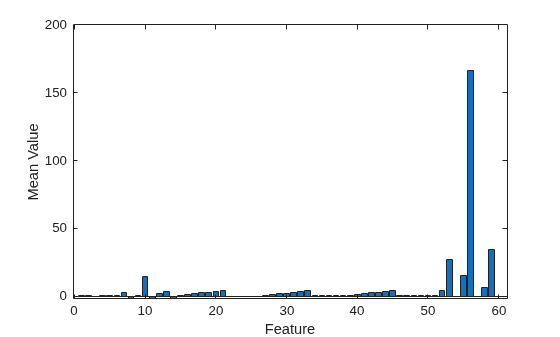
The plot shows that feature 56 has a significantly higher mean than the other features. This result suggests that it is useful to normalize the data prior to incremental learning by converting the data to z-scores, which have a mean of zero and a standard deviation of 1.
Create Incremental Learning Models
For the purposes of this example, perform incremental learning using three methods:
Normalize the incoming data using simple weighting, and then fit the normalized data using a classification ECOC model that does not perform normalization.
Normalize the incoming data using class weighting, and then fit the normalized data using a classification ECOC model that does not perform normalization.
Fit the incoming data using a classification ECOC model that performs normalization.
Create an incremental normalizer model named normalizerSW that uses simple weighting.
normalizerSW = incrementalNormalizer("zscore");Create an incremental normalizer model named normalizerCW that uses class-weighted normalization. Use the activity class numbers in actid as the class names, and assign prior probabilities based on the frequencies of the activity classes in the data.
frequencies = histcounts(feat, [classes; max(classes) + 1])/n;
normalizerCW = incrementalNormalizer("classweighted",classes,frequencies);
Create two incremental classification ECOC models for multiclass learning. First, configure binary learner properties by creating an incrementalClassificationLinear object. Set the linear classification model type (Learner) to logistic regression, use the sgd solver, and specify to not normalize the input data.
binaryMdl = incrementalClassificationLinear(Learner="logistic", ...
    Standardize=false,Solver="sgd");
Configure the incremental ECOC models as follows:
Set the maximum number of classes equal to the number of activity states in the data.
Specify a metrics warm-up period of 5000 observations.
Specify a metrics window size of 500 observations.
Specify to use the binary learner
binaryMdlfor the learners.
mdlSW = incrementalClassificationECOC(MaxNumClasses=length(classes), ...
    MetricsWarmupPeriod=5000,MetricsWindowSize=500,Learners=binaryMdl);
mdlCW = incrementalClassificationECOC(MaxNumClasses=length(classes), ...
    MetricsWarmupPeriod=5000,MetricsWindowSize=500,Learners=binaryMdl);
Create a third incremental ECOC model that normalizes the input data and does not use binaryMdl.
mdl = incrementalClassificationECOC(MaxNumClasses=length(classes), ...
MetricsWarmupPeriod=5000,MetricsWindowSize=500);mdlSW, mdlCW, and mdl are incrementalClassificationECOC model objects configured for incremental learning. By default, incrementalClassificationECOC uses classification error loss to measure the performance of the model.
Perform Incremental Fitting
Fit the incremental models to the data by using the fit and updateMetricsAndFit functions. At each iteration:
Simulate a data stream by processing a chunk of 50 observations.
Call the
updateMetricsAndFitfunction to overwrite the incremental ECOC modelmdlwith a new one fitted to the unnormalized data, and to update the performance metrics.Call the incremental
fitfunction to overwrite the previous simple-weighted incremental normalizer modelNormalizerSWwith a new one fitted to the incoming observations. Return the normalized datanormalized.Store the
center(mean) andscale(standard deviation) values ofNormalizerSWto see how they evolve during incremental learning.Call the
updateMetricsAndFitfunction to overwrite the previous incremental ECOC modelmdlSWwith a new one fitted to the normalized data, and to update the performance metrics.Store the cumulative and window metrics of
mdlSWto see how they evolve during incremental learning.Repeat the previous four steps using the class-weighted incremental normalizer model
NormalizerCWand the incremental ECOC modelmdlCW.
During incremental learning, after each model is warmed up, updateMetricsAndFit checks the performance of the model on the incoming observations, and then fits the model to those observations.
% Preallocation
numObsPerChunk = 50;
nchunk = floor(n/numObsPerChunk);
ceSW = array2table(zeros(nchunk,2),VariableNames=["Cumulative","Window"]);
ceCW = array2table(zeros(nchunk,2),VariableNames=["Cumulative","Window"]);
ce = array2table(zeros(nchunk,2),VariableNames=["Cumulative","Window"]);
centerSW = zeros(nchunk,60);
scaleSW = zeros(nchunk,60);
centerCW = zeros(nchunk,60);
scaleCW = zeros(nchunk,60);

% Incremental fitting
for j = 1:nchunk
    ibegin = min(n,numObsPerChunk*(j-1) + 1);
    iend   = min(n,numObsPerChunk*j);
    idx = ibegin:iend;

    mdl = updateMetricsAndFit(mdl,feat(idx,:),actid(idx));
    ce{j,:} = mdl.Metrics{"ClassificationError",:};

    [normalizerSW,normalized] = fit(normalizerSW, feat(idx,:));
    centerSW(j,:) = normalizerSW.Center;
    scaleSW(j,:) = normalizerSW.Scale;
    mdlSW = updateMetricsAndFit(mdlSW,normalized,actid(idx));
    ceSW{j,:} = mdlSW.Metrics{"ClassificationError",:};

    [normalizerCW,normalized] = fit(normalizerCW, feat(idx,:),actid(idx,:));
    centerCW(j,:) = normalizerCW.Center;
    scaleCW(j,:) = normalizerCW.Scale;
    mdlCW = updateMetricsAndFit(mdlCW,normalized,actid(idx));
    ceCW{j,:} = mdlCW.Metrics{"ClassificationError",:};
end
To see how the Center and Scale values of the incremental normalizer models for feature 56 evolve during training, plot them on separate tiles.
figure
t = tiledlayout(2,1);
nexttile
plot([centerSW(:,56) centerCW(:,56)])
ylabel("Center")
xlim([0 nchunk])
legend(["Simple weighted" "Class weighted"],Location="southeast")
nexttile
plot([scaleSW(:,56) scaleCW(:,56)])
ylabel("Scale")
xlim([0 nchunk])
legend(["Simple weighted" "Class weighted"],Location="southeast")
xlabel("Iteration")
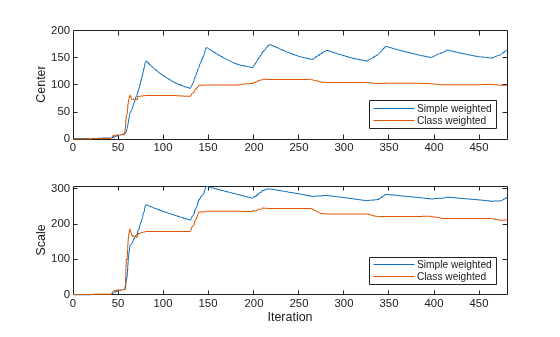
The plots show that the Center and Scale values of feature 56 for both models rise sharply after the 55th iteration, and approach approximately constant values after the 350th iteration. The final values of Center and Scale are different for each model because they use different weighting schemes.
To see how the performance metrics of the incremental ECOC models evolve during training, plot them on separate tiles.
figure
t = tiledlayout(3,1);
nexttile
plot(ceSW.Variables)
ylabel("mdlSW Error")
xlim([0 nchunk])
xline(mdlSW.MetricsWarmupPeriod/numObsPerChunk,"--")
ylim([0 0.25])
legend(ceSW.Properties.VariableNames,Location="northwest")
text(310,0.2,"Simple-weighted normalization",FontSize=8)
nexttile
plot(ceCW.Variables)
xlim([0 nchunk])
ylim([0 0.25])
ylabel("mdlCW Error")
xline(mdlCW.MetricsWarmupPeriod/numObsPerChunk,"--")
legend(ceCW.Properties.VariableNames,Location="northwest")
text(310,0.2,"Class-weighted normalization",FontSize=8)
nexttile
plot(ce.Variables)
xlim([0 nchunk])
ylim([0 0.25])
ylabel("mdl Error")
xline(mdl.MetricsWarmupPeriod/numObsPerChunk,"--")
legend(ce.Properties.VariableNames,Location="northwest")
text(310,0.2,"ECOC model normalization",FontSize=8)
xlabel("Iteration")
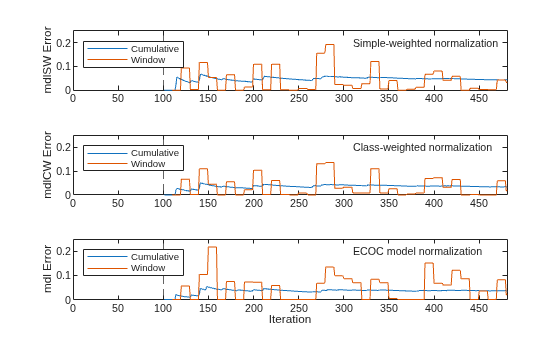
The plots indicate that updateMetricsAndFit performs the following actions:
Compute the performance metrics after the metrics warm-up period (dashed vertical line at 100th iteration) only.
Compute the cumulative metrics during each iteration.
Compute the window metrics after processing 500 observations (10 iterations).
A comparison of the plots indicates that, for this data set, the three incremental learning methods produce similar levels of classification error.
Input Arguments
Name-Value Arguments
Output Arguments
More About
Algorithms
incrementalNormalizer and the incremental fit function
normalize by n–1 when calculating the
Scale values, where n is the number of
observations.
When a value in Normalizer.Scale is 0 or
[], the fit and transform
functions compute the z-score values of the corresponding predictor using a
standard deviation value of 1. This behavior matches the behavior of zscore, which computes z-score values using a standard
deviation value of 1 when the input data consists of identical values. The normalize
function always calculates z-scores using the standard deviation of the
input data.
Version History
Introduced in R2026a
See Also
ZScoreNormalizer | ExponentiallyWeightedNormalizer | ClassWeightedNormalizer | fit | transform | reset | zscore | normalize

