Establish Traceability and Extend Model Elements
R2026bThis topic describes elements of an activity diagram for a mobile robot. For more information on the architecture of this example, see Design Architectures and Activity Diagram for Mobile Robot.
The functional flow diagram of robot software first calculates the path distance. If the
distance exceeds robot battery life to traverse the distance, the token flows to
Error out and the activity terminates. Otherwise, the robot follows
the path.
We use action nodes to describe following activities.
Select Target Position: Calculates random starting position and ending position.
Compute Self Position: Computes the current position vector of the robot.
Plan Path: Calculates the path of the robot towards the target position.
Follow Path: Initiates algorithm to follow the path developed.
Error Out: Produces error if the path is incorrect.
The action node Select Target Position has a behavior type of MATLAB.
The GeneratePosition function for this behavior type calculates a random
starting position and ending position on the graph for the mobile robot. The
GeneratePosition function contains no input arguments and one output
argument. The output argument TargetPos corresponds to the output pin on
the action node and represents a three-dimensional vector with the starting position, ending
position, and orientation of the robot.
The nested activity Plan Path executes normally according to the MATLAB
function behaviors on each of the serially connected action nodes Do Plan Path
and Apply Path Limits. Path planning calculates the path in
steps:
Turn the robot to the starting orientation.
Move the robot in the x-direction.
Turn the robot from the x-direction to the y-direction.
Move the robot in the y-direction.
Turn the robot to the ending orientation.
You can further link requirements and allocate elements within activity diagram to establish traceability within model based system design. Use stereotypes to add custom properties to each element of activity.
| Topic | Description |
|---|---|
| Link and Trace Requirements for Activity Diagram | Link requirements to activity diagram elements. |
| Allocate Activity Diagram Elements to Architecture Model Components | Establish traceability using allocation. |
| Set Properties Using Stereotypes | Add custom properties using stereotypes |
Open Activity Diagram for Mobile Robot Functional Flow
This example shows a functional flow diagram for modeling a mobile robot architecture that travels between a randomized starting point and destination.
Open the project.
openProject("scMobileRobotExample");Open the activity diagram.
systemcomposer.openActivity("RobotActivity");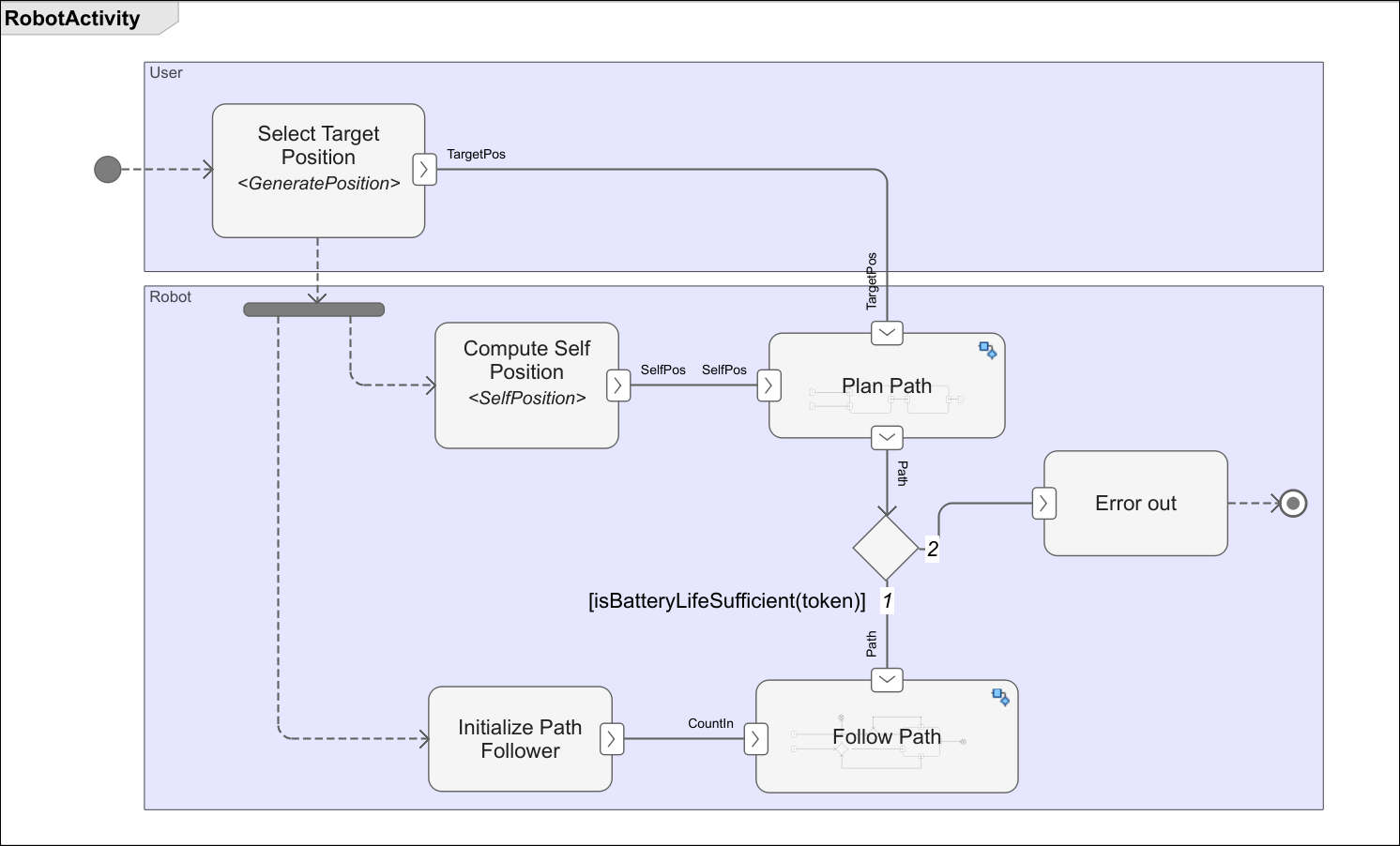
First, the robot software calculates the path distance. If the distance exceeds robot battery life to traverse the distance, the token flows to Error out and the activity terminates. Otherwise, the robot follows the path.

