compute
R2026bClass: tireModel
Syntax
Description
Add-On Required: This feature requires the Extended Tire Features for Vehicle Dynamics Blockset add-on.
Input Arguments
Output Arguments
Examples
Execute the tire model solver on input tire data to calculate forces and moments.
Create a built-in Magic Formula 6.2 tire model.
tm = tireModel.builtin("Light passenger car 205/60R15","MF62");
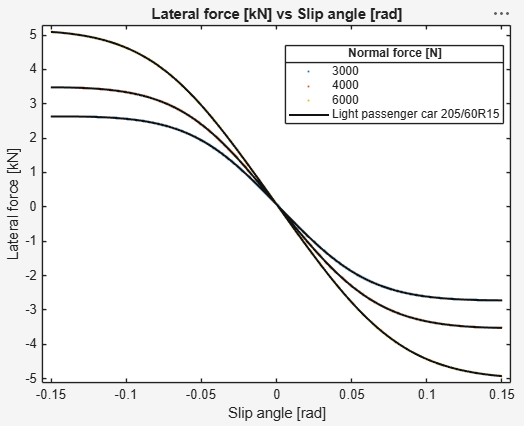
Generate synthetic tire data with a slip angle ramp from -0.15 to 0.15 rad at three vertical load levels. This simulates a cornering stiffness test.
td = tireData.generate("Ramp", ...
    direction="alpha", ...
    initialValue=-0.15, ...
    finalValue=0.15, ...
    Fz=[3000;4000;6000], ...
    kappa=0, ...
    gamma=0, ...
    Vx=16.7, ...
    IP=220000, ...
    psidot=0, ...
    omega=55);
Run the tire model solver to compute forces and moments from the kinematic inputs.
td = compute(tm,td);
Plot the computed lateral force against slip angle for all three load conditions.
plot(tm,Data=td,DataVariableNames=["alpha","Fy"],ColorBy="Fz")
Version History
Introduced in R2023b

