MATLAB 帮助中心
绘制点
plot(points)
plot(points,ax)
plot(points,ax,Name=Value)
plot(points) 在当前轴上绘制点。
points
示例
plot(points,ax) 在指定的轴上绘制点。
ax
plot(points,ax,Name=Value) 支持上述语法中的任何参量组合,且可使用一个或多个名称-值参量指定选项。例如,plot(ShowOrientation=true) 在显示绘图中呈现方向。
plot(ShowOrientation=true)
全部折叠
读取一个图像。
I = imread("cameraman.tif");
从图像中检测 KAZE 点。
points = detectKAZEFeatures(I);
从检测到的点中提取 KAZE 特征。
[features,valid_points] = extractFeatures(I,points);
绘制 10 个最强的点并显示其方向。
imshow(I) hold on strongestPoints = selectStrongest(valid_points,10); plot(strongestPoints,showOrientation=true) hold off
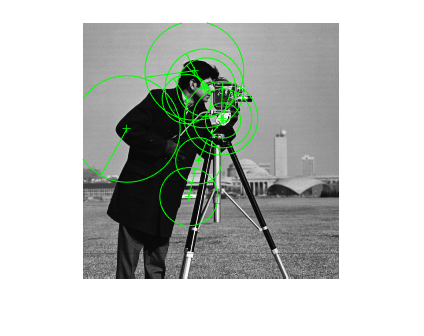
I = imread("cameraman.tif"); points = detectSURFFeatures(I); [features, valid_points] = extractFeatures(I,points);
可视化 10 个最强的 SURF 特征,包括在描述符提取过程中确定的这些特征的尺度和方向。
imshow(I); hold on; strongestPoints = valid_points.selectStrongest(10); strongestPoints.plot("showOrientation",true);
点对象,指定为由 M 个 [x y] 坐标组成的 M×2 矩阵,或指定为Point Feature Types中所述的点特征对象之一。该对象包含关于在输入图像中检测到的特征点的信息。要获取点,请使用与点特征类型配对的适当检测函数。
用于显示的句柄。您可以使用 gca 设置句柄。
gca
将可选参量对组指定为 Name1=Value1,...,NameN=ValueN,其中 Name 是参量名称,Value 是对应的值。名称-值参量必须出现在其他参量之后,但对各个参量对组的顺序没有要求。
Name1=Value1,...,NameN=ValueN
Name
Value
如果使用的是 R2021a 之前的版本,请使用逗号分隔每个名称和值,并用引号将 Name 引起来。
示例: plot(ShowOrientation=true) 在显示绘图中呈现方向。
ShowScale
true
false
显示缩放的圆,指定为 true 或 false。当您将此值设置为 true 时,对象将绘制与检测到的特征的尺度成正比的圆,特征点位于其中心。当您将此值设置为 false 时,对象会关闭圆的显示。
该算法使用半径为 6*Scale 的圆来表示特征的尺度。该算法使用圆形区域的此等效大小来计算特征的方向。
6
Scale
ShowOrientation
显示特征点方向,指定为 true 或 false。当您将此值设置为 true 时,对象会绘制一条对应于此点的方向的线条。该对象绘制从特征点位置到圆的边的直线,指示尺度。
在 R2011b 中推出
extractFeatures
matchFeatures
You clicked a link that corresponds to this MATLAB command:
Run the command by entering it in the MATLAB Command Window. Web browsers do not support MATLAB commands.
选择网站
选择网站以获取翻译的可用内容,以及查看当地活动和优惠。根据您的位置,我们建议您选择:。
您也可以从以下列表中选择网站:
如何获得最佳网站性能
选择中国网站(中文或英文)以获得最佳网站性能。其他 MathWorks 国家/地区网站并未针对您所在位置的访问进行优化。
美洲
欧洲
亚太
联系您当地的办事处